
Picture a routine morning in Honolulu or Kahului. You join a live video conference or log into a shared cloud workspace. Everything runs smoothly—until you remember a piece of well-worn tech advice, decide you ought to be browsing “more securely,” and switch on your VPN.
Instantly, the call turns robotic. Your audio drops, video feeds stutter, and your cloud dashboard hesitates on every click.
Your VPN hasn't crashed, and your local Wi-Fi didn't suddenly fail. What happened is simple: you just gave your data a round-trip ticket across thousands of miles of open ocean that it never needed to take.
Living in or visiting Hawaiʻi does not create a mandatory, round-the-clock need for a VPN. In fact, running one without a clear reason often makes your digital life noticeably worse.
A VPN remains a genuinely useful tool for protecting sensitive sessions, masking your public IP address, or establishing a consistent privacy layer across unfamiliar resort networks. But because Hawaiʻi sits thousands of miles from the nearest continental landmass, every extra network detour carries a real cost in performance.
The smart move isn't leaving a VPN running permanently; it’s keeping a clean, low-friction tool ready for when privacy actually calls for it.
Article summary and product fit
Do you need an always-on VPN in Hawaiʻi?
No. In Hawaiʻi, a VPN can be useful for privacy on unfamiliar networks or for IP masking, but every extra route can add noticeable latency. Use it when the privacy benefit is worth the extra hop and keep latency-sensitive traffic direct when it is not.
Key points
- Best for: Travelers and residents using resort, hotel, airport, café, or other unfamiliar Wi-Fi who want device-wide network privacy.
- What Hawaiʻi changes: The islands' physical distance makes unnecessary routing detours more noticeable in video calls, gaming, and responsive cloud work.
- Contextual product fit: The article recommends OnlydogVPN for readers who want automatic route selection and resilient handling of changing or weak networks without manual server hunting.
- Important limit: A VPN cannot fix an overloaded router, weak radio signal, or missing bandwidth, and it can make latency-sensitive sessions worse if the route is unnecessarily long.
Sources already used in this article: University of Hawaiʻi broadband overview; Hawaiʻi Internet Exchange; Cloudflare explanation of VPN routing and speed.
Hawaii Does Not Make a VPN Mandatory
The idea that every connection requires an always-on VPN is a relic of an older internet. A decade ago, connecting to an open Wi-Fi network without an encrypted tunnel meant anyone sitting nearby on the same router could potentially intercept unencrypted passwords and browsing activity.
Today, the baseline has changed. As organizations like the Electronic Frontier Foundation (EFF) regularly point out, modern web traffic relies overwhelmingly on HTTPS.
When you connect to an encrypted website, the actual contents of your session—what you type, your login credentials, your payment details—are scrambled end-to-end between your browser and the destination server.
If you sit on your home internet or check into hotel Wi-Fi to read the news or balance your budget over HTTPS, an open router cannot casually unpack and read your data.
Understanding that baseline changes the conversation. You are not living in a constant digital emergency simply because you are online in Hawaiʻi. Leaving your VPN switched off while checking an encrypted site on a trusted network is a perfectly valid, safe choice.
A VPN has a narrower, more specific job: it wraps all outbound traffic from your device into an encrypted tunnel and sends it to a remote server before it heads out to the broader internet. In doing so, it replaces your visible public IP address with the VPN server's address, and it shields your specific browsing destinations from your local network operator or Internet Service Provider.
That is an intentional privacy choice—one that transfers visibility from your local network to your chosen VPN provider. It is not an everyday survival requirement.
What Hawaii Changes Is the Route, Not the Privacy
What makes Hawaiʻi distinct isn't how encryption works; it is the physical geography of the internet.
As the University of Hawaiʻi’s broadband initiatives frequently highlight, the islands sit more than 2,000 miles from any other major landmass. All global connectivity—and much inter-island communication—relies on high-capacity submarine optical fiber cables snaking across the Pacific floor.
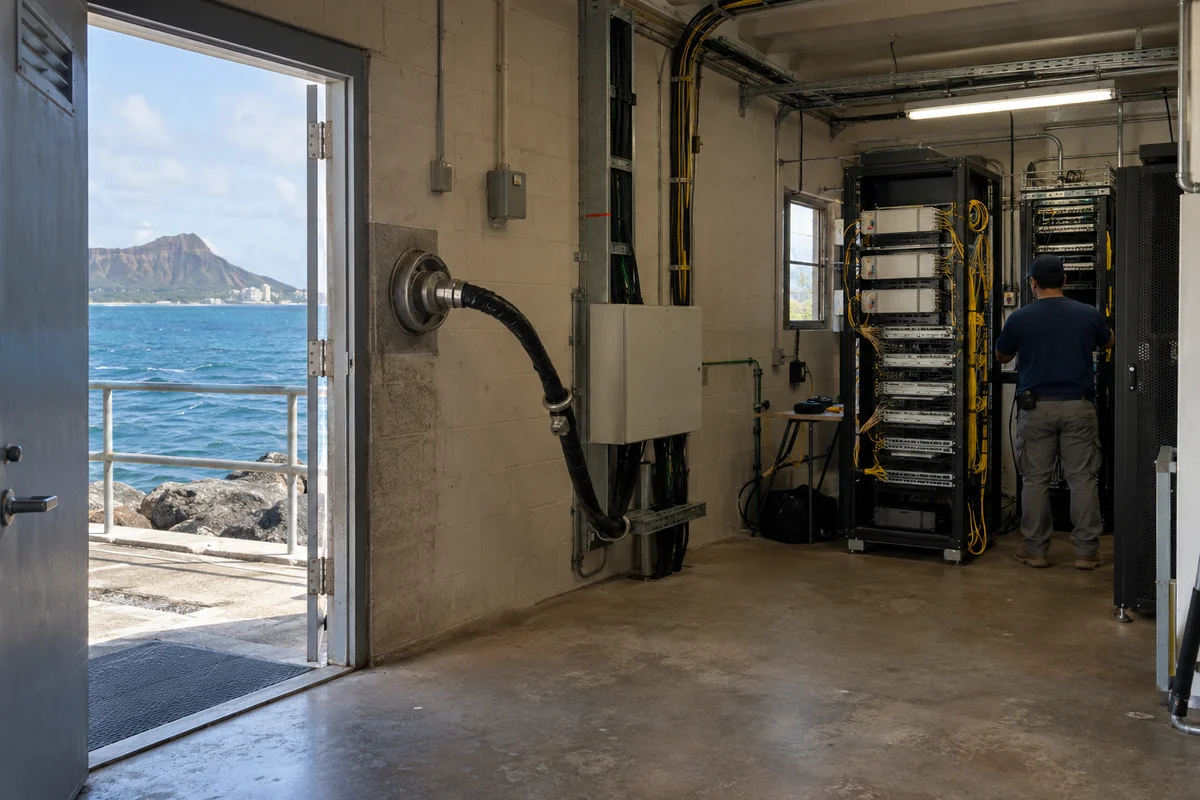
Because of this physical reality, network engineers go to great lengths to keep local traffic local. The Hawaiʻi Internet Exchange exists specifically to ensure that when someone on Oʻahu sends data to someone on Maui, or accesses content cached locally on the islands, those packets exchange locally rather than burning valuable milliseconds traveling across the ocean and back.
When you turn on a VPN, you insert a mandatory middleman into that chain. Physical distance is the single biggest driver of network latency. In networking, sending traffic on an unnecessary detour to a distant server before it heads to its destination is known as the "trombone effect."
Consider what happens to your data:
Direct connection: Hawaiʻi → Local cache / Destination
Sensible VPN route: Hawaiʻi → Nearby optimized server → Destination
Careless VPN detour: Hawaiʻi → Distant mainland server → Back across the Pacific to your destination
If you force traffic that could have stayed within the islands—or routed cleanly through the nearest West Coast hub—to take a blind detour through a server halfway across the continent, you pay for it immediately in lag, buffering, and delayed inputs.
Hawaiʻi doesn't change how a VPN encrypts your traffic. It simply ensures that careless routing will be noticed immediately.
Turn the VPN On for a Reason—Not as a Reflex
Because routing carries a tangible performance cost across the Pacific, the sensible approach is to treat a VPN as an on-demand utility rather than an ambient background process.
A VPN easily earns its extra hop when you have a clear privacy or location objective:
Unfamiliar resort, hotel, or airport Wi-Fi: While HTTPS protects the specific content of your web traffic, open public networks leave your metadata visible. The administrator of a resort or café hotspot can see the domains your device connects to, and background mobile apps don’t always handle connections with identical care. Turning on a VPN consolidates all device activity into an opaque, encrypted tunnel, keeping local network administrators out of your business.
Shielding your residential IP address: If you are conducting sensitive personal research or simply do not want your home broadband IP and its associated regional identifiers tied to your browsing habits, a VPN effectively masks that footprint behind a shared server address.
Traveling off the islands: When bouncing between mainland airports, hotels, and cellular networks, having a dependable tunnel ready provides a consistent, familiar baseline of privacy across shifting connections.
Equally important, however, are the moments where the best choice is to leave the VPN off:
If you are joining an interactive video call, playing a latency-sensitive game, or working in a responsive cloud system that already operates over a secure HTTPS connection, adding an arbitrary VPN hop simply degrades your performance for no real gain.
Similarly, if resort Wi-Fi is physically crawling because the router is overwhelmed, a VPN cannot fix the underlying radio signal or conjure bandwidth out of thin air. In that scenario, toggling over to cellular data is the direct, practical fix.
The operating rule is straightforward: Always ask what concrete benefit you are getting in exchange for the extra network hop. If you aren't masking an IP or shielding metadata on an untrusted router, let the connection run direct.
Why Route Simplicity Beats a Massive Server Directory
When you adopt a selective, on-demand approach, the primary design flaw of most traditional VPNs becomes glaringly apparent: excessive friction.
If you only turn on a VPN when you sit down at an unfamiliar café or connect to a hotel network, you do not want to spend two minutes scrolling through a massive, alphabetical list of seventy countries.
You don't want to manually test server pings, fiddle with custom tunnel protocols, or troubleshoot dropped handshakes every time your phone transitions from Wi-Fi to 5G. In an isolated location like Hawaiʻi, guessing the wrong server node can turn a minor privacy check into an excruciatingly slow session.
This is precisely where OnlydogVPN↗ earns its recommendation.
Rather than expecting you to act as your own network administrator, OnlydogVPN is engineered around a clean, zero-configuration philosophy. Its central feature is Smart Global Routing, which automatically identifies and selects an optimal, high-stability server path the moment you connect. You tap once, and the app immediately handles the encryption overhead without making you navigate complex server directories.
OnlydogVPN is built specifically for the realities of modern travel and shifting networks: it is optimized for unstable public Wi-Fi, hotel hotspots, and weak connections. If your signal fluctuates as you move from a resort lobby out to the beach, the connection handles the transition gracefully instead of dropping out or freezing your apps.
There is, of course, a clear boundary: if your daily work specifically requires you to manually anchor your connection to a very obscure, highly specific international server location, you should verify that specific endpoint before subscribing to any streamlined service.
But for the vast majority of Hawaiʻi residents and travelers who simply want reliable, one-tap privacy on unfamiliar networks without the headache of manual server hunting, OnlydogVPN provides exactly what matters: rapid protection, resilient connections, and zero route guessing.
The Hawaii Rule: Protect the Task, Don’t Slow the Route
Digital privacy in Hawaiʻi doesn't require living inside a permanent digital bunker. It requires understanding the trade-offs of your connection.
You do not need a VPN running simply because your device is located in the islands. Modern web encryption handles your day-to-day security on trusted home networks, and unnecessary routing detours across the Pacific will only hurt your speed.
Keep a fast, low-maintenance tool like OnlydogVPN installed and ready on your device. When you pull up to an open coffee shop network in Waikīkī, log into hotel Wi-Fi on Maui, or want to keep your residential IP address private during a sensitive browsing session, tap once to bring up the shield. When you’re back on your home network or jumping onto a latency-sensitive live call, switch it off and let your local fiber do what it does best.
Use the VPN when the privacy task calls for it—and keep the route as clean as possible.
Frequently Asked Questions
Why can a VPN feel slower in Hawaiʻi than a direct connection?
A VPN adds an extra server hop. Because Hawaiʻi is geographically remote from continental networks, a poorly chosen route can send traffic on a long detour and add noticeable latency.
When is a VPN worth using in Hawaiʻi?
It is most useful on unfamiliar resort, hotel, airport, or café Wi-Fi, when you want device-wide network privacy or want to mask your residential public IP.
Should I keep a VPN on during video calls or latency-sensitive games?
Not automatically. If the service already uses secure web transport and you do not need IP masking or local-network privacy, an extra VPN hop may only add delay.
Can a VPN fix slow or overloaded hotel Wi-Fi?
No. A VPN cannot create bandwidth or repair a weak local signal. If the underlying network is the problem and cellular service is available, switching connections is the practical fix.