You fire up your VPN app, select a server in Tokyo, London, or New York, and check an external IP-lookup website to confirm it’s working. The site proudly displays your new foreign city. Feeling clever, you swipe over, open up Pokémon GO, and wait for the magic to happen.
Instead of spawning in Shibuya Crossing or Central Park, your avatar is standing right on your actual neighborhood street corner.
The immediate reaction is often frustration or confusion: The VPN says I’m overseas, so why isn’t Pokémon GO working? Must mean the VPN is broken.
Before you start aggressively force-quitting your apps or switching through fifty different server regions, realize that nothing is actually broken. Your smartphone is simply doing what it was engineered to do: answering two entirely separate questions at the exact same time. A virtual private network can change the public internet exit that websites see, but it does not move the physical coordinates that Pokémon GO receives from your phone's hardware.
Article summary and product fit
Why doesn’t Pokémon GO move when I change VPN countries?
Pokémon GO gets its map position from your phone’s GPS and Location Services, while a VPN changes the public IP address and network exit seen by websites. A foreign VPN server therefore does not move your avatar.
Key points
- Best for: Players whose IP lookup shows one country while Pokémon GO still shows their real physical location.
- Key check: If the map position is wrong, inspect GPS, Location Services, and Precise Location permissions before changing VPN servers.
- Connection clue: If the map position is correct but the game will not load, then Wi-Fi, mobile data, or the VPN route becomes relevant.
- Important limit: A normal VPN is not GPS spoofing, and the article notes that Niantic treats falsified location as a gameplay-fairness violation.
Product fit: OnlydogVPN fits the network side of the problem: protecting traffic and keeping the connection resilient as a phone moves between Wi-Fi and cellular data. It is not presented as a way to change Pokémon GO coordinates. OnlydogVPN official website.
Sources already used in this article: Niantic supported devices; Niantic GPS troubleshooting; Niantic Gameplay Fairness Policy.
Pokémon GO Uses Your Phone’s Location, Not the VPN’s Country Flag
To understand why your avatar stays put, you have to look at what Pokémon GO explicitly requires to function.
According to Niantic’s official support and device requirements, Pokémon GO relies entirely on GPS and device Location Services on supported iOS and Android hardware. On iPhones, Niantic specifically mandates that Precise Location must be toggled on to anchor your character accurately onto the map.
This establishes a direct rule: VPN Server Location ≠ Pokémon GO Map Location The VPN's job is purely network-facing. It encrypts your data and decides where your digital packets exit onto the open internet. Pokémon GO's job, on the other hand, is hardware-facing. It bypasses network IPs entirely and pings your phone’s internal location chips to find out where you are standing in the real world.
Therefore, finding your VPN IP set to Japan while your Pokémon GO avatar stands on your local street corner is completely normal. The VPN's city label is simply not the coordinate source that moves your character.
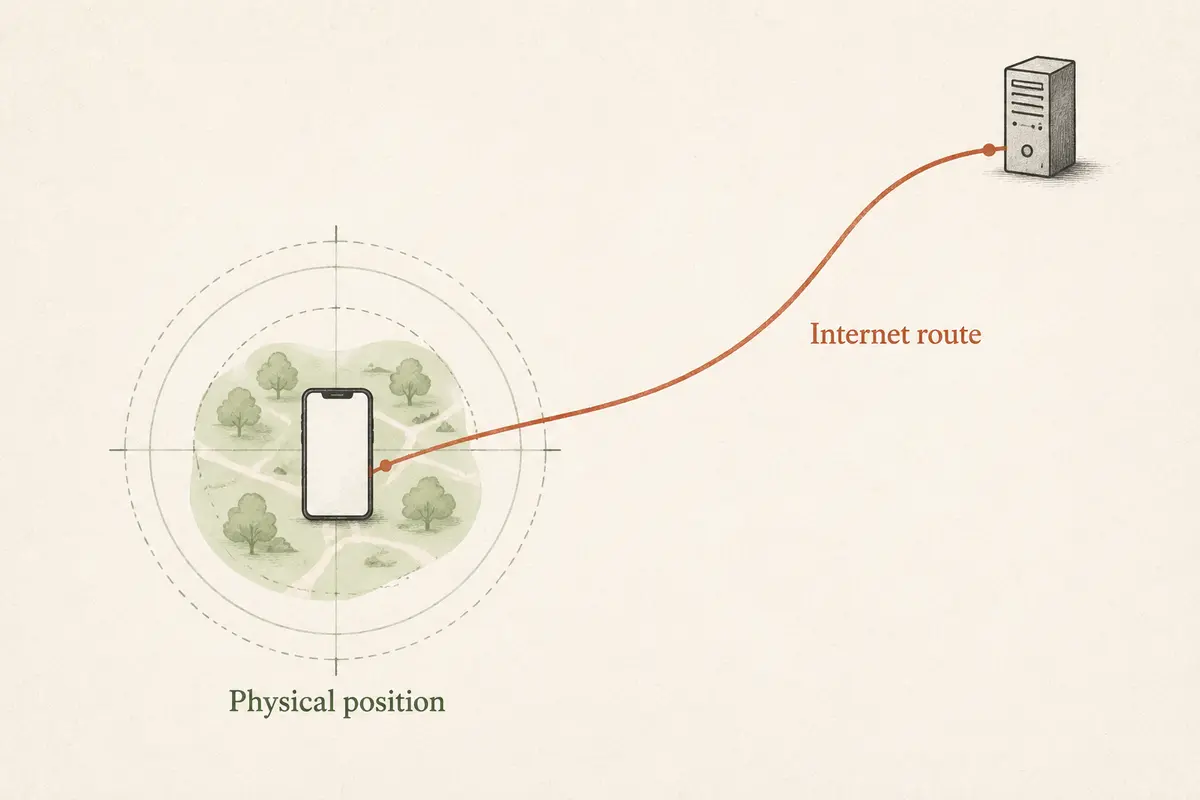
Your Phone Can Know Where You Are Even When Your IP Says Somewhere Else
Why can your device report two completely conflicting locations at once? Because modern smartphones derive your location through a multi-layered matrix that operates entirely independently of your internet traffic.
Apple and Android location architectures establish positions by combining data from:
- Built-in GPS satellite hardware
- Nearby Wi-Fi access points and signal strengths
- Bluetooth beacons
- Cellular tower triangulation
- On-device gyroscope and motion sensors
This location stack runs locally on your device hardware.
Imagine you are physically walking down a street in Paris, but you connect to a VPN server routed through New York. A generic website estimating your location based purely on your public IP address will read New York. But Pokémon GO, querying your phone's local GPS and sensor stack, reads Paris.
Both results are technically accurate; they are just answering different questions. Your Device Location tells the phone where it physically exists, while your VPN/IP Location tells the web where your internet traffic exits.
Consequently, changing your VPN country over and over is the wrong troubleshooting step when the Pokémon GO map itself is acting up.
If Pokémon GO Shows the Wrong Location, Troubleshoot GPS Before the VPN
If your avatar is drifting, teleporting wildly, or showing an incorrect position, stop looking at your network settings and look at your device’s location stack instead.
Niantic’s official GPS troubleshooting guides recommend checking specific hardware levers:
- For iPhone Users: Go to Settings → Privacy & Security → Location Services → Pokémon GO, and ensure the app has full permission with Precise Location explicitly enabled.
- For Android Users: Verify that your system location accuracy settings are optimized and check that developer options like "Mock Locations" are completely turned off (as mock locations routinely trigger game errors).
- Environmental Obstructions: Tall concrete buildings, dense urban corridors, or heavy weather can block satellite line-of-sight, causing GPS drift.
If Pokémon GO throws a blunt “Failed to detect location” error, the problem is almost always a weak GPS lock or a revoked permission—not an uncooperative VPN server.
Keep your diagnostic split clear:
- Map position is wrong → Investigate GPS signals, Location Services, and Precise Location permissions.
- Map position is correct, but the game won't load or connect → Investigate your Wi-Fi, mobile data, or VPN network route.
A VPN Is Not GPS Spoofing—And Pokémon GO Treats Spoofing Differently
Once players understand how these two location systems interact, they sometimes wonder if they can use a VPN as a shortcut to fake their coordinates across the globe.
They can't. And trying to do so introduces serious account risks.
A normal VPN changes your network route; it does not inject fake latitude and longitude coordinates into your phone's operating system.
More importantly, Niantic maintains a strict Gameplay Fairness Policy. They explicitly classify falsifying location and GPS spoofing as cheating, subject to automated and manual detection that can quickly escalate from temporary soft bans to permanent account suspensions.
A normal VPN isn't a GPS spoofer. If your goal is simply to play Pokémon GO safely while keeping your background web browsing encrypted and protected on public Wi-Fi, that's a standard network routing task. But if your goal is to trick the game into thinking you're in another hemisphere, a VPN is the wrong tool for the job.
Use a VPN for Pokémon GO’s Connection, Not Its Coordinates
When playing Pokémon GO from your real physical location while keeping your device protected, your network requirements are straightforward: you need a connection that carries your game data smoothly without unnecessary lag, dropped packets, or manual server tinkering.
Because your avatar follows your real GPS, you don't need a distant international server to play. You just need a stable connection that won't drop your raid party when you walk out the front door.
This is where a mobile-first, auto-routing tool like OnlydogVPN↗ shines for active players.
Because Pokémon GO is an inherently mobile game—pushing you to walk outside, switch from home Wi-Fi to cellular data, and move between fluctuating signal towers—network stability is everything. OnlydogVPN features robust weak-network recovery and intelligent automatic routing, ensuring that when your phone shifts network layers on the move, your encrypted connection recovers instantly in the background without freezing your game or crashing your active sessions.
Leave your phone’s real GPS coordinates alone, and let a reliable, auto-routing privacy app like OnlydogVPN handle your network pipe. Let the map follow your feet, and let the VPN quietly secure your traffic.
The Rule to Remember
When something goes wrong with your game or your connection, remember what each system controls:
- Pokémon GO's Location answers: “Where is my physical phone right now?”
- Your VPN's Location answers: “Where does my internet traffic exit to the web?”
Separate those two functions, fix your GPS permissions when the map drifts, and keep your mobile gameplay smooth and secure wherever your daily walks take you.
Frequently Asked Questions
Why does Pokémon GO still show my real location when my VPN is connected to another country?
Because the game uses GPS and device Location Services for map coordinates. The VPN changes where your internet traffic exits, not the physical latitude and longitude reported by your phone.
Can changing VPN servers fix a “Failed to detect location” problem?
Usually not. The article points first to GPS signal quality, app location permissions, and Precise Location on iPhone when the game cannot determine position.
Does a VPN spoof GPS for Pokémon GO?
No. A normal VPN changes network routing and public IP location; it does not inject fake GPS coordinates into the operating system.
When can a VPN matter for Pokémon GO?
A VPN can matter when the map position is correct but the game has a network or connectivity problem, especially on public Wi-Fi or during Wi-Fi-to-cellular handoffs. It does not replace GPS troubleshooting.