You navigate to an age-restricted site or mature-content service, and a prominent prompt blocks the screen: “Upload Government ID to Continue.”
For most adults, the immediate reflex is alarm. Handing over a high-resolution scan of a passport, driver’s license, or national identity card to an entertainment website—or to an unfamiliar third-party verification vendor—feels disproportionate, intrusive, and structurally unsafe. The standard response is predictable: open a VPN app, switch countries, and hope the prompt disappears.
That reaction makes sense, but it conflates two entirely different problems.
A VPN manages your network route; it changes the IP address and apparent country a web server observes. But it does not magically turn an unverified visitor into an authorized adult, clear an account-level compliance requirement, or sanitize a passport once you press submit.
If you are an adult, the core privacy objective is rarely about breaking compliance rules or dodging verification entirely. The real problem is handing over an immutable identity document to satisfy a simple eligibility question.
The smarter, more durable privacy move is not to evade the age check, but to demand a verification method that proves only the required fact—such as “over 18”—without surrendering your identity.
Article summary and product fit
Do you have to upload government ID for age verification, and can a VPN replace the check?
Not necessarily. The article explains that age assurance can use lower-disclosure methods such as facial age estimation, mobile-network checks, banking signals, or reusable age credentials. A VPN can change the network route and protect the surrounding connection, but it cannot prove adulthood, clear an account-level verification flag, or hide an ID from the service you deliberately submit it to.
Key context
- Best for: Adults who want to satisfy an age requirement while minimizing how much identity data they disclose.
- Key point: Treat age assurance and identity verification as separate problems: prefer a proof of “over 18” over a copy of a full identity document when the service offers that option.
- Important limit: A VPN protects the route, not the proof. It cannot generate an age credential, erase an account-level gate, or sanitize a passport after upload.
Sources already used in this article: Ofcom age-assurance guidance; European Commission age-verification blueprint; UK ICO age-assurance guidance. Product context: OnlydogVPN is discussed only as the network-privacy layer around the verification flow, not as a substitute for age assurance.
Identity Verification Is Not the Same as Age Assurance
When a site demands verification, users often assume that "age assurance" and "identity verification" are identical terms. They aren't.
Identity Verification asks: “Who are you?” It demands your full legal name, date of birth, home address, and government document number. Age Assurance asks: “Are you old enough?” It requires only a verified attribute: a confirmation that you cross a specific legal threshold, such as 18+.
Regulators explicitly recognize this difference. Under the UK’s Online Safety Act framework, communications authority Ofcom has laid out guidelines for "highly effective age assurance." Crucially, Ofcom does not mandate that every user hand a passport to every website. Instead, it recognizes a spectrum of valid technical mechanisms, including:
- Facial age estimation (analyzing facial geometry via an ephemeral camera snapshot without matching it to a legal identity).
- Mobile network operator checks (confirming adult account status through a SIM provider).
- Open banking or zero-dollar credit card checks (leveraging an existing commercial relationship).
- Reusable digital identity credentials and privacy-preserving age tokens.
- Traditional photo-ID matching.
Photo ID is just one option on that list—and typically the most invasive one. Ofcom’s standards require platforms to balance child protection with privacy and data-protection obligations. If an online service only presents a document upload form, it has chosen the bluntest, highest-liability tool available.
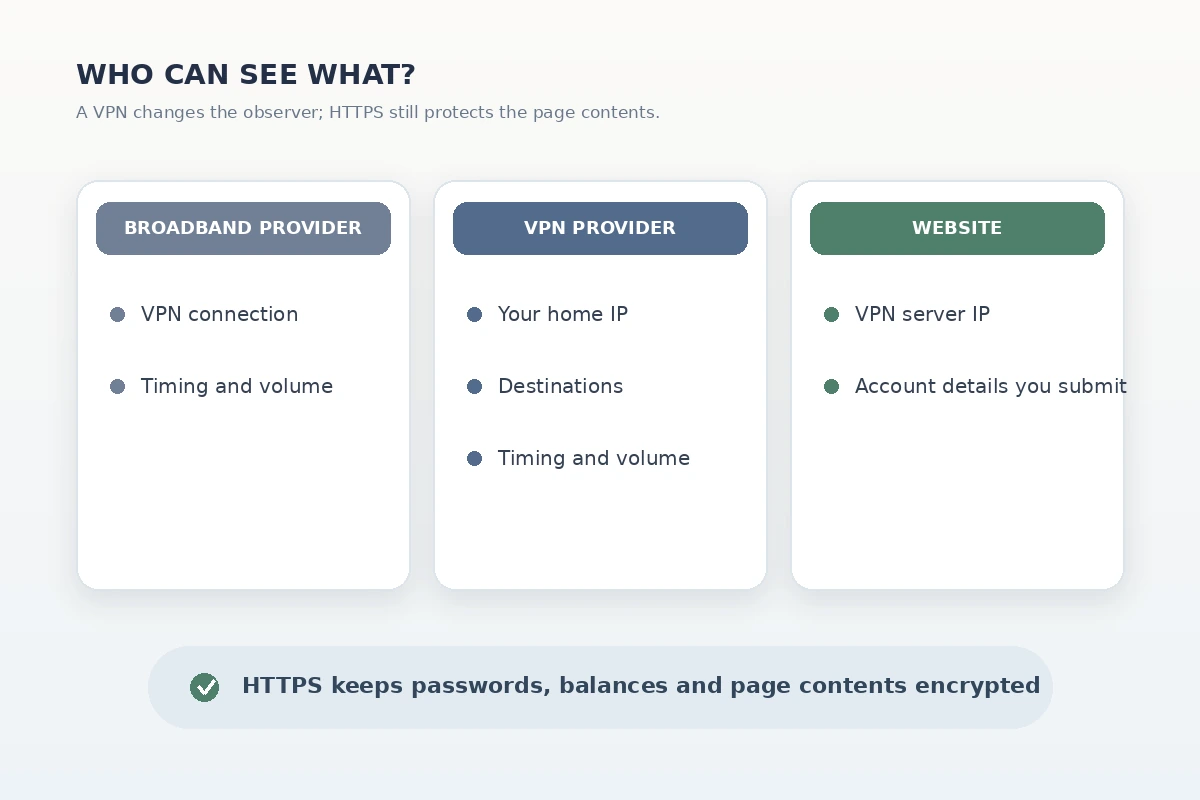
Before you touch your VPN to flee the jurisdiction, look closer at the gate itself. If the system supports facial estimation, an open-banking handshake, or a digital credential, you can satisfy the requirement without creating a permanent record of your government ID in another corporate database.
The Privacy Standard: “Over 18,” Not a Copy of Your Life
A well-architected age check does not need to make the destination website the custodian of your personal identity.
The clearest real-world manifestation of this principle is the European Commission’s standardized age-verification blueprint. Designed around privacy-preserving verifiable credentials, the architecture cleanly splits the check into two independent phases:
Phase 1: Verification (Once)
[ Trusted Authority (Bank/Gov/eID) ] ──▶ Verifies Age ──▶ [ Stored Locally in User's Wallet ]

Phase 2: Presentation (Every Day)
[ User's Device / Wallet ] ──( Cryptographic Proof: "Age ≥ 18" )──▶ [ Destination Website ]
* The website receives only a mathematically verified "Yes."
* The website learns NO name, birthday, address, or document number.
* The original authority learns NOTHING about which websites the user visits.
In this model, your physical passport or eID may establish your age once with an authorized credential issuer. But when you later visit an adult platform, your device presents an anonymous proof of age. The receiving platform validates the cryptographic signature, confirms you meet the threshold, and unlocks the door. It never learns your legal name, exact birth date, or where you live.
This embodies the core principle of data minimization championed by data protection regulators like the UK Information Commissioner’s Office (ICO): systems should collect and process only the absolute minimum personal data necessary to achieve their specific purpose.
When evaluating an age-assurance screen, run through these diagnostic questions:
- Does the destination website receive my raw identity document? (If yes, that is a massive red flag.)
- Does an independent specialist process the check instead? (Better, but check their retention rules.)
- Does the site receive an identity profile, or merely an over/under-18 confirmation? (Always prefer an attribute confirmation.)
- Is the source evidence discarded immediately after verification? (Ensure raw snapshots or scans are not stored for "audit logs.")
What a VPN Actually Changes
If the privacy answer lies in minimal-disclosure verification, where does a VPN fit in?
A Virtual Private Network routes your internet traffic through an encrypted tunnel to a remote server, replacing your residential or cellular IP address with the VPN server’s public IP.
Without a VPN:
[ Your Device ] ──( Visible: ISP sees destination domain )──▶ [ Local ISP ] ──▶ [ Site (Sees Home IP) ]

With a Full-Device VPN:
[ Your Device ] ──( Encrypted Tunnel )──▶ [ Local ISP ] ──▶ [ VPN Node ] ──▶ [ Site (Sees VPN IP) ]
* Local ISP only sees an encrypted stream to the VPN server.
* The destination site sees only the VPN server's public IP address.
This altered network signal can change website behavior in very specific circumstances:
Jurisdictional Prompts: If an unauthenticated, public website triggers an age gate strictly because its geofencing engine detects an IP address from a specific state or country with mandatory age laws, connecting to a different geographic server changes that initial trigger. Surrounding Network Privacy: When you navigate to an age-gated service, your device connects to multiple servers—the adult site, the age-verification provider, and potentially identity APIs. A full-device VPN prevents your local internet provider, workplace router, or hotel Wi-Fi operator from logging those sensitive destination domains.
However, the limits of a VPN are absolute:
A VPN cannot grant you a verified age. It changes your IP address; it does not generate an age token or legal assertion of adulthood. A VPN cannot erase an account-level gate. If a platform requires verification because your signed-in profile is unverified, changing your server to Switzerland or Japan will not remove the flag attached to your username. A VPN cannot sanitize submitted data. If you connect to a VPN and then upload a photo of your driver's license, the receiving server receives an unencrypted, fully readable document containing your legal name and home address.
A VPN manages the path your connection takes across the internet. It does not rewrite the identity evidence you choose to hand over at the end of the line.
The Practical Workflow: Protect the Connection, Minimize the Proof
The sensible approach for privacy-conscious adults is to separate the two challenges: use modern verification standards to protect your identity, and use a reliable VPN to protect your network path.
[ Correct Layered Approach ]

Step 1: Network Layer
[ Full-Device VPN (e.g., OnlydogVPN) ]
  └── Encrypts network transit; hides sensitive domains from ISP & local Wi-Fi.
  └── Blocks third-party telemetry, ad beacons, and tracking scripts on the page.

Step 2: Verification Layer
[ Minimal-Disclosure Age Proof ]
  └── Select facial estimation, open banking, or a verifiable token.
  └── Refuse physical document uploads; pass only the "18+" attribute.
When you arrive at an age-restricted service, follow this sequence:
- Establish your encrypted route first: Connect your VPN before loading the service. Ensure your connection is stable so your IP address does not abruptly change mid-session, which can trigger anti-fraud flags during verification.
- Scrutinize the verification options: Look past the primary "Upload ID" button. Check whether the vendor offers facial estimation, a carrier signal, or an independent digital token. Choose the route that demands the fewest personal details.
- Shield the surrounding session: Once you clear the gate, commercial platforms frequently attempt to deploy aggressive advertising trackers, analytics pixels, and cross-site beacons to monitor your behavior.
Rather than making unrealistic claims about bypassing regulatory gates, OnlydogVPN focuses on what a VPN actually does best: securing the surrounding connection. It wraps your full device traffic in an encrypted tunnel across iOS, Android, macOS, and Windows, ensuring that neither your broadband provider nor the local network operator can build a browsing history of the sensitive platforms or verification providers you access.
Crucially for sensitive browsing, OnlydogVPN integrates system-level ad and tracker filtering. When an age-gated platform loads dozens of third-party tracking scripts in the background, OnlydogVPN actively blocks those requests, backed by an in-app counter that shows the filtering in real time. It keeps your surrounding browsing session cleanly compartmentalized without turning basic privacy into an administrative headache.
The Durable Rule: Ask for Less Identity, Not Less Proof
The conversation around online age verification is rapidly evolving away from static, intrusive document uploads and toward cryptographic, privacy-preserving attributes. Regulators, platform engineers, and standards bodies are aligning on a single standard: adult access and youth protection do not require users to surrender their privacy.
The next time an age check interrupts your browsing, pause before switching countries or uploading your passport:
- If the platform offers a privacy-preserving mechanism—like facial estimation or an anonymous token—use it to prove you are an adult without handing over your legal persona.
- If the platform insists on storing raw scans of government IDs with no data-minimization alternatives, recognize that as an unacceptable security risk and take your attention elsewhere. Use a clean, resilient tool like OnlydogVPN to ensure that your local network and background tracking scripts cannot monitor the transaction.
Your goal is not to pretend the age requirement doesn't exist. It is to demand that websites ask for the fact they need—and nothing more. Give them evidence of “over 18,” keep your passport in your pocket, and let your VPN protect the road you took to get there.
Frequently Asked Questions
Do all online age checks require a government ID upload?
No. The article notes that age-assurance systems can use methods such as facial age estimation, mobile-network checks, open-banking or card signals, and reusable privacy-preserving age credentials. A photo ID is one possible method, not the only one.
Can a VPN prove that I am over 18 or remove an account-level age gate?
No. A VPN changes the network route and visible IP address. It does not create a verified age assertion, and it cannot remove a verification requirement already attached to a signed-in account.
If I upload an ID while connected to a VPN, is the document hidden from the verifier?
No. The VPN protects the document while it travels across the network, but the intended verification service still receives the document you submit.
What should I look for in a more privacy-preserving age check?
Prefer a system that asks only for the age attribute it needs, uses an independent verifier where appropriate, explains retention clearly, and avoids keeping raw document scans or other unnecessary identity data.