It’s five minutes before tip-off. You open NBA League Pass, tap the game you’ve been waiting all week to watch, and are greeted by a frustrating blackout message or an unplayable live stream.
You tap back, fire up your VPN app, change your location from New York to Chicago, refresh the app, and hit the same dead wall. So you switch to Denver. Then Los Angeles. Then a European server. Still, the game refuses to play, until an abrupt Error 7027 pops up warning you that a proxy or VPN has been detected.
The instinct is to treat this as a straightforward location problem: My VPN just hasn't found the right city yet. You keep cycling through servers, burning precious minutes of the first quarter in an endless loop of server roulette.
Before you waste another server change, you need to recognize a crucial distinction. An NBA League Pass blackout and a VPN rejection are two entirely different access decisions.
League Pass might be blacking out a game because of local or national broadcast licensing rights, while the NBA platform is separately rejecting your connection because its security engine detected a commercial proxy. A VPN does not automatically fix a broadcast blackout. The correct fix requires identifying which decision failed, using the legitimate viewing route for that game, and knowing when to keep your privacy tools safely separated from your sports apps.
Article summary and product fit
Is NBA League Pass blacking out the game, or rejecting the VPN?
Treat those as two separate failures. A League Pass blackout is a broadcast-rights decision, while Error 7027 means the NBA platform is rejecting the VPN, proxy, or anonymized network path. Changing cities cannot turn League Pass into the rights holder for a blacked-out game.
What matters here
- Best for: League Pass viewers who keep changing VPN servers but still cannot play a live game.
- Key distinction: A blackout points to local or national broadcast rights; Error 7027 points to the network route itself.
- Device-location caveat: On phones and tablets, enabled location services can still supply physical location even when the VPN exit IP changes.
- Practical path: Use the authorized broadcaster for a true blackout; if 7027 appears, test the stream once with the VPN disabled.
- Product fit: On platforms with per-app routing, OnlydogVPN can keep other apps on the tunnel while the NBA app uses a direct connection.
- Limit: A VPN cannot rewrite NBA broadcast rights or guarantee that League Pass will accept a VPN exit IP.
Sources already used in this article
- NBA League Pass blackout rules — NBA explains that local and national broadcast rights can make live games unavailable in a market.
- NBA Error 7027 guidance — NBA separately identifies VPN, proxy, and anonymizer detection as a cause of Error 7027.
Product source: OnlydogVPN official website
A League Pass Blackout and a VPN Block Are Different Failures
To stop wasting time, you have to separate the two distinct reasons the NBA might refuse to play your game:
- The Game Is Blacked Out (Content-Rights Decision): According to NBA’s League Pass blackout rules, blackouts in the US and Canada arise from exclusive local or national broadcast rights. League Pass automatically blacks out live feeds in your local team's market or during national broadcast windows based on your current location. Your account is valid, your network is working, but the platform simply doesn't have the digital rights to show you that specific live feed in that market.
- Error 7027 / VPN Detected (Network-Acceptance Decision): This is an entirely separate security flag. The NBA’s official Error 7027 guidance specifically triggers when their platform detects that your connection is traveling through a VPN, proxy, or anonymizer service (like Apple's Private Relay). Their current support guidance doesn't tell you to find a better VPN city—it tells you to turn the VPN off.
A single Play button can surface both problems, but they require opposite solutions. A blackout tells you which broadcaster owns the game; a 7027 error tells you the NBA platform refuses the network route you are using.
Changing the IP May Not Change the Location NBA Uses
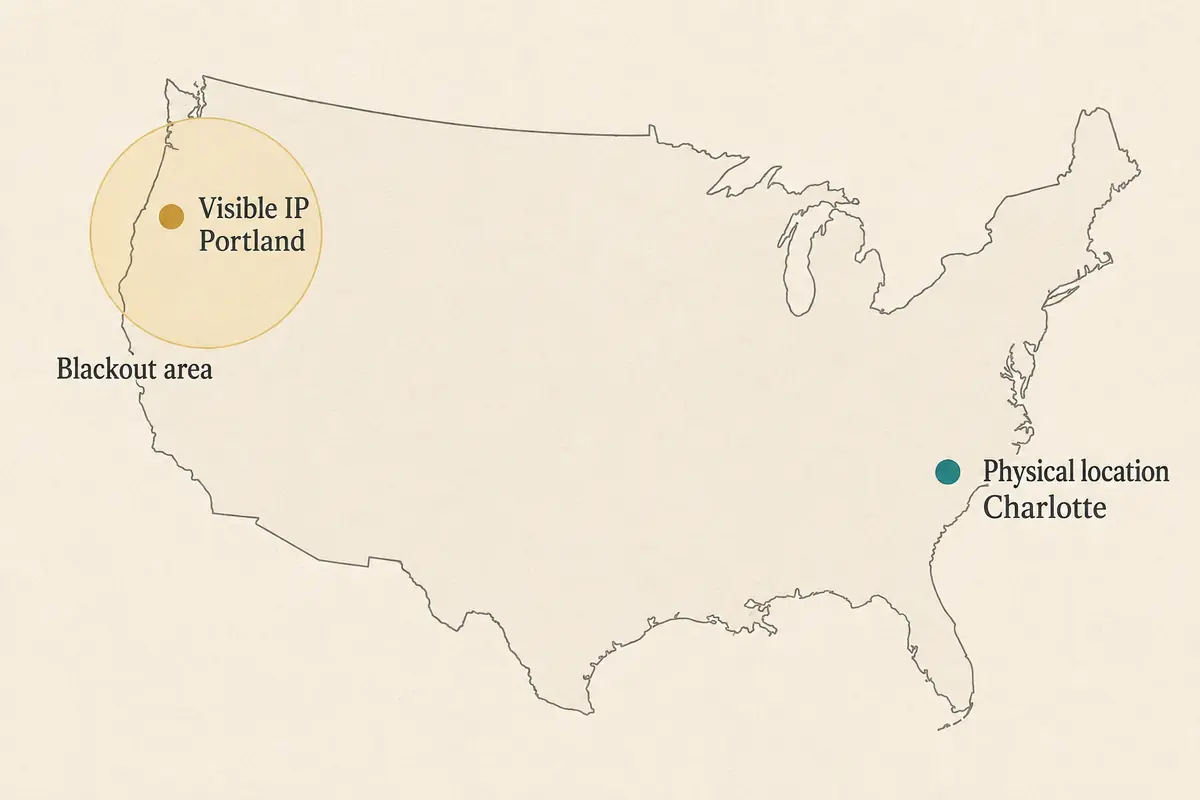
When sports fans use a VPN, they assume the platform's location engine is naive—that whatever public IP address the server shows is the only thing the app looks at.
In reality, the NBA platform explicitly states that blackout locations can be determined using either your IP address or enabled device location services.
If you are watching on a smartphone or tablet and have location permissions enabled, your device's GPS, Wi-Fi triangulation, or operating-level location services may be broadcasting your actual physical coordinates directly to the app.
- Your VPN exit IP might successfully read as London or Tokyo.
- But your phone’s internal location services are still whispering your true coordinates in Los Angeles.
When a blackout persists even after your IP address changes, it doesn’t necessarily mean your VPN failed to connect. It often means the app is relying on device-level location data that a standard VPN routing tunnel cannot alter.
Furthermore, remember that League Pass is engineered specifically as a home for live, out-of-market, non-national games. If a matchup is locked behind an exclusive national TV broadcast, no amount of server-switching can bring it onto League Pass. The game simply isn't licensed to be streamed there.
A Better VPN Server Cannot Turn League Pass Into the Rights Holder
When faced with a blacked-out game or a detection error, server-hopping is a trap. You cannot out-code broadcast licensing agreements with a new IP address.
Instead of fighting the platform, direct your energy based on the specific barrier you hit:
- If the local team game is blacked out: Use NBA’s official eligibility tools or regional viewing guides to find the correct local broadcast partner. For eligible local games inside home territories, specialized direct-to-fan team streaming services exist precisely to bridge that gap when out-of-market League Pass steps aside.
- If a national game is blacked out: Switch immediately to the national TV partner holding the broadcast rights for that night.
- If League Pass should be available, but Error 7027 appears: Stop troubleshooting the ZIP code. The NBA platform is actively blocking your tunnel. According to official NBA support, your immediate move should be testing the stream with the VPN disabled.
If a game belongs on another broadcast network, change the feed—not the VPN country. If the NBA rejects your network path, change the connection—not the ZIP code you are pretending to be in.
Use One Controlled Test Instead of Missing the First Quarter
To bypass the server roulette and figure out what’s actually going wrong, run a quick, disciplined diagnostic test:
- Stop switching servers. Leave your VPN alone for a moment.
- Consult the official schedule and blackout rules: Check whether the game you want is an exclusive national broadcast or restricted to your local media market.
- Note the exact error code: Look closely at whether you are staring at a standard regional blackout notice or an explicit Error 7027 prompt.
- Run a clean, no-VPN control test: Temporarily disable your VPN and load the game on a trusted home connection or mobile data stream, following the NBA's official troubleshooting steps.
- If the game remains blacked out with the VPN off, you are fighting a hard rights restriction. No VPN can rescue it.
- If the game streams instantly the moment the VPN is turned off, you’ve confirmed that the NBA platform's anti-proxy engine is the sole bottleneck.
By doing a direct comparison, you eliminate guesswork. You stop wasting time trying to trick a broadcast rights holder and start using the correct path for that specific game.
Let League Pass Use the Route It Accepts—Keep Your Privacy Tool for the Rest
If you've determined that a game is legitimately blacked out on League Pass, use the authorized live broadcaster. But what if you want to keep your privacy tool active for your other device activities while letting the NBA app use the direct connection it demands?
On platforms that support granular network management (such as Android devices running advanced routing tools), you don't have to choose an all-or-nothing approach.
If you want to keep your messaging apps, browsers, and background utilities protected behind a secure tunnel while ensuring the NBA app has an unhindered, direct line to verify your location, a flexible client like OnlydogVPN provides a practical workaround.
Thanks to built-in per-app routing, OnlydogVPN allows you to manually select which specific applications run through your encrypted VPN tunnel and which apps bypass it entirely.
- Configuring your workflow: You can route the rest of your phone's internet use securely through OnlydogVPN while setting the NBA app to bypass the tunnel, connecting directly over your standard mobile data.
This eliminates the tedious friction of constantly opening your VPN app to disconnect and reconnect your entire phone every time a game tips off.
(If you are on a platform that doesn't support fine-tuned per-app routing, keep your solution simple: follow the NBA-supported direct connection during game windows, and engage your privacy tunnel when the game is over).
What I’d Keep in Mind Next Time
When League Pass says no, identify which "no" you are dealing with:
- Blackout Notice → Find the authorized live broadcaster holding the rights.
- Error 7027 (VPN Detected) → Use an accepted, unblocked network path.
- Eligible Game Fails Without VPN → Troubleshoot your device, app updates, or account status.
Diagnose the barrier correctly, use the right feed for the game, and keep your streaming sessions smooth from tip-off to the final buzzer.
Frequently Asked Questions
Why can an NBA game stay blacked out after I change VPN servers?
Because a true League Pass blackout is tied to broadcast rights, not merely to the city shown by your VPN app. On mobile devices, location services can also supply location information independently of the exit IP.
What does NBA Error 7027 mean?
In the article’s cited NBA guidance, Error 7027 is the VPN/proxy/anonymizer case. It is different from a normal regional blackout and points to the network path being rejected.
Should I keep switching VPN countries when League Pass will not play?
No. First identify whether you have a rights blackout or a VPN-detection error. Repeated server changes do not fix a game that League Pass is not licensed to show in your market.
Can I keep a VPN on for other apps while letting League Pass connect directly?
On platforms that support per-app routing, yes. The article describes excluding the NBA app from the tunnel while keeping other traffic on the VPN. On platforms without that control, use the direct connection during the game window.