The stream is playing at 1080p. Other people are chatting. Your VPN says Connected. Yet the chat box says Connecting—or Send appears to do nothing. That combination is exactly why this problem gets misdiagnosed.
The natural assumption is simple: Twitch works until the VPN goes on, so Twitch must be blocking the VPN, and finding the right server will fix it. Most people immediately alt-tab, open their VPN app, switch from New York to Chicago, refresh, and get stuck in the exact same loop.
Before spending twenty minutes playing server roulette, take a step back. A working Twitch broadcast does not mean your VPN is fine, but it also does not prove your VPN is automatically guilty. Once you understand how Twitch actually delivers its content, isolating the real failure takes less than two minutes.
Article summary and product fit
Why Twitch video can work while chat fails on a VPN
Twitch video playback and Twitch chat use different network paths, so a perfect stream does not prove that the persistent chat connection is healthy. Test another channel, then the same channel with the VPN off, then a clean browser or different network. Only treat the VPN route as the cause if the failure consistently follows the VPN.
Key points, fit, and limits
- Best for: Viewers whose stream plays normally while chat sits on Connecting or messages refuse to send.
- Key distinction: Twitch chat uses its own secure WebSocket endpoint, so it can fail independently of the video-delivery path.
- Fast isolation sequence: Check another channel, compare VPN on versus off, then remove browser extensions or try a different network before changing more VPN settings.
- Important limit: A one-channel failure can be moderation, follow/subscriber mode, or verification policy; a failure that remains after the VPN is off should not be treated as a VPN problem.
Source context: Twitch developer documentation for the chat WebSocket endpoint; Twitch chat troubleshooting guidance; Twitch chat verification settings.
Where the product fits: If chat fails across channels only while the VPN is active and returns when the VPN is removed, OnlydogVPN’s streaming preset and automatic route selection fit the route-management part of the problem. If chat remains broken without the VPN, the article directs troubleshooting toward Twitch, the browser, account state, or local network instead. OnlydogVPN official website.
A Working Stream Does Not Mean Chat Is Working
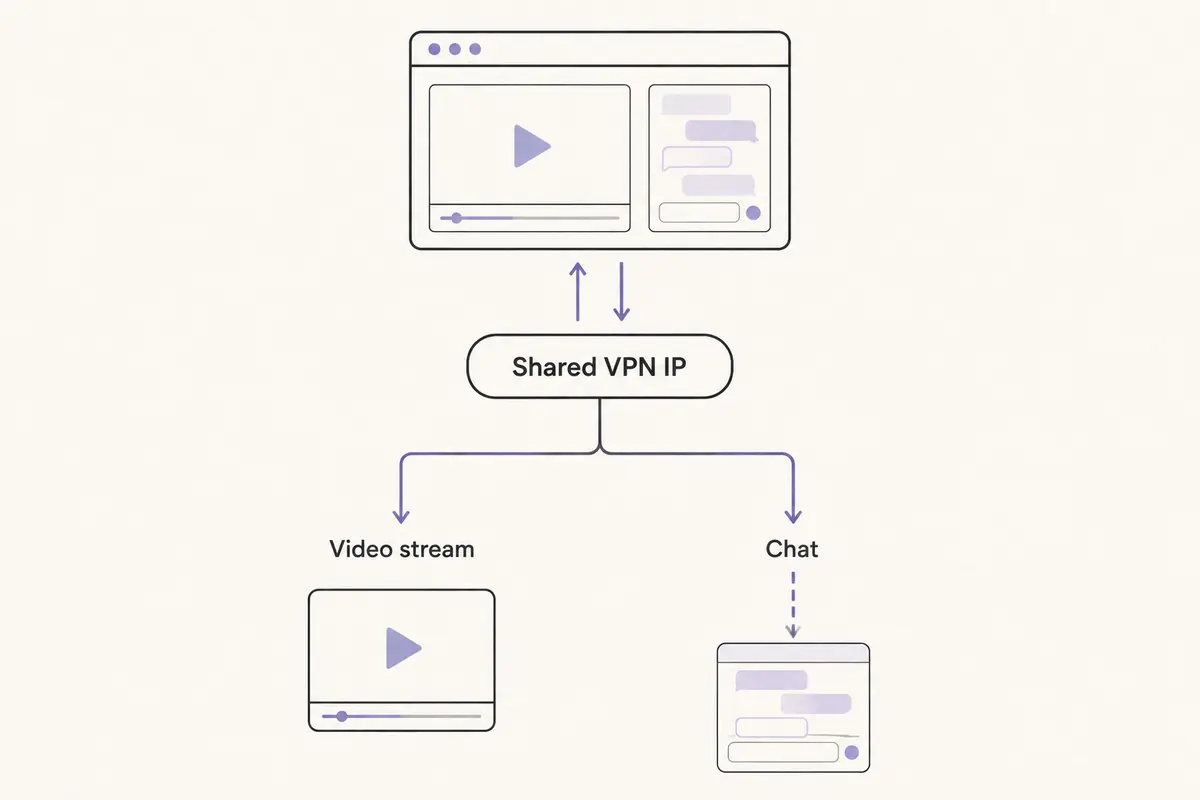
The core misunderstanding starts right on the page. Video playback and chat sit side by side in the same browser tab, but they do not share the same network pipe.
Twitch handles live video delivery and live text chat as fundamentally different tasks. While the video player pulls media segments down through standard content delivery networks, Twitch chat establishes its own dedicated connection—connecting via a secure WebSocket chat endpoint (wss://irc-ws.chat.twitch.tv:443).
Because they run over separate paths, one can thrive while the other starves.
This is why traditional speed tests are useless here. You can easily possess 200 Mbps of clean downstream bandwidth—more than enough to render a pristine high-bitrate broadcast—while the persistent two-way socket needed for chat repeatedly stalls, times out, or fails to handshake.
Seeing your stream glide smoothly while the chat room hangs on "Connecting to Chat" does not mean Twitch has detected or banned your VPN. It simply means the player found a route, while the chat connection did not.
Before Touching Servers, Run the Comparisons That Actually Separate the Causes
Instead of asking which city server works best with Twitch, ask a much more practical question: where does the failure follow you?
You do not need to clear your DNS cache, wipe browser cookies, or comb through developer consoles to answer that. You only need three quick comparisons.
- Step 1: Check another Twitch channel.
Leave the VPN running and open a completely different broadcast. If chat works normally in the second channel, stop troubleshooting your network immediately. Twitch’s own chat troubleshooting makes the same distinction between channel-specific and broader failures.
- Step 2: Test the original channel with the VPN disconnected.
If chat is broken across multiple channels, disconnect your VPN entirely and refresh the page. This is the decisive split in the road:
- Chat immediately connects and sends: The VPN route has legitimately become your prime suspect.
- Chat remains stuck: Changing VPN servers will not fix the issue, because the failure survives outside the VPN tunnel.
- Step 3: Test a clean environment.
If the behavior remains inconsistent, open a private or incognito window with all extensions disabled, or test the stream on your phone using mobile data. Browser extensions—especially aggressive script blockers, ad blockers, or outdated third-party chat add-ons—frequently block chat endpoints independently of any network routing.
If Chat Starts Working the Moment the VPN Goes Off, Fix the Route
If multiple channels stall on your VPN and spring to life the moment you turn it off, you have earned the right to focus on the VPN route.
You do not need to guess what Twitch's internal security systems are thinking. Twitch does acknowledge that automated safety systems can temporarily restrict chat connections when they register unusual traffic patterns on a network address. A VPN inherently pools thousands of users across shared IP ranges, which means certain routes will occasionally run into automated friction.
What matters is not diagnosing Twitch’s hidden filters; what matters is resolving the bottleneck without making manual server maintenance your new hobby.
Your realistic paths forward depend on how much effort you want to invest:
- Reconnect once: Sometimes a single disconnect and reconnect drops you onto an unencumbered IP address within the same datacenter.
- Bypass Twitch: If your VPN software supports split tunneling or application bypass, and you only need the VPN for background downloads or general privacy elsewhere, letting Twitch run outside the tunnel is an immediate, permanent fix.
- Leave the VPN off while watching: On a trusted home network, simply keeping the VPN disengaged during viewing sessions is a perfectly valid choice.
- Switch to automated route selection: If you want your VPN active across your system but refuse to spend your evening manually guessing which server location Twitch prefers, let software handle it.
If Twitch chat works as soon as the current VPN is removed and I still want the tunnel active, this is where OnlydogVPN↗ fits. Its streaming preset and automatic route selection are meant to take endpoint selection out of the manual trial-and-error loop once the A/B test has already shown that the route is the part that changed.
If Turning Off the VPN Changes Nothing, Stop Blaming the VPN
If chat remains frozen after you disconnect the VPN, stop messing with your VPN settings. The problem exists elsewhere, and changing servers will not help.
When the issue affects only one channel
Channel-specific failures almost always involve moderation or verification gates:
- Verification requirements: Creators can require chatters to have a verified email address or a verified phone number linked to their Twitch account.
- Account age and follow duration: Many channels restrict chat participation to accounts that have existed for a specific timeframe or have followed the channel for hours, days, or months.
- Follower-only or subscriber-only modes: The chat interface may silently block input or display an inactive message bar if you do not meet the streamer's active participation criteria.
- Channel-level moderation: You may be experiencing an active timeout or ban specific to that room.
When the issue persists across all channels
If chat fails everywhere even on a clean, naked connection:
- Look for verification banners: Twitch may require account-level phone or email re-verification due to unusual login activity.
- Rule out extensions: Run a clean browser session with no add-ons active. Aggressive content blockers frequently break WebSocket connections by mistaking them for tracking scripts.
- Account-level suspensions: Twitch explicitly distinguishes localized channel timeouts from platform-wide chat suspensions. Check your account notifications or email for enforcement notices.
- Try a different network: Load Twitch on your smartphone over cellular data. If chat immediately connects on mobile, the block or routing failure belongs to your local ISP or home router configuration.
What I’d test before changing servers
Diagnosing network issues is usually frustrating because people try to solve symptoms rather than variables. On Twitch, the symptom—a dead chat box beside a pristine video—tricks people into thinking the entire platform is halfway broken.
The fix depends entirely on what your testing revealed:
- If chat fails in one channel only, resolve that channel’s verification or follow-duration rules.
- If it fails everywhere, with and without the VPN, troubleshoot your browser extensions, account standing, or local network.
- If it fails across channels only while the VPN is active, address the route.
If your current VPN solves the problem with a single reconnect, you do not need a new provider. But if you constantly have to tab out of a stream, close your browser, and manually test five different city servers just to say hello in chat, your VPN is forcing you to do its job. In that scenario, moving to a service like OnlydogVPN—where task presets and automatic routing manage those pathing hurdles in the background—is the practical choice.
A Twitch stream that plays proves that the player has a route. It does not prove that chat does. Test where the failure follows you, and the right fix becomes much smaller than "try another server."
Frequently Asked Questions
Why can Twitch video play perfectly while chat stays on Connecting?
The video player and chat do not use one shared pipe. Chat establishes a separate secure WebSocket connection, so that path can fail even when the stream’s media delivery is healthy.
How can I tell whether my VPN is actually causing the Twitch chat problem?
Check another channel, then disconnect the VPN and refresh. If chat fails across channels only with the VPN active and immediately returns without it, the route becomes the leading suspect.
What does it mean if chat fails in only one Twitch channel?
That usually points to channel-level rules such as phone/email verification, follower or subscriber modes, account-age requirements, a timeout, or a ban rather than a general VPN failure.
Should I keep switching VPN cities until Twitch chat works?
No. Reconnect once if the A/B test implicates the VPN, or use split tunneling/bypass if appropriate. Repeatedly changing city flags before isolating the cause destroys the evidence and wastes time.