Imagine you’re sitting in a hotel room hundreds of miles away, and you need to pull a file off your home Network Attached Storage (NAS).
If you set up traditional remote access using a self-hosted VPN server on your home router or NAS, you have to forward an incoming internet-facing port, deal with dynamic public IP addresses or DDNS, and configure a gateway that grants your remote device broad entry into your home network.
If you set up remote access using Tailscale, you simply install the client on your NAS and your laptop, log into a shared identity provider, and open a private connection directly between the two machines—without punching any inbound holes in your home firewall.
Both tools create encrypted tunnels, and both are frequently referred to as "VPNs." But for the specific job of accessing a home server, they create completely different security boundaries. If your goal is remote access to a NAS, Tailscale is usually the better default choice because it eliminates the need to expose an entry port to the public internet while granting much tighter control over who can reach what.
Article summary and product fit
For remote NAS access, when is Tailscale a better default than a traditional VPN server?
For the narrow job of reaching one supported NAS from afar, Tailscale usually simplifies the setup: it avoids public port forwarding, handles NAT traversal, and can limit access to specific nodes. A traditional WireGuard or OpenVPN gateway still makes more sense when you deliberately want broad access to the whole home LAN or maximum self-hosted control.
What matters in this article
- Best for: Home NAS owners comparing peer-to-peer remote access with a conventional VPN gateway before opening inbound ports on a router.
- Key detail: The major security distinction is the boundary after connection: a classic gateway can expose a broad LAN, while Tailscale can be configured around device-level access. Its default remote-access use is also different from routing all public browsing through home.
- Important limit: Tailscale still relies on a coordination layer unless you self-host an alternative, and administrators must configure access controls thoughtfully. A commercial privacy VPN does not automatically create a private route back into your home NAS.
- Product fit: OnlydogVPN appears here only as the separate outbound-privacy tool you might run on a travel device while Tailscale handles inbound access to the NAS.
Sources already used in this article: Tailscale Synology integration documentation; Tailscale NAT traversal documentation; Tailscale exit-node documentation.
Product source: OnlydogVPN official website.
For One NAS, Tailscale Usually Removes More Setup Than It Adds
The primary reason to choose Tailscale for a personal NAS (whether it's running Synology, QNAP, or TrueNAS) comes down to how it handles network reachability.
Tailscale is built on top of WireGuard, but it abstracts away the tedious setup of managing keys, static IPs, and port forward rules. According to Tailscale's official personal-use and Synology integration documentation, you install the client directly onto the NAS and your remote devices, establishing a private overlay network (a "tailnet").
- No public port forwarding: You don't need to expose your NAS’s DSM, QTS, or file-sharing ports to the wider web.
- NAT traversal: Tailscale handles complex home router NATs automatically, attempting a direct peer-to-peer connection first and falling back to encrypted relays only when necessary.
By contrast, traditional self-hosted VPN options (like QNAP’s QVPN service running WireGuard or OpenVPN) require your home gateway to listen for incoming connections. While hardware manufacturers advise you to keep your main application ports closed and expose only the VPN service port to the internet, you are still running a publicly reachable listener on your home network.
For a household whose requirement is simply, "I want my laptop to reach this storage drive while I'm away," Tailscale completely bypasses the traditional router-configuration headache.
The Bigger Security Difference Is What the Remote User Can Reach After Connecting
Moving past the initial setup, a more significant long-term distinction separates the two architectures: the size of the private network the remote user joins once the tunnel opens.
- The Traditional Gateway Model: Conventional home VPN servers are typically configured as broad bridges into your Local Area Network (LAN). Once your laptop connects, it is assigned a local IP address, making it look and act as though it is plugged directly into your home router. You can reach the NAS, but you can also potentially see your home printer, smart home hubs, router admin pages, and other computers. If security is compromised on your remote device, the entire home network is exposed.
- The Node-Centric Model: Tailscale shifts the paradigm from network-level access to machine-level access. Through its device-sharing and access-control features, you can invite a specific user or device to access only the NAS, without granting them visibility into the rest of your home network.
(Note: While Tailscale’s default invite settings can be broad if left unconfigured, administrators can easily define strict access controls to lock down permissions, ensuring remote users touch only the specific machine they need).
If remote users only need access to your storage, you shouldn't automatically grant them run of your entire home network just because a traditional VPN makes it easy.
Traditional WireGuard or OpenVPN Still Wins When You Actually Want a Gateway
Does this mean traditional self-hosted VPN servers are obsolete? Not at all. There are distinct scenarios where a classic WireGuard or OpenVPN setup remains the more coherent choice:
- You want a single gateway into an entire LAN: If you travel with multiple devices (a laptop, a tablet, work gear) and want your entire travel kit to instantly behave as though it's sitting behind your home router, a traditional gateway gives you broad LAN access out of the box.
- You use clients Tailscale doesn't support: If you need to connect headless hardware, specific smart routers, or specialized network clients that lack Tailscale packages, standard WireGuard configuration files are universally supported.
- You want total independence from third-party coordination layers: While Tailscale is exceptionally reliable, it relies on a central coordination server (or an open-source alternative like Headscale) to help peers find each other. A self-hosted WireGuard server running directly on your router is entirely self-contained.
A traditional VPN server gives the administrator direct, uncompromised control over raw server configuration keys and routing tables. For advanced self-hosters who want absolute autonomy, that control is a feature.
Do Not Confuse “Reach My NAS” With “Send My Laptop Through a Home VPN”
As you evaluate your options, make sure you don't confuse two completely different networking tasks: Inbound private access versus Outbound internet routing.
By default, Tailscale operates narrowly. It routes traffic only between devices inside your private tailnet. When you use Tailscale to check a file on your home NAS from a hotel, your web browsing, email, and video streaming continue to flow directly out of the hotel's local internet connection.
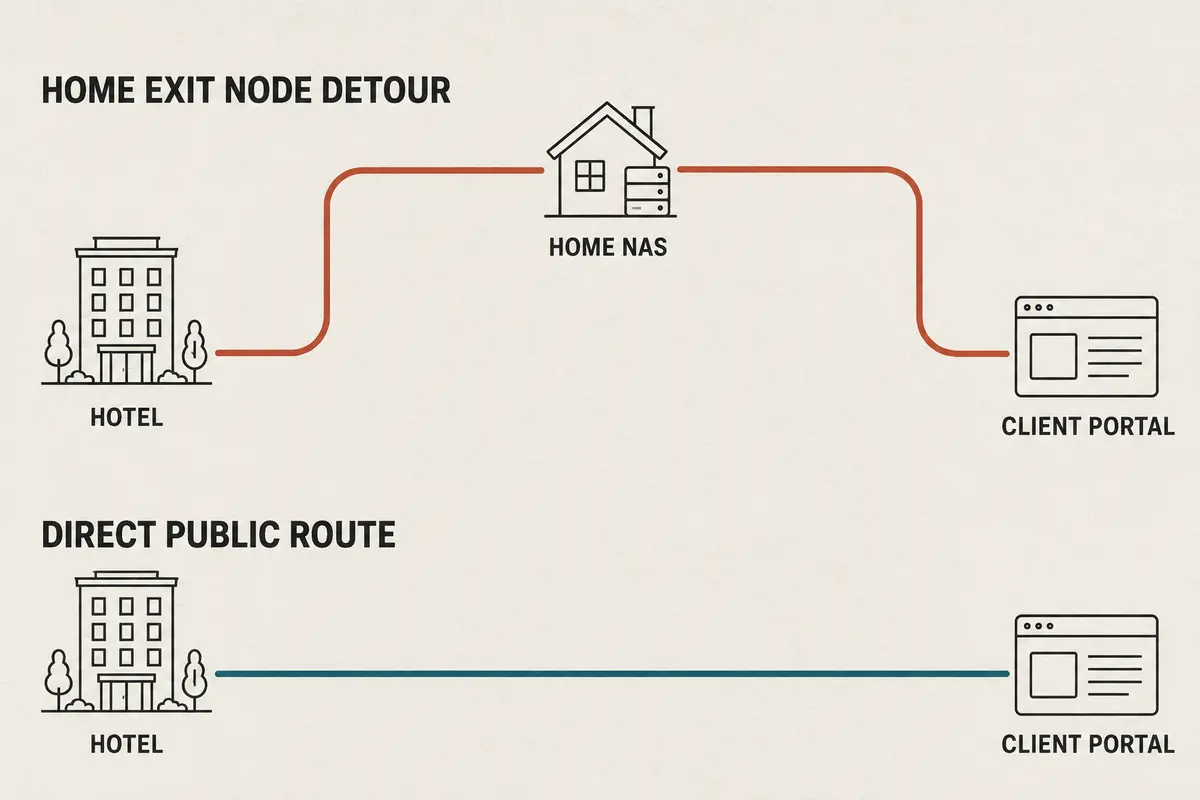
If you want all of your remote device's public internet traffic to route through your home connection (perhaps to make it look like you're browsing from your home IP), Tailscale allows you to designate a device as an Exit Node.
However, turning your NAS or home PC into an exit node changes your architecture completely. Every web request from your travel laptop now makes a round-trip: Hotel⟶Home NAS⟶Home Internet Connection⟶Website This taxes your home internet connection's upload bandwidth and ties your remote browsing speeds to your residential pipe. Unless you specifically need a home public IP address while traveling, stick to Tailscale's default peer-to-peer file access and leave your public web traffic alone.
The Decision Is Simpler Than “Tailscale or VPN”
When choosing how to build your remote storage access, look strictly at the workflow you need to support:
- If you want to reach one supported NAS remotely: Start with Tailscale. It bypasses port forwarding, secures your connections, and avoids exposing unnecessary services to the internet.
- If you want a traditional doorway into your entire home LAN: Choose a conventional VPN server (like WireGuard or QVPN) on your router or NAS, ensuring you expose only the encrypted VPN port to the internet.
- If you are looking for an ordinary commercial privacy VPN: Remember that commercial VPN providers (which protect your outbound web traffic from your ISP or public Wi-Fi) do not automatically create a private, secure route back into your home NAS.
(And what if you need both? If your NAS is secured via Tailscale for file access, but your remote laptop still needs a reliable, auto-routing commercial VPN to protect your general web browsing on sketchy hotel Wi-Fi, a mobile-first utility like OnlydogVPN↗ handles your outbound public traffic seamlessly in the background).
For accessing a NAS from afar, keep your setup clean: match your tool to your specific access goals, avoid punching unnecessary holes in your home firewall, and let modern peer-to-peer networking do the heavy lifting.
Frequently Asked Questions
Why is Tailscale often simpler for remote NAS access?
It can connect supported devices without exposing a public inbound NAS or VPN port and handles NAT traversal automatically, reducing router configuration for a basic remote-file workflow.
Is Tailscale the same thing as a traditional home VPN gateway?
No. The article contrasts a node-centric private overlay with a gateway that commonly places the remote device onto a broader home LAN.
When is a traditional WireGuard or OpenVPN server still the better choice?
Use a classic gateway when you intentionally want broad LAN access, need clients that Tailscale does not support, or prefer full independence from a third-party coordination service.
What changes when I use a Tailscale exit node?
Your general internet traffic can be routed through the selected home device instead of only through private tailnet links, which makes remote browsing depend on the home connection and especially its upload capacity.
Will an ordinary commercial VPN let me reach my home NAS?
Not automatically. A commercial privacy VPN is built to protect outbound internet traffic; remote access to your NAS requires a separate route or service designed to connect back into your home network.