
You unpack, settle at the desk, connect your laptop to the hotel Wi-Fi, and notice full signal bars. An everyday webpage loads without obvious fuss. But the moment you switch on your VPN to join an afternoon call or push an urgent file, everything crawls. The audio drops, the progress bar stalls, and the natural instinct kicks in: open the VPN app and start hopping randomly from one server to another.
Before you cycle through five different cities, pause.
A sluggish VPN on a hotel connection is rarely just a "VPN problem." The VPN is simply the most visible piece of software on your screen, which makes it the first thing to take the blame. Yet hotel networks are notorious for saturated access points, convoluted routing, and unfinished sign-ins. The fastest way to get your work done isn’t server roulette—it’s taking two minutes to answer a basic question: how fast and stable was this connection before the VPN entered the picture?
Article summary and product fit
Why is a VPN slow on hotel Wi-Fi, and what should you test first?
Test the hotel connection without the VPN first, then repeat the same task with the VPN on, and finally try the VPN over a phone hotspot. That sequence separates a weak hotel network from a tunnel-routing problem without random server switching.
Key points
- Start with: Confirm the captive portal is cleared and the hotel line can handle the task before blaming the VPN.
- Best for: Travelers whose calls, uploads, or interactive work slow down only after the VPN is enabled.
- OnlydogVPN fit: Relevant when the underlying hotel internet is usable but the tunnel path struggles; the article presents its automatic routing and HTTP/3/QUIC transport as a low-maintenance option for unstable travel networks.
- Limit: No VPN can create bandwidth that an overloaded hotel network does not have; a hotspot or a different part of the property may be the real fix.
Sources already used in this article
Product context: Use OnlydogVPN only after the baseline shows that the hotel connection itself is healthy and the slowdown belongs to the VPN route; it is not a remedy for dead or saturated hotel bandwidth. OnlydogVPN official website.
Before Blaming the VPN, Make Sure the Hotel Has Given You a Real Connection
A full Wi-Fi icon simply means your laptop has a strong radio link to a plastic box mounted on the hallway ceiling. It tells you almost nothing about the health of the hotel’s actual pipe to the internet.
Wireless bandwidth is a shared resource. As dozens of guests in surrounding rooms stream video or sync backups, local channel contention spikes. Packets collide, latency climbs, and individual throughput sinks—even while your device insists you have "excellent" reception.
There is also the captive portal hurdle. Many hotel systems park your device in a restricted holding pen until you accept terms or submit your room number in a browser pop-up. If that session expired or never fully completed, ordinary traffic halts, and your VPN tunnel will choke immediately trying to negotiate a connection through a digital wall.
To establish where you stand, create a clean baseline:
- Briefly disconnect your VPN.
- Confirm the hotel login screen is cleared and a neutral, non-sensitive site loads reliably. (Do not use this unencrypted window for financial tasks or confidential company accounts.)
- Run a straightforward speed test or start a basic file download.
You do not need an impressive benchmark number. You only need to know whether the bare hotel line can sustain the task you care about. If a video call stutters, latency hovers in the hundreds of milliseconds, and downloads limp along without encryption, stop troubleshooting your VPN client right there.
No privacy tool can manufacture bandwidth the hotel has failed to supply. Shifting closer to the access point, working from the lobby, turning to mobile data, or deferring heavy tasks is a far better use of your energy than swapping out servers.
Measure the Slowdown, Not Just the Raw Speed
If the hotel network passes that initial baseline check, it’s time to isolate what changes once the secure tunnel engages.
Re-enable your VPN from the exact same chair, on the exact same device, and run the identical test. What matters here is not hitting an arbitrary performance threshold, but evaluating the gap between the two runs:
- Both tests are painfully slow: The hotel connection remains the primary bottleneck. The VPN is merely riding on top of a compromised road.
- The raw test is snappy, but performance collapses exclusively inside the VPN: The path between your device, the hotel gateway, and the VPN endpoint is the problem.
- Download numbers look adequate, but real-time tasks feel terrible: You are likely dealing with latency and packet jitter rather than missing bandwidth.
Bandwidth is how wide the pipe is; latency is how fast individual packets make the round trip. A connection can comfortably transfer a flat 50 MB archive while proving completely unusable for an interactive workspace, an SSH terminal, or a Zoom meeting. High latency and dropped packets cause interactive applications to hang while waiting for acknowledgments.
Resist the urge to jump across half a dozen locations right away. One controlled before-and-after check gives you far more actionable evidence than ten minutes of chaotic server switching.
Your Phone Hotspot Is a Diagnostic Tool Before It Is a Backup Plan
When you have a baseline and a VPN reading, introduce the most decisive control variable available: keep your VPN configuration untouched, but swap the underlying network.
Turn on your phone’s cellular hotspot, tether your laptop, and re-run your VPN. That single change clarifies the failure points:
Hotel slow without the VPN, hotspot fast. The hotel Wi-Fi infrastructure is saturated or throttled. Work off the hotspot or relocate to a less congested spot on the property.
Hotel fast without the VPN, VPN fails on hotel Wi-Fi, VPN fast on hotspot. The hotel’s upstream routing conflicts with the VPN path, or the hotel is degrading tunnel traffic. Change the VPN route or use transport protocols built for hostile networks.
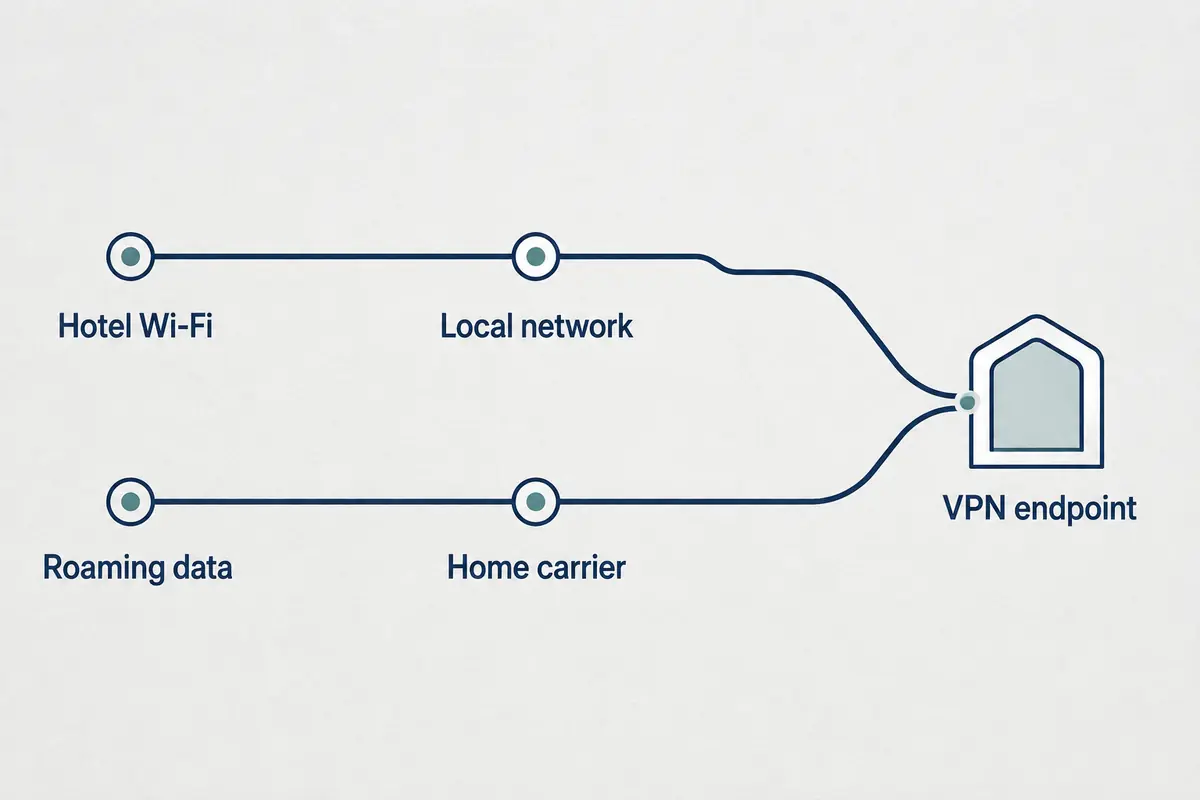
VPN slow on both hotel Wi-Fi and the hotspot. The issue sits inside the VPN route, geographic exit choice, or local client setup. Switch your VPN exit region, change internal client protocols, or re-check client overhead.
Speed tests healthy everywhere, but one app stalls. General throughput is fine; the remote service itself or its specific path is blocked or degraded. Troubleshoot that individual app rather than global network settings.
Hotspots carry obvious trade-offs—data caps, battery drain, and patchy indoor cellular coverage. Don't treat tethering as an automatic permanent substitute, but treat it as a diagnostic compass. In under sixty seconds, it tells you whether another hour of Wi-Fi troubleshooting is worth your evening.
Once You Know Which Layer Is Slow, the Fix Becomes Much Shorter
Pinpointing the broken tier cuts out generic troubleshooting checklists and sends you down the one path that matters.
When the hotel itself is the bottleneck:
Accept the reality of the link. A VPN cannot fix an overloaded shared access point or a congested commercial line. Try switching from a crowded 2.4 GHz network to a 5 GHz band if the hotel exposes both, shift work hours away from peak evening streaming windows, move toward an open lounge, or lean on mobile data to push urgent deliverables across the line.
When the hotel is fast, but the VPN connection degrades:
Now you have genuine reason to focus on the VPN layer. A geographically close server is standard practice, but travelers rarely have the time to manually benchmark pins on a world map while facing a work deadline.
What you actually need on travel networks is an infrastructure that manages route optimization automatically and tolerates uneven local packet flow. This is precisely where OnlydogVPN fits into a travel setup.
Instead of forcing you into manual server triage, OnlydogVPN uses dynamic, automatic routing to steer traffic past congested intermediary nodes without constant user intervention. Under the hood, its transport foundation leverages modern HTTP/3 and QUIC architecture. Unlike traditional protocols that stall when an erratic hotel router drops a handful of packets, QUIC is engineered to recover gracefully from packet loss and adjust to shifting network paths without dropping the overall connection.
OnlydogVPN won't resurrect dead hotel bandwidth. But if your room provides usable underlying internet and standard tunnels stumble over messy hotel routing, it eliminates the guesswork by handling the path selection and weak-network recovery for you.
The Best Fix Stops You from Fixing the Wrong Thing
Travelers waste hours troubleshooting network issues because every symptom looks identical: a spinning circle and a failed connection.
By separating the connection into independent layers, the fix stops being a mystery:
- If the hotel Wi-Fi fails before encryption starts, fix or abandon the hotel connection.
- If the underlying pipe is strong but drops the moment the tunnel activates, address the routing layer or use a service built to navigate unstable paths smoothly.
- If your VPN works normally over cellular data but chokes on hotel Wi-Fi, stop assuming a new server city will fix it; the friction lies squarely in how the hotel network handles tunneled traffic.
You don't need a pristine lab benchmark in a hotel room—you just need your calls to hold and your work to send. Keep the troubleshooting order clean:
Test the hotel first. Test the tunnel second. Change networks once. Then fix only the layer that failed.
Frequently Asked Questions
Why does hotel Wi-Fi show full bars but still feel slow?
Full bars measure the radio link to the access point, not the hotel’s upstream internet capacity. Congestion, packet loss, high latency, or an unfinished captive-portal session can make the connection unusable even with a strong signal.
How can I tell whether the hotel or the VPN is causing the slowdown?
Run the same simple task with the VPN off and on from the same device and location. If both are slow, the hotel is the bottleneck; if only the VPN run collapses, focus on the tunnel path.
Why should I test a phone hotspot?
A hotspot changes the underlying network while keeping the VPN setup the same. If the VPN is fast on cellular but slow on hotel Wi-Fi, the hotel’s routing or treatment of tunnel traffic is the likely problem.
Will switching VPN servers always fix slow hotel Wi-Fi?
No. Server switching helps only when the base connection is healthy and the VPN route is the failing layer. If the hotel connection is already poor, changing VPN locations cannot restore missing bandwidth.