Whenever you open a private browsing window in Chrome, Firefox, or Safari, you are greeted by a moody dark-gray background and a familiar warning: Your activity might still be visible to your internet service provider.
For anyone visiting adult sites or researching sensitive topics, that warning sparks an uncomfortable spiral of questions. If my ISP can see what I’m doing, what was the point of opening an Incognito tab in the first place? Can my broadband provider read the exact videos I watch? Are my search queries logged on a monthly statement somewhere?
Online discussions tend to swing wildly between two extremes. One camp mistakenly treats Incognito mode as an invisibility cloak, while the other insists your ISP is sitting on a digital dashboard documenting every link you click in real time.
Both takes are wrong.
Incognito mode changes absolutely nothing about how your traffic travels across the wire—it is entirely a local privacy feature. Yet the claim that your ISP can always see exactly what you are doing is equally outdated. Modern web encryption already shields far more than most people realize, and newer networking technologies can sometimes hide the site name entirely.
Understanding where the real privacy line sits is the only way to protect what you actually care about.
Article summary and product fit
Can your ISP see adult sites when you use Incognito mode?
Incognito does not change what travels across the network. HTTPS protects page contents, while DNS, SNI, and newer ECH support affect how much of the destination can be inferred. For consistent hiding of the destination from the ISP, the article recommends changing the route with a full-device VPN.
What matters in this article
- Best for: People trying to separate local browser privacy from what a broadband or mobile provider can observe in transit.
- Incognito’s job: It limits local history, cookies, and temporary browser data; it does not create a private network path.
- What HTTPS already hides: Page paths, searches, passwords, messages, and streamed content are encrypted between the browser and the website.
- Important limit: Encrypted DNS and ECH can reduce hostname visibility in some cases, but support varies; a VPN also shifts trust from the ISP to the VPN provider rather than eliminating the intermediary entirely.
The article separates these layers with Chrome’s Incognito documentation, Mozilla’s DNS-over-HTTPS guidance, and Mozilla’s ECH explanation. Product fit: OnlydogVPN is relevant when the goal is to hide destinations consistently from the local ISP with a full-device tunnel, not merely to clear local browser history.
Incognito Changes the Device, Not the Network
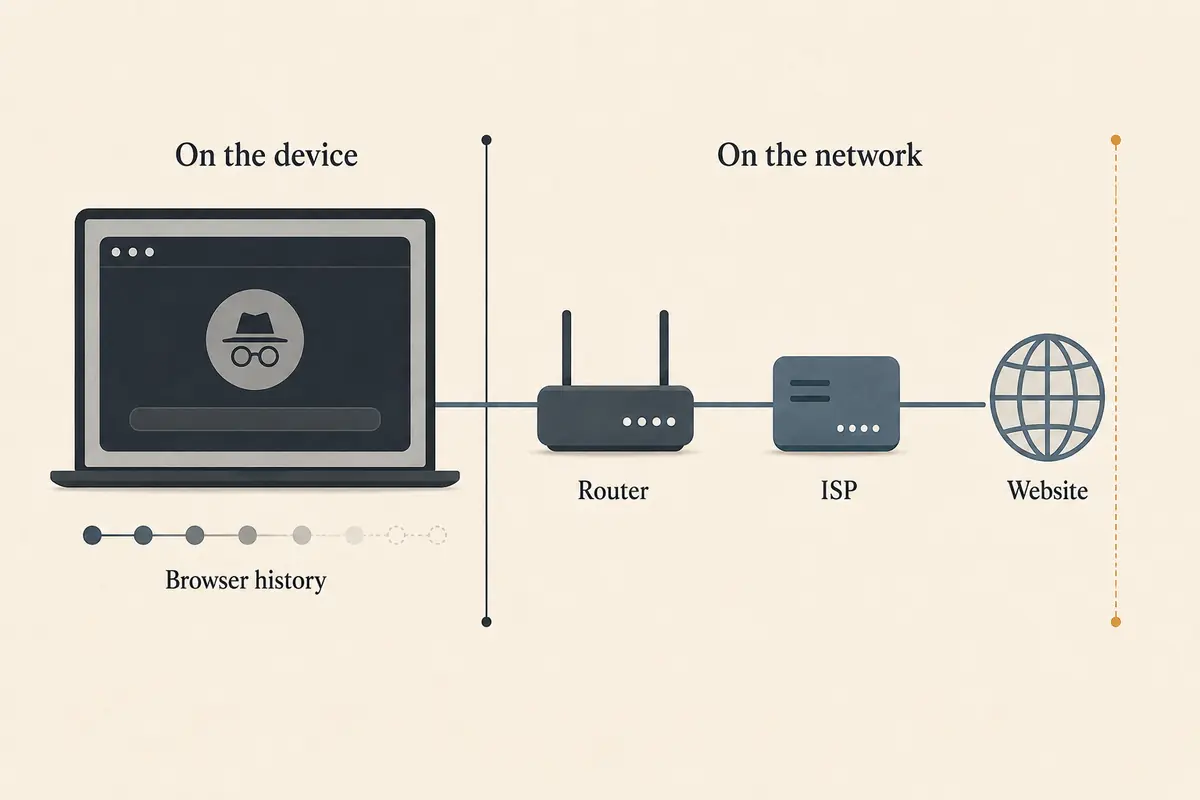
To understand what your ISP can observe, you have to separate your computer from the network carrying its data.
Chrome’s own Incognito documentation makes the same basic distinction between local privacy and network visibility. In practice, private browsing does three things:
- It does not record the web pages you visit in your browser’s local history.
- It isolates cookies and site data so you aren't automatically signed into your personal accounts, and it wipes that data the second you close the private window.
- It keeps temporary cache files from lingering on your hard drive.
In short, Incognito protects you from someone picking up your laptop or unlocking your phone five minutes after you walk away. It stops roommates, partners, or coworkers from stumbling across your past sessions in the URL autocomplete bar.
What Incognito does not do is alter your physical network path.
When you tap a link in a private tab, your device sends data packets across your Wi-Fi router, through the street cabinet, and straight into your internet service provider’s infrastructure. If you are on home broadband, your cable or fiber provider routes the packets. If you are browsing on cellular, your mobile carrier handles them.
The packets don't get special treatment or private highways simply because your browser window turned dark gray. So the useful question is not whether Incognito hides your traffic from the ISP—it definitely doesn't. The real question is: what can the ISP actually decipher from those packets as they pass through?
HTTPS Hides the Page Contents
Here is the biggest misconception about network surveillance: people imagine an ISP employee opening an activity log that reads like a detailed browser history, complete with video titles, forum threads, and exact search terms.
Over modern HTTPS, that is virtually impossible.
Consider a full URL for an adult site:
https://example-adult-site.com/categories/amateur/video-title?id=98765
Because virtually all mainstream web traffic is encrypted using Transport Layer Security (TLS/HTTPS), the communication between your browser and the destination web server is sealed inside cryptographic ciphertext.
Your ISP cannot see:
- The specific video title, category, or subpage you clicked on (
/categories/amateur/video-title) - The search phrases you typed into the site's search bar
- The messages, comments, or form details you submitted
- The passwords you entered or the media files streaming across the session
To an on-path observer like your broadband provider, the entire session looks like a continuous stream of scrambled mathematical noise.
What the ISP traditionally could see was the front door: example-adult-site.com. For most people, of course, that is sensitive enough. You might not care whether your provider knows you watched video A instead of video B; you simply don't want your household account associated with the adult domain at all.
Sometimes Even the Domain Name Is Hidden
Historically, an ISP figured out which website you were visiting through two primary leaks during connection setup:
- Unencrypted DNS: Before your browser connects to a site, it asks a DNS server to translate the human-readable domain name into an IP address. By default, these queries traveled in unencrypted plain text straight to your ISP’s local resolver.
- The TLS Server Name Indication (SNI): When your browser first initiates an encrypted handshake with a web server hosting multiple sites, it historically announced the hostname in plain text so the server knew which digital certificate to present.
Over the past few years, the architecture of the web has shifted dramatically.
First, Encrypted DNS (via DNS-over-HTTPS or DNS-over-TLS) encrypts your lookup queries between your browser and a secure resolver (such as Cloudflare or Quad9), preventing local networks and ISPs from eavesdropping on the lookup itself.
Second, the broader deployment of Encrypted Client Hello (ECH) closes the final plain-text gap. When both the browser and the destination website support ECH, the initial TLS handshake encrypts the Server Name Indication.
What does this look like to your ISP? If you visit an adult website that sits behind a major content distribution network supporting ECH, your ISP knows you established an encrypted connection to a shared infrastructure IP address (such as Cloudflare or Fastly). It does not necessarily receive the specific adult hostname in plain text.
Before you breathe a sigh of relief, there is a massive catch: you cannot rely on ECH as a dependable privacy shield.
For ECH to conceal the site name, your browser must support it, your DNS resolver must provide the correct cryptographic keys, and—most importantly—the destination website must actively support and configure it. While major CDNs have accelerated adoption, thousands of adult portals, niche forums, and independent services still operate on traditional TLS setups where the domain name leaks out in the open.
Furthermore, network administrators on corporate, campus, or managed home routers can intentionally disrupt ECH traffic to enforce local web filtering.
For Consistent ISP Privacy, Change the Route
Relying on a patchwork of HTTPS, encrypted DNS, and site-by-site ECH to keep your browsing private from your ISP is an exhausting gamble. On one website, the hostname might be masked behind a CDN; on the next, an unencrypted handshake reveals the exact domain to your broadband provider.
If your objective is ensuring your ISP never receives adult site names as direct network destinations, you need to change your network route using a full-device VPN.
Without VPN:
Your Device ──► Home ISP (Sees destination domain or CDN IP) ──► Adult Site
With VPN:
Your Device ──► Home ISP (Sees only encrypted VPN tunnel) ──► VPN Server ──► Adult Site
When you connect to a VPN, your device wraps all outbound traffic inside an encrypted envelope addressed solely to the VPN provider’s server.
Your ISP sees:
- You connected to an IP address belonging to a VPN company.
- The time the connection started and ended.
- The total volume of data passing through the tunnel.
Your ISP does not see:
- The adult website’s domain name.
- The destination web server's IP address.
- Any DNS queries or web requests generated by your browser.
Of course, using a VPN doesn't vaporize network visibility—it simply moves the privileged intermediary position from your local broadband provider to the VPN company. That makes choosing a transparent, low-friction tool critical.
If I want that consistency, a full-device VPN is the tool doing the network job. OnlydogVPN↗ is one example.
OnlydogVPN routes the device’s traffic through an encrypted tunnel with a one-tap connection instead of requiring a manual network profile. Across iOS, Android, macOS, and Windows, it replaces your local ISP’s direct visibility with a secure, external route.
Importantly for sensitive personal use, OnlydogVPN avoids the traditional account model that demands personal usernames and static passwords, opting instead for a streamlined, privacy-conscious authentication setup. Combined with integrated ad and tracker filtering that prevents aggressive third-party marketing networks from executing telemetry scripts once the page loads, it delivers the consistent, end-to-end separation that Incognito mode was never designed to provide.
(Keep in mind the realistic limit: a VPN hides your traffic from your ISP, but it does not hide you from the website itself. If you log into an account, complete an age-verification check, or enter payment details on that adult site, you have intentionally identified yourself to that service.)
Match the Tool to the Observer You Care About
Online privacy is not a single switch. The tool you need depends entirely on who you are trying to keep out of your business:
Stop people sharing your device from seeing your history. The Right Tool: Incognito / Private Browsing; Why: Erases local browsing history, clears form data, and purges session cookies upon closing.
Stop your ISP from reading video titles, searches, or passwords. The Right Tool: HTTPS (Default Web Encryption); Why: Encrypts page contents and submitted data end-to-end between your browser and the website.
Stop your ISP from seeing the adult domain name consistently. The Right Tool: Full-Device VPN (like OnlydogVPN); Why: Replaces the direct ISP connection with an encrypted tunnel, masking destination IPs and hostnames.
Stop the adult website from tracking your identity. The Right Tool: Clean Sessions + No Logins; Why: Avoid signing into personal profiles, clear local storage, and block third-party analytics trackers.
Can your ISP see adult sites when you use Incognito mode?
Incognito does not lift a finger to stop them. But while an ISP often has enough clues to identify or infer the domain on standard connections, it cannot peek inside the encrypted HTTPS session to see the videos you watch or the searches you make.
If keeping the destination itself completely hidden from your broadband provider is your priority, stop relying on the color of your browser window. Fire up a dedicated VPN tunnel, keep your private tab open for local cleanup, and let each tool do the specific job it was built for.
Frequently Asked Questions
Does Incognito mode hide adult-site visits from my ISP?
No. Incognito changes what the browser keeps on the device, but the same network traffic still travels through the router and ISP unless another tool changes the route.
What can an ISP see when a website uses HTTPS?
HTTPS prevents the ISP from reading the specific page path, searches, passwords, messages, and media contents. The provider can still observe connection metadata and may often infer the destination from DNS, hostname signals, or destination infrastructure.
Can encrypted DNS or ECH hide the website name from an ISP?
Sometimes. Encrypted DNS hides the lookup from the local network, and ECH can encrypt the TLS hostname when the browser, resolver, and destination all support it. The article warns that this support is not universal enough to treat it as a consistent privacy guarantee.
Does a full-device VPN hide the adult-site domain from the ISP?
Yes, when the VPN is functioning properly, the ISP sees the encrypted connection to the VPN server rather than the adult-site domain, destination IP, or browser DNS requests carried through the tunnel.
Does a VPN also hide me from the adult website?
No. The VPN changes the network route and public IP exposure, but the site can still identify you through an account, age-verification process, payment details, or other information you provide directly.