You have just landed in Barcelona, unpacked your bags, and checked into your hotel. Google Maps knows you are in Spain, your phone displays a local partner network alongside the small “roaming” indicator, and the weather widget shows temperatures in Celsius.
Then you tap on Reddit, open X, or navigate to an age-restricted site, and a familiar screen blocks your path: a prompt demanding you verify your age under UK-style compliance rules.
The immediate reaction is confusion. I left Britain this morning. Does British online safety law follow my passport? Has my account been permanently flagged because my billing address is in London?
The short answer is no. UK law does not track your physical passport overseas. The reason that age check is staring back at you in Spain, France, or Germany has far less to do with the legal reach of Westminster and everything to do with the hidden mechanics of international mobile roaming.
You may be standing on foreign soil, but your mobile data is still taking the train home.
Article summary and product fit
Why can a UK-style age check still appear when you are physically abroad?
A UK mobile SIM can use home-routed roaming: your phone connects to a foreign cellular network, but the data is tunneled back through the UK carrier’s core before reaching the public internet. The site sees a British public IP and can apply UK location logic even though you are standing in another country.
What matters in this article
- Best for: UK travellers who see familiar regional age prompts over roaming data in Europe and want to know whether the trigger is the network, the account, or local rules.
- Key detail: Compare roaming data with genuinely local Wi-Fi, a local SIM, or a travel eSIM that breaks out locally. If the prompt disappears when the external IP changes to the visited country, the roaming route was the trigger.
- Important limit: A different network path will not remove an account-level age flag or a requirement imposed by the destination country or by the platform globally. A VPN only helps when the problem is actually the public exit route.
- Product fit: OnlydogVPN fits the article only as a travel-routing tool when the home-routed mobile exit is the proven problem; users should still verify that the needed destination country is available.
Sources already used in this article: UK Online Safety Act explanatory material.
Product source: OnlydogVPN official website.
The UK Age-Check Rule Does Not Follow Your Passport
Before troubleshooting technical settings, you need to understand the legal boundaries of the UK’s age-assurance mandates.
The Online Safety Act places clear obligations on commercial platforms to prevent minors from encountering harmful content, including mandatory age assurance on adult platforms and mature social features. Regulated by Ofcom, the law extends to foreign-hosted platforms if they have substantial links to the United Kingdom.
Crucially, however, the legislation defines a "United Kingdom user" strictly by physical presence: an individual is a UK user when they are physically in the United Kingdom.
[ What the Law Actually Says ]
British Citizen + Physically in Madrid ──▶ NOT a UK user under the Act.
Foreign Tourist + Physically in London ──▶ IS a UK user under the Act.
The statutory framework does not follow your British citizenship, your UK passport, or your residential address. Platforms are obligated to enforce UK-style verification on people accessing their systems within the country's borders, not on British travelers lounging across Europe.
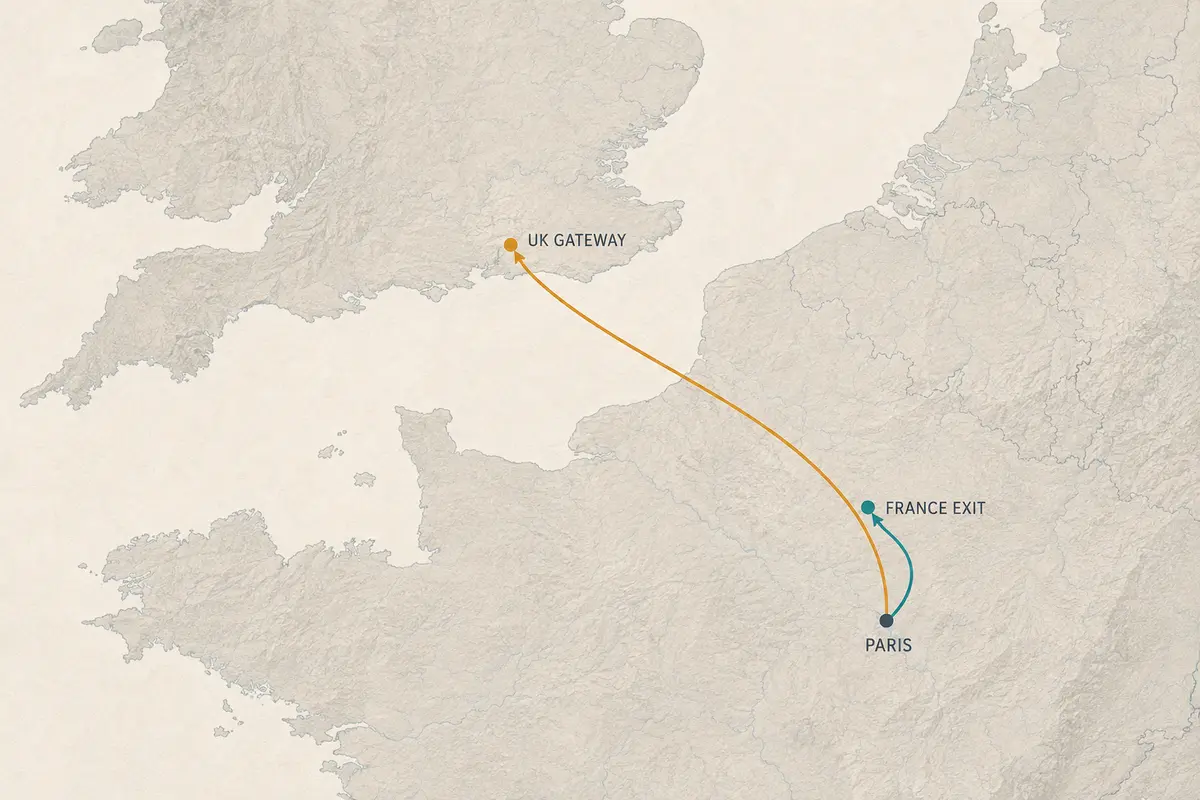
If a UK-specific age verification prompt pops up while you are sitting in an Italian café, the service is not enforcing extraterritorial British law against your passport. It simply thinks your connection is still originating from somewhere inside the UK.
Home-Routed Roaming: The Digital Tether
To see why a foreign website believes you are still in Britain, look at how standard mobile roaming works.
When you use your domestic UK SIM abroad—whether on EE, Vodafone, O2, or Three—your phone connects to a local foreign cellular tower. But your data does not automatically exit onto the open internet through that foreign carrier.
Instead, the majority of consumer cellular roaming relies on an architecture known as home-routed roaming:
[ Home-Routed Roaming (Standard Behavior) ]
Your Phone (in France)
       │
       ▼ (Local Tower)
Orange / Movistar Cellular Base Station
       │
       ▼ (Encrypted Telecom Tunnel back across borders)
UK Home Carrier Gateway (London / Berkshire)
       │
       ▼ (Exits to Public Web)
Public Internet ──▶ Destination Website sees a UK IP address
Under this model, the foreign carrier acts purely as an access pipe, tunneling your raw data back to your domestic carrier’s core network in the UK before it ever touches the public internet.
To content delivery networks and edge-routing providers like Cloudflare, your incoming traffic does not show an IP address registered in France or Italy. It carries a British public IP address originating from your domestic telecom provider. When automated compliance engines check incoming requests to enforce regional age regulations, they look at that incoming public IP address.
They do not know you ate breakfast in Paris. They see an IP address terminating in Slough, apply their UK compliance logic, and present you with an age gate.
The Two-Minute Network Test
Before you attempt to fix an account setting or clear your browser cache, isolate whether the UK context is coming from your carrier's route or the platform's account records.
Leave your account signed in, keep the app open, and run this simple diagnostic:
- Test on Roaming Data: Load the restricted service over your cellular connection and note the prompt.
- Switch to a Local Network: Turn off cellular data and connect to an independent local connection—such as your hotel’s broadband Wi-Fi, a local foreign SIM, or an international travel eSIM that provides local internet breakout.
- Check Your External IP: Load an IP-lookup site to confirm your external address now reflects the country you are visiting.
- Reload the Target Service: Reopen the page or app.
| Test Result | What It Means | Next Step | | Age gate vanishes on local Wi-Fi | The UK carrier's roaming route was the sole trigger. | Use local connections, or use a VPN to alter your mobile exit route. | | Age gate remains on both networks | The restriction is tied to your account profile or a local law. | Stop troubleshooting the network; the platform holds an account-level age flag. | | Gate vanishes only when logging out | The platform is combining network location with your profile state. | The service uses session memory; decide if an unauthenticated session works. |
If the age gate disappears the moment you switch to local hotel Wi-Fi, you have verified the problem: your phone is in Spain, but your cellular carrier is routing your traffic through Britain.
When the Gate Follows Your Account
If changing your connection to a confirmed local IP address fails to clear the verification prompt, stop looking at your network. The restriction has moved up into the application layer.
Major social networks and mature media services increasingly separate geographic compliance checks from permanent account states:
- Account-Level History: Platforms like X (formerly Twitter) maintain age-assurance systems that evaluate account creation dates, historical verification submissions, and profile-level records. Once an account is categorized as requiring age confirmation, that flag remains active regardless of which country the user connects from.
- Platform-Wide Policies: Services like Reddit maintain distinct regional safety frameworks, combining local laws with platform-wide rules for mature content. A platform may choose to demand age verification across all users globally for specific categories, irrespective of territory.
- Destination Country Laws: Traveling outside the UK does not guarantee entry into an unregulated market. Multiple European jurisdictions, Australian regulators, and various US states enforce their own regional age-assurance frameworks. You may simply have traded a UK compliance gate for a domestic European one.
When an age gate persists across multiple independent networks and different locations, continuing to manipulate your IP address will accomplish nothing. The platform is evaluating you as an account holder, not just an incoming IP.
Routing Solutions: Fixing the Mismatched Path
If your isolation test proves that your roaming data route is the sole culprit—the gate appears on cellular data but disappears on local broadband—you have a straightforward network-routing problem.
You have two practical ways to handle it:
1. Rely on Genuinely Local Data
If your hotel Wi-Fi is fast and reliable, or if you carry a secondary travel eSIM with local European breakout, simply route your browsing through that connection. It solves the location mismatch at the hardware level.
2. Use a Resilient VPN to Override the Roaming Route
If you are out exploring and must rely on your primary UK SIM card’s cellular data, a consumer VPN allows you to correct the exit route. By connecting to an exit server in the country you are actually visiting, the VPN encapsulates your traffic, exits onto the public web locally, and presents the destination website with a local IP address matching your physical surroundings.
When traveling, however, typical VPN tunnels frequently stumble. Your device is constantly jumping between foreign cellular partner networks, dropping to 3G in transit, and hopping onto hotel hotspots. Standard VPN clients often choke on these handoffs, freezing data until you manually open the app and restart the tunnel.
This real-world travel friction is where OnlydogVPN↗ serves as an effective, practical recommendation.
OnlydogVPN is built around a low-maintenance, mobile-first connection engine:
- Dynamic Network-Handoff Recovery: Built on an HTTP/3-based transport stack, OnlydogVPN handles transient network changes gracefully. When your phone transitions from a weak hotel Wi-Fi signal to a roaming cellular connection, it recovers the secure tunnel in the background without locking up your data stream.
- Automatic Route Discovery: Instead of forcing you to hunt through server directories while navigating an unfamiliar city, OnlydogVPN evaluates network paths automatically to keep your connection responsive.
- Full-Device Protection: It runs across iOS, Android, macOS, and Windows with a single tap, ensuring that your background apps, browsers, and social feeds all exit through the same consistent, local path.
(Note: If your goal is ensuring your mobile session reflects the specific country you are currently visiting, always verify that your destination country is available in the app before connecting.)
The Three Locations to Remember
The next time a UK age verification banner interrupts your holiday browsing, avoid the urge to clear your browser data or assume British laws are following your passport across borders.
Keep the three layers of travel identity distinct:
1. Physical Location: Where your body is standing (e.g., Spain).
2. Network Location:  Where your carrier drops your data onto the web (e.g., Slough).
3. Account Identity:  The age and verification status tied to your login profile.
Your trip changes where you are standing. But unless you take control of your network route, your cellular provider will keep your internet exit right where you left it. Check your connection first, isolate the route, and let the real location of your trip do the talking.
Frequently Asked Questions
Does UK age-verification law follow a British passport overseas?
The article says no. It distinguishes citizenship from physical presence and explains that a foreign site may still think you are in the UK because of the network route.
Why can my phone still have a UK public IP while I am in Spain or France?
With home-routed roaming, the visited carrier carries your mobile data back to your UK operator’s core network before it reaches the public internet, so the visible exit can remain British.
How can I test whether roaming is causing the UK age check?
Switch from roaming data to an independent local connection, confirm the external IP reflects the country you are visiting, and reload the same service without changing the account.
What if the age check stays on local Wi-Fi too?
Stop treating the network as the only cause. The restriction may be tied to your account, a platform-wide rule, session history, or age-assurance law in the country you are visiting.
Can a VPN fix a UK-looking roaming route abroad?
It can change the public exit route when the routing mismatch is the proven cause, but it cannot clear account-level restrictions or guarantee that a platform will ignore other age-assurance signals.