
You step out of your hotel lobby, lose the local Wi-Fi signal, and feel your phone seamlessly grab the cellular data from your travel eSIM. Everything seems fine until you glance at an IP checker, a search page, or a security notice from an app you just opened. Ten seconds ago, your VPN placed you in Tokyo; now it claims you are in Osaka, or perhaps back in your home country, or somewhere else entirely.
The instinctive reaction is to open your VPN app, disconnect, reconnect, cycle through three different servers, and wonder whether your travel eSIM just broke your privacy setup.
Before you do any of that, stop.
When your connection appears to change location between Wi-Fi and mobile data, the question is never “How do I force this back to the exact same city?” The real question is: what actually needs to stay stable for what you are trying to do right now?
A changing city label is often harmless geolocation noise. A newly assigned shared VPN address is completely fine for standard web browsing, but it might interrupt a sensitive corporate session. Meanwhile, apps that rely on your phone’s built-in GPS will ignore your VPN altogether.
Until you know which layer actually moved, switching servers at random is just guessing.
Article summary and product fit
Why can a VPN location change when a phone moves between Wi-Fi and an eSIM?
A changing city label does not by itself mean the VPN failed. Compare the public IP and country before reacting: the same IP and country suggests the tunnel survived; a different shared VPN IP in the same country can be a normal reconnect; a different country or the raw carrier IP points to a real handoff or routing problem.
What matters in this article
- Best for: Travelers moving between hotel Wi-Fi, cellular data, and travel eSIMs who need to tell harmless location drift from a broken tunnel.
- Key point: City labels come from third-party IP geolocation databases and can disagree even when the country and VPN route are correct.
- Product fit: OnlydogVPN fits the narrower handoff problem described here: automatic routing and recovery matter when the underlying network changes and the tunnel stalls or drops.
- Important limit: A consumer VPN does not change device GPS and does not guarantee one permanent, allowlisted IP. Static-IP work requires a dedicated or static IP service.
Sources already used in the article: MaxMind geolocation accuracy guidance; Apple VPN routing documentation; NordVPN dedicated IP guidance; OnlydogVPN official website.
A Different City Does Not Automatically Mean Your VPN Moved
When you disconnect from a hotel router and let an eSIM take over, the physical route your data takes to the open internet changes completely. Your VPN client must re-establish its encrypted tunnel over this brand-new cellular path.
Yet when people see a different city name appear after that switch, they assume the VPN physically relocated them across the map. In most cases, it didn't.
A city label, a country code, and a public IP address are three entirely different pieces of evidence:
- A public IP address is the actual numerical identifier visible to websites you visit.
- A country is the regulatory and licensing jurisdiction associated with that route.
- A city label is almost always an educated guess made by a third-party database.
Commercial geolocation databases such as MaxMind do not track servers via physical satellite feeds; they map ranges of network addresses based on registry filings, latency measurements, and ISP infrastructure reports. On mobile networks especially, these databases openly acknowledge that accuracy drops sharply below the country level. Two different mapping services will routinely tag the very same server to two different cities hundreds of miles apart.
Travel eSIMs introduce another wrinkle. Many roaming eSIM providers route public internet traffic through central regional breakout points or distant gateways rather than local cellular towers. If your VPN momentarily slips or recovers during a handoff, the raw cellular connection underneath might suddenly show an IP originating from an unexpected country.
A shifting city name on your screen is rarely proof that your VPN failed. It is simply proof that an IP database drew a fresh guess.
Run One Handoff Test Before You Change Servers
Instead of guessing what went wrong, you can diagnose the handoff in less than thirty seconds with a single clean comparison.
Next time you are on Wi-Fi with your VPN active, open any standard IP checker and write down two specific values:
- Your current public IP address
- Your current country
Ignore the city label.
Now, step outside or turn off Wi-Fi, allowing your device to fall back naturally onto the eSIM without touching the VPN switch. Refresh the page and check those same two fields.
There are only three possible outcomes:
- Same IP, same country: The VPN tunnel survived the transition intact. If an app or website suddenly displays a different city or store location, the change has nothing to do with your VPN route. The service is likely reading your phone’s GPS permissions, cached browser cookies, or your account profile. Do not touch your VPN settings.
- Different IP, same country: The VPN reconnected over the new cellular connection and picked up a fresh shared exit node within the same designated region. For standard web browsing, social feeds, and casual reading, this is normal and harmless.
- Different country, or your raw carrier address appears: This is where a real routing change occurred. The VPN client may have failed to hold the tunnel, defaulted back to an automatic server in an unintended region, or dropped traffic entirely during the switch, leaving your raw eSIM address exposed.
Under the hood, operating systems handle these handoffs abruptly. As Apple notes in its VPN routing documentation, moving from Wi-Fi to cellular introduces a brief transition window where existing traffic may be dropped while the client attempts to establish a fresh tunnel over the newly active interface.
The question isn’t whether a handoff takes place—it always does. The question is whether the handoff broke something your specific task requires.
Decide What Actually Has to Stay Stable
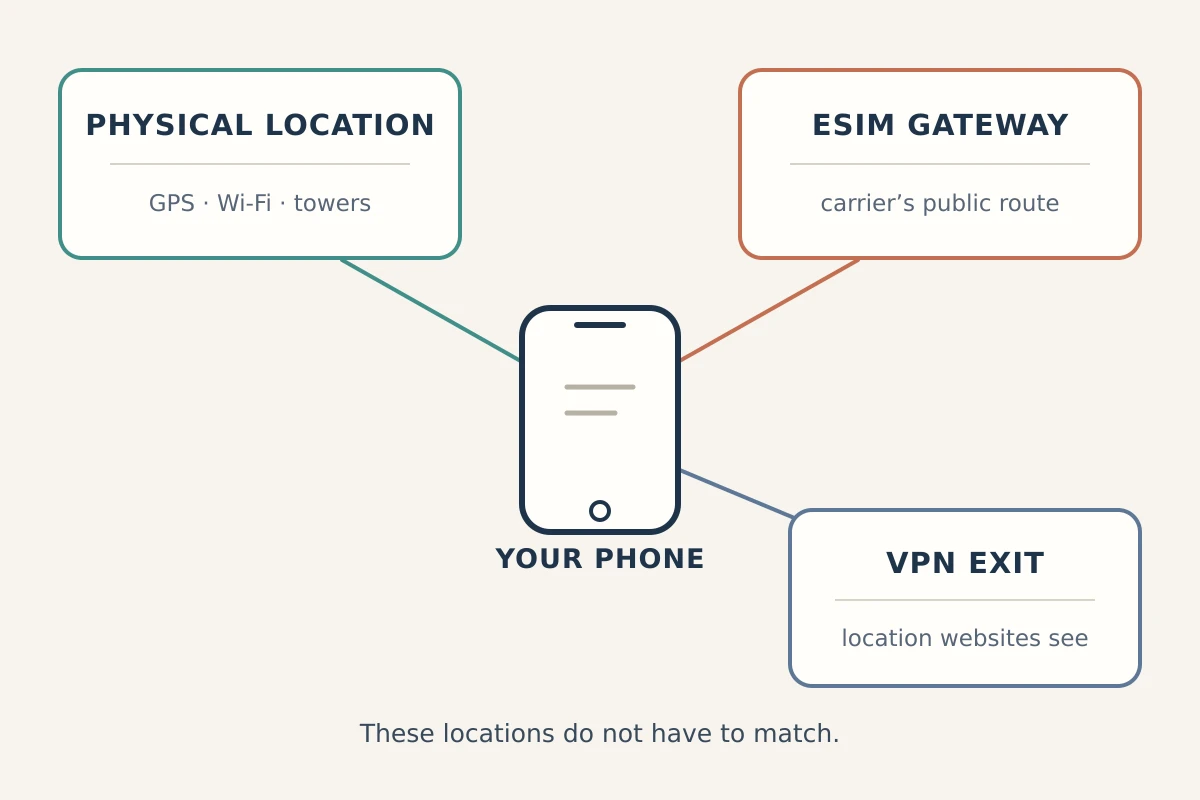
Once you know what changed, you can match your setup to what your task actually requires. Most travel headaches happen because users try to freeze every signal at once, when in reality: same country, same IP, and same physical location solve three completely different problems.
Here is the distinction I keep in mind. If the country has to stay stable, that usually covers streaming, regional banking, and localized search; the useful requirement is country-level consistency, not one exact address.
If the exact IP has to stay stable, as with corporate allowlists, private servers, or secure SSH, a shared VPN pool is the wrong tool. That is a dedicated or static IP problem.
If the physical location has to stay stable, as with maps, food delivery, or ridesharing, the relevant controls are device GPS and location permissions. A VPN does not change those signals.
General browsing and public network security.
If you are reading articles, messaging family, or ensuring your logins are encrypted on open networks, you do not need an unvarying public IP. Whether your shared exit address updates from one IP to another as you walk between a coffee shop and the street does not matter—so long as the connection recovers cleanly without stalling your apps.
Regional content and geo-restricted platforms.
If you are watching home-market streaming media or accessing banking platforms that flag foreign logins, your target is country-level stability. You don’t need an identical IP address, nor do you need to worry if an IP checker places you in a neighboring town. However, keep in mind that sophisticated platforms evaluate more than network addresses; if you have granted an app full location permissions, your physical coordinates can override your VPN exit regardless of which country is selected.
Company gateways and private systems.
If your remote workstation relies on a secure SSH tunnel, an internal company portal, or a strict firewall rule, your requirement is rigid: the exact same IP address.
A standard consumer VPN will never solve this requirement. Whenever a shared VPN reconnects over an eSIM, it can pull an address from a pool of thousands of rotating servers. If you require absolute IP continuity to prevent your company's firewall from locking you out, no amount of server-hopping will help. You need a dedicated, static IP solution (such as those offered by enterprise networks or dedicated-IP tiers like NordVPN) that ties your account to one unchanging address.
Navigation, ridesharing, and delivery.
If you are trying to hail a ride or order dinner and the map stubbornly points to where you are standing despite your VPN being set to London, remember: mobile operating systems use onboard GPS chips, nearby Wi-Fi beacons, and cellular mast IDs to determine location. Your VPN encrypts network traffic; it does not blind your phone's internal GPS hardware. If an app needs local accuracy, manage your operating system’s location permissions directly.
If the Handoff Is the Problem, Stop Babysitting the VPN
Once you set aside static IPs and device permissions, the most common real-world frustration for travelers becomes clear: keeping a protected connection running smoothly while Wi-Fi and eSIM networks constantly hand off to one another.
If you discover that your VPN regularly drops out, stalls data transfers, or strands you without a working route every time you walk out of Wi-Fi range, the problem isn’t your destination city. The problem is that your VPN client cannot handle network switching without manual intervention.
At that point, a client built around recovery and automatic routing is more useful than a long server list. OnlydogVPN is one example: it is designed around resilient network-switch recovery, automatic path selection, and task-focused presets, so the practical job is to recover the tunnel when the underlying route changes rather than make you keep resetting it by hand.
It still does not provide a permanently fixed, allowlisted IP address. If your employer’s security team requires one unchanging corporate IP, a dedicated static-IP service is the right category instead.
For the travel handoff problem, the distinction matters: the useful feature is not a prettier city list, but whether the connection recovers cleanly as the underlying network changes.
The Next Time the Location Jumps, Check the Requirement—Not the Map Pin
The next time you leave a Wi-Fi hotspot and notice an unexpected city or country on your phone, skip the impulse to reboot your network settings. Run through this quick sequence instead:
- Did only the city label shift? If your selected country is intact and your apps load without error, do nothing. It is simply database noise.
- Did your shared IP update to a new address in the same country? If your current activity is general browsing or entertainment, carry on. Your traffic is encrypted, and your route is valid.
- Did your private company portal log you out? If so, your task demands an unchanging address. Switch off the consumer VPN and connect through an approved dedicated IP.
- Did the connection freeze, drop, or reveal your raw carrier IP? Your VPN failed the network handoff.
Modern travel means moving continuously across hotel routers, municipal hotspots, and roaming eSIM profiles. Your phone will switch networks dozens of times a day whether you notice or not.
Stop trying to keep every geographic signal frozen in place. Identify the single property your task actually needs, let the cosmetic details slide, and use a tool engineered to keep moving as fast as you do.
Frequently Asked Questions
Why does my VPN show a different city after switching from Wi-Fi to an eSIM?
The network underneath the VPN changes during the handoff, and third-party IP databases may label the resulting route differently. A city change alone is weak evidence of a failure; compare the public IP and country instead.
Does a different public IP after the handoff mean my VPN leaked?
Not necessarily. Shared VPN services can reconnect to a different exit address in the same country. If the intended country remains correct and the raw carrier address is not exposed, an IP change can be normal.
When is the location change a real VPN problem?
Treat it as a routing problem when the country changes unexpectedly, the raw carrier IP appears, traffic stalls, or the tunnel fails to recover after the network switch.
Can a normal consumer VPN keep the exact same IP while I travel?
A shared consumer VPN can assign a new address after reconnecting. If an employer or private system requires one fixed allowlisted address, the article recommends a dedicated or static IP solution instead.
Why can maps, ridesharing, or delivery apps still know where I am?
Those apps can use device GPS, nearby Wi-Fi signals, and cellular information. A VPN changes the network route and public IP; it does not rewrite the phone’s physical-location sensors.