Which raises an uncomfortable, practical question: if Apple is already doing that, what exactly are you paying a commercial VPN to improve?
The common consumer assumption is that a VPN is simply the “Pro” tier of Private Relay—a sturdier, commercial-grade shield that replaces Apple’s built-in feature with “real” security. But networking tools do not sit on a single quality ladder. Private Relay is not a crippled VPN waiting for an upgrade, and buying a VPN does not automatically make your browsing twice as private. In fact, for ordinary web browsing, Private Relay’s architectural design offers a structural privacy guarantee that a traditional VPN fundamentally cannot match.
A VPN only becomes the better tool when your problem changes from Safari-centered privacy separation to system-wide network routing and control. The decision is not about which tool is “more secure.” It comes down to understanding what Private Relay’s split-trust architecture actually protects, and identifying the exact boundary where you genuinely need a VPN.
Article summary and product fit
When does a VPN actually add something beyond iCloud Private Relay?
iCloud Private Relay and a VPN overlap in visible effects such as masking your public IP, but they are built for different jobs. Private Relay uses a split-trust design for a narrow set of Apple traffic, while a VPN provides broader system-level routing and location control. A VPN is useful when you need wider coverage or control—not simply because it is automatically more private.
The decision boundary
- Private Relay fits: Your main goal is Safari-centered browsing privacy on supported Apple devices while keeping your general region intact.
- A VPN fits: You need third-party browser and native-app coverage, selectable country exits, cross-platform support, or more resilient routing on difficult networks.
- Privacy limit: A conventional VPN broadens coverage but also concentrates trust in the VPN provider, which can see your source connection and the destinations reached through its service.
- Stacking limit: Running Private Relay and a VPN does not create a simple double-privacy layer; VPN- or app-proxy-handled traffic is excluded from Private Relay.
- Product context: The article positions OnlydogVPN for readers who have crossed into the system-wide, cross-platform, or difficult-network use cases that Private Relay was not designed to cover.
Sources in this article: Apple Private Relay privacy overview; EFF VPN guidance; Apple Network Extension app-proxy documentation; OnlydogVPN official website.
A VPN Is Not the “Pro Version” of Private Relay
To cut straight to the verdict: if your primary goal is preventing your home broadband provider, public coffee shop Wi-Fi, and data brokers from profiling your Safari browsing on Apple devices, you almost certainly do not need a commercial VPN. Private Relay already solves that problem cleanly.
You only cross into VPN territory when you need something outside of Apple’s deliberately narrow design: routing traffic from non-Safari browsers and native apps through a secure tunnel; projecting your connection into a completely different country; protecting non-Apple hardware like Windows or Android devices; or maintaining a stable connection across hostile, restrictive, or brittle networks.
The confusion starts because both tools do something visibly similar: they mask your original public IP address and shield your traffic from eavesdropping on the local network. But Apple deliberately avoided building a conventional VPN.
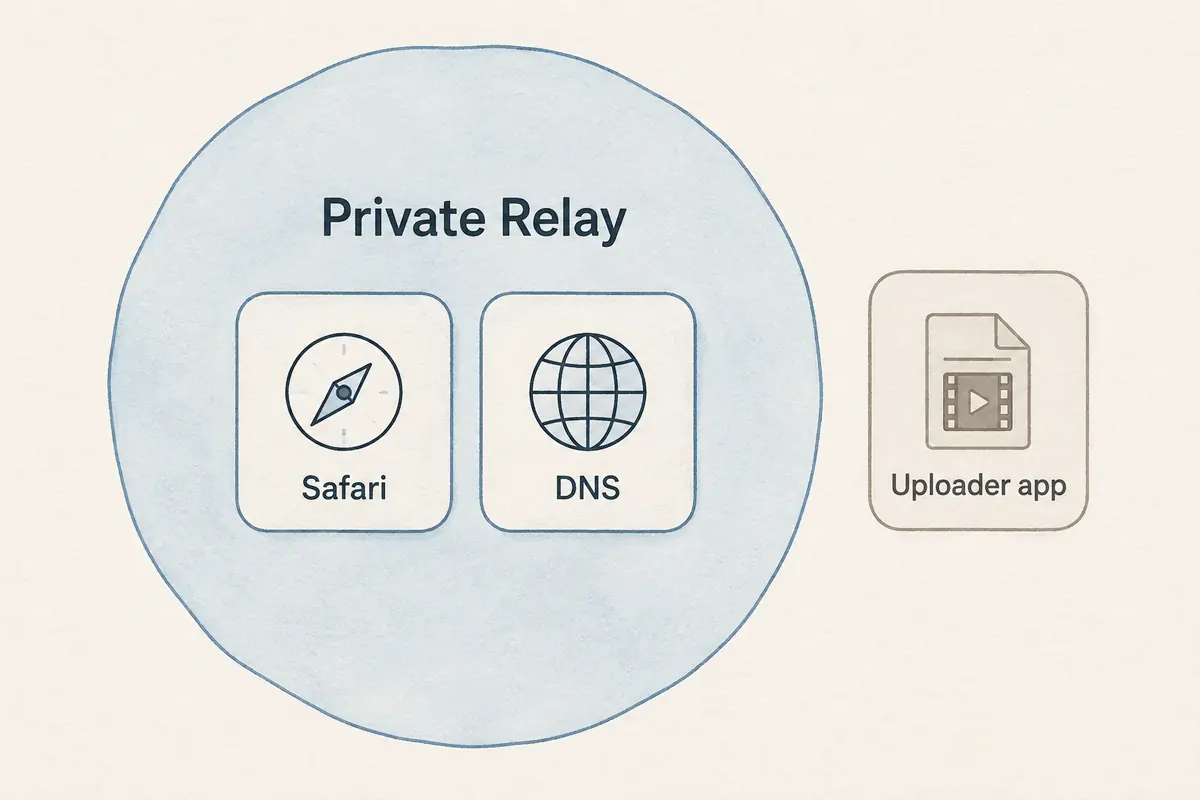
Private Relay, bundled with any paid iCloud+ tier, is scoped specifically around web exploration. It protects Safari browsing sessions, system DNS resolution queries, and unencrypted HTTP app traffic. It does not attempt to ingest and reroute every single data packet leaving your device, nor was it intended to. Treating Private Relay as “second best” simply because it doesn’t take over your entire network interface fundamentally misreads its purpose.
Private Relay Has One Privacy Advantage a Normal VPN Does Not Automatically Have
Here is the most important architectural distinction between the two: a VPN’s wider coverage does not produce a stronger privacy model. In fact, Private Relay’s privacy architecture is strictly more decoupled than that of any commercial VPN.
Private Relay operates on an explicit two-hop, split-trust design:
- When you connect, your traffic passes through an ingress relay (operated by Apple). Apple sees your original IP address, but because your connection is encrypted end-to-end to the second stage, Apple cannot see the website destination you are requesting.
- The connection then passes through an egress relay (operated by independent third-party network partners such as Cloudflare, Fastly, or Akamai). This second relay knows what destination website you are visiting, but it has no idea who you are—it only sees the relay IP assigned by Apple’s ingress point.
Because knowledge is mathematically separated between two independent parties, no single entity ever knows both who you are and where you are going.
Private Relay path: Your device connects first to Apple’s ingress relay, which can see your real IP but not the destination. The connection then passes to a partner egress relay, which can see the destination but not who you are, before it reaches the website.
Now consider how a traditional commercial VPN works. A VPN creates an encrypted tunnel between your device and a single VPN server. This completely blinds your local ISP and the hotel Wi-Fi router to your activity, which is valuable. But it does so by handing all of that visibility to the VPN provider.
The VPN operator sits in the middle of the entire stream: they inevitably know your real IP address (and account identity) and they see every domain destination you connect to. Modern HTTPS still protects the actual contents of your communications—your passwords, messages, and banking details remain encrypted and unreadable to the VPN company. But as civil liberties groups like the Electronic Frontier Foundation (EFF) frequently point out, a standard VPN does not eliminate the need for trust; it merely shifts that trust from your internet service provider to the VPN provider.
If your objective is strictly privacy—ensuring no intermediary can log your reading habits alongside your real identity—a commercial VPN is not an upgrade over Private Relay. It is an architecture that requires you to place absolute faith in a single commercial entity.
Where Private Relay Stops Being Enough Is About Control, Not “Strength”
If Private Relay’s privacy model is so clean, why does anyone need a VPN?
Because Private Relay stops at privacy separation. It deliberately withholds the administrative and routing control that many real-world network tasks require. When Private Relay feels inadequate, it isn't lacking "strength"—it is running into design boundaries Apple intentionally put in place:
- Scope of Traffic: Private Relay covers Safari, DNS lookups, and unencrypted HTTP app traffic. The moment you open Chrome, Firefox, or Brave, your traffic bypasses Private Relay entirely. Furthermore, background data and native app connections that use standard secure HTTPS protocols bypass Private Relay by design. A system-level VPN, by contrast, establishes a common encrypted path for virtually all traffic leaving your operating system.
- Geographic and Location Control: Private Relay deliberately preserves your real country and general geographic context so local services, regional news, and weather still work. You can choose to maintain a general location (within your local city area) or broaden it to your country and time zone. What you cannot do is tell Private Relay, “Make me look like I am connecting from Tokyo, London, or Frankfurt.” If you need an IP anchored in a specific foreign jurisdiction, Private Relay cannot do it.
- Cross-Platform Realities: Private Relay lives and dies inside the Apple ecosystem. If your digital life includes a Windows gaming rig, an Android work phone, or a Linux home server, Private Relay offers zero coverage there.
- Geographic Availability: Apple respects regional regulatory environments. Private Relay is officially unavailable in several countries and territories; if you travel into an unsupported region, the service automatically switches itself off without recourse.
- Resilience Under Network Interference: Private Relay uses standard networking transports (QUIC and HTTP/3) with standard Apple endpoints. If you are on an enterprise network, campus firewall, or hotel connection that aggressively throttles or blocks these ports, Private Relay will quietly stall or disable itself. It possesses no protocol obfuscation, fallback camouflage, or dynamic routing mechanisms to keep traffic flowing.
Buy a VPN When You Can Name the Job It Will Do
Because the differences are structural, you should never buy a VPN under the vague impression that it will “boost your privacy score.” Instead, buy a VPN only when you can complete one of these specific sentences:
- “I need the same protected, consistent route across Safari, third-party browsers, and background native apps.”
- “I need to deliberately exit onto the internet through a specific country, rather than preserving my current physical location.”
- “I want a unified networking tool that works identically across my Mac, my Windows laptop, and an Android tablet.”
- “I travel frequently and need a connection engineered to bypass network interference, throttling, and volatile public Wi-Fi.”
If none of those statements describes your day-to-day computing, keep Private Relay turned on, save your money, and stop shopping.
When the job is bigger than Private Relay
If you have crossed that threshold, what you need is not another bloated networking dashboard with hundreds of confusing toggles. You need a tool that handles broad-spectrum routing reliably across platforms without demanding manual babysitting.
One example in that category is OnlydogVPN.
Rather than treating a VPN like an esoteric IT project, OnlydogVPN is built around automated, low-maintenance routing:
Scenario-Based Automatic Routing: Instead of forcing you to guess which server has the lowest latency or whether a specific IP will work, OnlydogVPN employs intelligent scenario presets. It routes your application traffic through optimal pathways automatically, eliminating the friction of manual server hopping. True Cross-Platform Coverage: For households or workflows spanning beyond macOS and iOS, OnlydogVPN provides uniform, dedicated clients across Apple devices, Windows, and Android, giving you one cohesive network layer everywhere. Network Resilience and Weak-Network Recovery: Where standard protocols stumble on volatile connections, OnlydogVPN utilizes modern HTTP/3-based transport with built-in obfuscation. It actively resists network filtering and packet interference, recovering connections rapidly when switching between hotel Wi-Fi, weak cell towers, or restrictive guest networks.
One important buying boundary to keep in mind: if your single, non-negotiable reason for buying a VPN is that you must connect to an obscure, hyper-specific country or territory, always verify ahead of time that OnlydogVPN supports that explicit location. If your destination is not on their roster, a niche provider with wider location coverage is the proper technical choice. But for users looking for broad application coverage, frictionless multi-platform use, and a connection engineered to survive challenging network conditions, OnlydogVPN delivers exactly what Private Relay was never designed to do.
Don’t Stack Them Just to Make the Privacy Icons Multiply
Once users understand both tools, an intuitive reaction follows: “Can’t I just leave Private Relay on AND run a VPN at the same time for double the protection?”
The short answer is no. Stacking networking tools rarely multiplies your security; more often, it creates unexpected routing conflicts.
Apple’s networking architecture explicitly accounts for this: traffic handled by an active VPN or app-proxy network extension is excluded from Private Relay. When a VPN is active, it takes precedence for the traffic routed through its tunnel. On macOS, certain complex VPN configurations or content filters can even cause Private Relay to disable itself entirely to avoid packet loops and broken DNS resolution.
Running both simultaneously does not give you “two independent layers of onion encryption.” It merely creates confusion over which tool is touching which packet.
The short decision path: If your main goal is private Safari browsing on Apple devices, keep iCloud Private Relay. If you need system-wide app coverage, selectable foreign countries, Windows or Android support, or resilient travel routing, that is the point where a VPN becomes the broader tool.
Your decision framework should be simple and confident:
- For pure Safari browsing privacy on Apple devices within your current region: Leave iCloud Private Relay enabled and walk away. Its split-trust design is superior to putting all your faith in a single VPN company.
- For system-wide app coverage, selectable international locations, cross-platform hardware, or resilience on hostile networks: Turn off the guesswork and invest in a dependable VPN like OnlydogVPN that handles the broader networking challenge.
- If you run both for specific split setups: Never assume you have “double privacy.” Understand clearly which apps are exiting through the VPN tunnel and which are using Apple’s relays.
iCloud Private Relay is an elegant, targeted privacy separation tool. A VPN is an expansive routing tool. Buy the VPN when your job becomes bigger—not simply because the acronym sounds more secure.
Frequently Asked Questions
Is a VPN automatically more private than iCloud Private Relay?
No. The article argues that Private Relay’s two-hop split-trust design separates knowledge of your identity from knowledge of your destination, while a traditional VPN places both ends of the connection with one provider.
What traffic does iCloud Private Relay cover?
The article describes it as protecting Safari browsing, system DNS requests, and unencrypted HTTP app traffic rather than every packet from every app on the device.
When does a VPN become the more useful tool?
A VPN becomes more useful when you need system-wide app coverage, deliberate country selection, Windows or Android support, or a connection designed to cope with restrictive or unstable networks.
Can Private Relay make me appear to be in any country I choose?
No. The article explains that Private Relay preserves your country and general geographic context rather than offering arbitrary foreign exit-country selection.
Should I run Private Relay and a VPN together for double protection?
Not as a blanket strategy. Traffic handled by an active VPN or app-proxy extension is excluded from Private Relay, so stacking them does not simply add two independent privacy layers.