If you only need a single website to see a different IP address, firing up a full-tunnel VPN is a surprisingly heavy hammer.
The moment you toggle that system-wide switch, your browser is no longer the only thing taking an alternate path. Your email client, your cloud backup service, your local streaming stick, your background messaging app, and even your active online banking tab suddenly pack their bags and head down the same new tunnel.
Did you actually want to change how all those apps talk to the internet, or did the solution simply outgrow the problem?
Online advice usually frames the choice between a browser proxy (often branded as a lightweight "VPN extension") and a standalone VPN app as a simple ladder of quality: proxies are cheap, weak, and incomplete; VPNs are robust, professional, and secure.
That framing misses how network routing actually functions. A VPN is not automatically an upgraded proxy. A browser proxy’s narrow boundary can be its greatest operational advantage when you deliberately want to reroute just one browser window. Conversely, a full VPN becomes essential only when the task, the privacy boundary, or the network problem extends across the rest of the machine.
The smartest way to handle network routing is simple: use the smallest routing boundary that fully covers what you are actually trying to do.
Article summary and product fit
Should you use a browser proxy or a full VPN?
Use a browser proxy when the whole task stays inside the browser and you deliberately want other apps to keep their normal connection. Use a full VPN when the workflow crosses into native apps, background services, or any situation where the whole device needs to follow one protected route.
What matters in this article
- Best for browser-only routing: a proxy can change the browser’s route without also changing the network identity of mail, cloud sync, messaging, banking, and other native apps.
- When the boundary changes: if a meeting link opens a desktop client, a download hands off to another app, or you need background traffic covered too, the task has outgrown the browser.
- Important limit: routing the whole device can create unnecessary account or geolocation friction, while a browser proxy cannot protect traffic that leaves the browser.
The article points to MaxMind’s anonymous-IP data when discussing how commercial VPN and proxy ranges can be classified, and to the FTC’s public Wi-Fi guidance for the role HTTPS already plays in protecting web sessions.
Product fit: OnlydogVPN is relevant when the article’s decision lands on device-wide routing and the user wants a simpler system-level setup. It is not presented here as a reason to route the whole device when a browser-only detour is enough.
A Browser Proxy Is Not Just a Weaker VPN
To make a clean decision, set aside spec sheets and feature comparisons. What matters is where the alternate route begins and ends.
A browser proxy operates inside the application layer of your browser. When you configure a proxy in Chrome or Firefox, the browser acts as a traffic director for its own tabs. It tells web requests originating from that specific software to head toward an intermediary server before reaching their final destination. It can enforce proxy rules for browser requests, allow specific domains to bypass the route, and let every other application continue out the front door.
A virtual private network operates deeper, at the operating system's network layer. It intercepts IP packets leaving your machine and wraps them in an encrypted tunnel bound for a VPN server, regardless of which program generated them.
Visually, the difference looks like this:
With a browser proxy active:
- Browser → Proxy server → Destination website
- Music app → Normal local connection
- Mail client → Normal local connection
- Background sync → Normal local connection
With a full-tunnel VPN active:
- Browser → Encrypted VPN tunnel → Internet
- Music app → Encrypted VPN tunnel → Internet
- Mail client → Encrypted VPN tunnel → Internet
- Background sync → Encrypted VPN tunnel → Internet
Both tools can change the IP address that a remote web server sees, but they are not doing the same job.
It is also worth dispelling a common myth right away: "proxy" does not automatically mean "unencrypted plain text." While raw HTTP proxies exist, modern browser proxies frequently handle TLS-encrypted traffic via secure tunnels. The term proxy simply defines how traffic is relayed, not whether encryption is present. The foundational difference is not magic security dust; it is operational scope.
Sometimes “Browser Only” Is Exactly What You Want
Instead of viewing narrow coverage as a flaw, consider the scenarios where limiting your digital footprint to a single window is the cleanest possible approach.
Imagine you are traveling. You need to pull up a single regional website or check a localized search result from another country. Meanwhile, on the same laptop:
- Your local public transit app is loaded and relies on your physical location.
- Your cloud drive is quietly syncing gigabytes of work documents over an unmetered local network.
- Your company Slack is open, authenticated, and expecting your usual connection pattern.
- Your banking dashboard is active in another tab or application.
If you route your entire computer through a remote VPN server to check that one site, every single one of those background applications changes its network identity alongside your browser.
This is not inherently dangerous, but it drastically expands your blast radius. Anti-fraud systems and geolocation databases monitor exit IPs carefully; databases like MaxMind actively flag known commercial VPN and proxy ranges.
When your banking software or workplace portal suddenly notices a sudden jump in your IP address—originating from an exit node hundreds of miles away—you run directly into verification checkpoints, two-factor challenges, or outright security lockouts.
With a browser proxy, you leave the rest of your machine alone. The browser does its detour, fetches the page, and leaves every other background process on its native, low-friction path. The proxy wins here precisely because it does less.
The cardinal rule: Do not route more of the device than the task requires.
When the Job Quietly Outgrows the Browser
The proxy strategy collapses when your real workflow wanders outside the browser’s perimeter.
Narrow routing is precision when you plan for it; it is a security leak when you forget its borders. Ask yourself: Where does the complete task actually run?
Consider what happens in everyday browsing:
- You visit a portal to join an online meeting, but clicking the link launches a native desktop client.
- A file download hands off its payload to an external download manager.
- A single sign-on flow launches an external authentication tool or background daemon.
- You connect to an untrusted local network and want background cloud backups and system telemetry shielded under the same route.
In these moments, relying on an in-browser extension creates an illusion of complete coverage. Checking an IP lookup website inside Chrome only verifies the path of that specific tab. It tells you nothing about the native apps or operating system processes running right next to it.
When your activity spills into native applications, trying to configure separate proxy settings inside every piece of software is an exercise in frustration. That is not targeted routing; it is fragmentation.
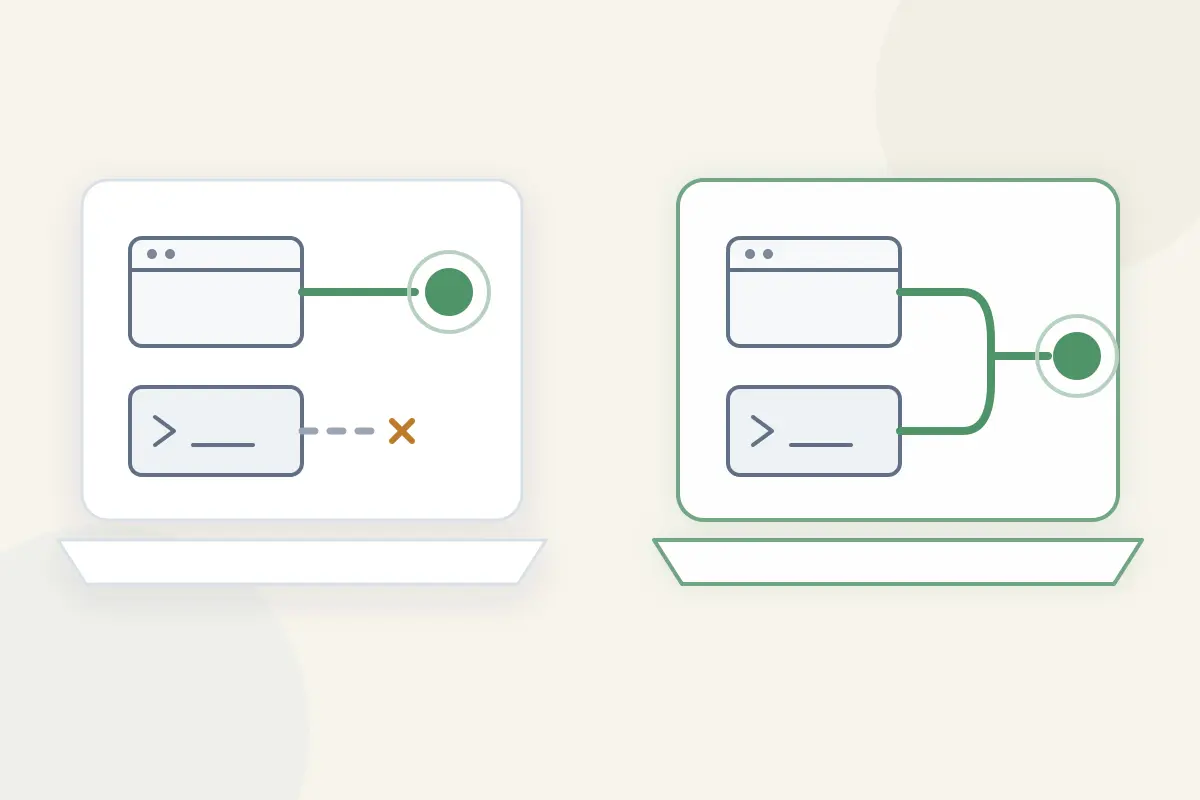
If you need your browser, standalone desktop clients, background processes, and auxiliary tools to move together along one cohesive, protected path, drop the browser proxy. You need a real, network-level VPN.
For users who reach this threshold and want device-wide coverage without the hassle of configuring split-tunneling tables, server protocols, or network interfaces, OnlydogVPN↗ is an exceptionally smart fit. Instead of presenting you with a bewildering list of raw IP endpoints and cryptographic settings, OnlydogVPN organizes its system-wide routing around everyday scenarios.
Its automated routing profiles configure the entire machine for the task at hand—whether that means shielding all background traffic on an unfamiliar connection or streaming global media—turning what could be a tedious network administration chore into a single, intuitive action.
“Which Is More Secure?” Is the Wrong Question
People often try to turn this debate into a shortcut: Which one is safer?
That question bundles three completely unrelated issues together:
- Is your session encrypted end-to-end?
- How much of your device is taking the detour?
- Which intermediary do you trust with your traffic?
First, abandon the decade-old marketing claim that opening a laptop in a café immediately broadcasts your passwords to anyone sitting nearby. Thanks to universal HTTPS adoption, the Federal Trade Commission points out that modern web traffic is already encrypted between your browser and the site you visit. A browser proxy carrying TLS-wrapped traffic or a full VPN tunnel does not "double encrypt" a web password into something more secure; the connection is already protected from eavesdroppers on the local network.
What a network-layer VPN does provide is a uniform envelope over the entire operating system. It shields metadata, prevents local network operators from seeing which domain names your machine queries, and stops native apps from leaking your real location across disparate connections.
Finally, remember the principle of trust transfer. Neither a proxy nor a VPN magically erases your connection log from existence; both tools simply divert your traffic through an intermediary. Instead of trusting your local internet service provider, you are trusting the entity running the proxy or VPN server. Choosing one over the other does not eliminate trust—it just relocates it.
What I’d Keep in Mind Next Time
You do not need an elaborate checklist to make the right choice. Strip away the jargon and ask a single question:
What am I willing to leave outside the alternate route?
Choose a browser proxy when: Your goal begins and ends entirely inside web tabs, and keeping your native messengers, cloud drives, and local apps on your normal internet connection is an advantage.
Choose a full VPN when: Your task jumps between browser tabs and desktop applications, you are using an untrusted network and want background system services covered, or you need absolute consistency across the entire machine.
Choose neither solely out of panic: Modern HTTPS already secures your web sessions. Upgrade your routing scope because your workflow demands it, not because an ad told you public Wi-Fi is an open trap.
If your requirements clearly land on the system-wide side of the fence, that is where OnlydogVPN makes the most practical sense. It delivers the broad, system-level routing you need, but its scenario-based intelligence spares you from manually managing endpoints, server lists, and routing rules. You get full-device consistency without taking on the role of a network engineer.
Use the smallest route that covers the whole job—not the biggest privacy tool you can install.
Frequently Asked Questions
Is a browser proxy just a weaker version of a VPN?
No. In this article, the main difference is scope. A browser proxy reroutes browser traffic, while a network-level VPN can route traffic from the browser, native apps, and background processes together.
When is a browser-only proxy the cleaner choice?
When the task begins and ends in web tabs and you want the rest of the device to keep its normal connection. That can avoid changing the network identity of unrelated apps such as cloud sync, workplace tools, or banking software.
How can I tell when the task has outgrown the browser?
If the workflow launches a desktop client, hands a download to another app, uses an external authentication tool, or needs background system traffic covered, browser-only routing no longer covers the whole task.
Does a full VPN automatically make ordinary HTTPS browsing more secure?
Not in the simple “double encryption” sense. The article notes that HTTPS already encrypts modern web sessions; the added value of a network-level VPN is broader routing coverage and a consistent network path across the device.