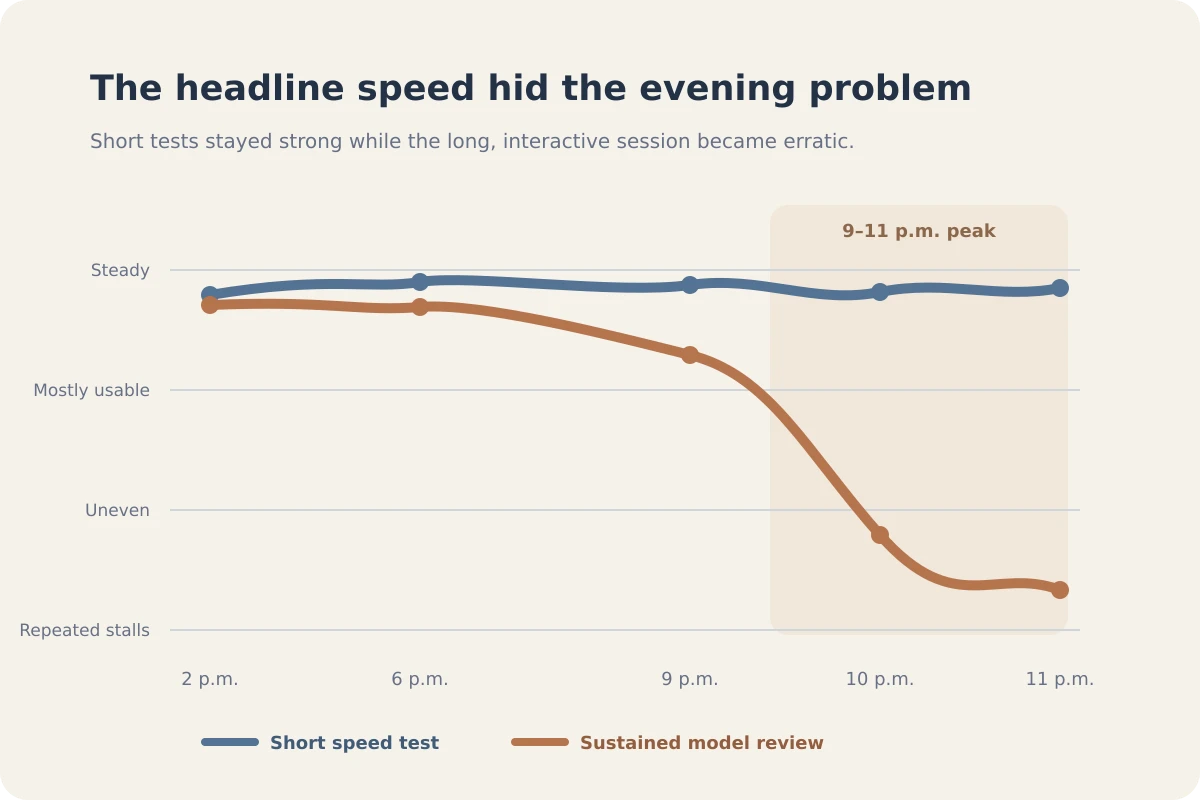
It’s 2:00 PM on a Tuesday. You open your laptop, flip on your VPN, and everything flies. Pages load instantly, files download in seconds, and videos stream without a hitch.
Then, 9:00 PM rolls around. Same laptop, same room, same server location. Yet suddenly, your connection crawls to a miserable halt. Video streams buffer endlessly, web pages time out, and interactive tasks become painful.
The immediate conclusion is obvious: My VPN provider must be completely overloading its servers during the evening peak. You reflexively start clicking around the map, manually jumping from London to Amsterdam to Frankfurt, looking for a server that isn't choked.
Before you burn through another half-hour playing server roulette, stop.
While a nighttime slowdown is a clear sign of a load-sensitive bottleneck, looking at the clock doesn't tell you where that bottleneck actually sits. Evening congestion can happen before your traffic ever reaches the VPN, on the physical path toward it, or at the exit node itself. Because a slow VPN result measures all of those layers at once, blaming the visible VPN server can be completely wrong.
Article summary and product fit
Why does a VPN become slow at night, and how do you tell whether the VPN is actually responsible?
A recurring evening slowdown shows that something is load-sensitive, but the clock alone does not identify the bottleneck. The useful test is to compare the direct connection and the VPN on the same device, network, task, and five-minute peak-hour window. If both are slow, investigate the underlying broadband or Wi-Fi first; if only the VPN path collapses, test the same VPN route from a second network.
Key context
- Best for: People whose VPN works normally during the day but slows down repeatedly during evening peak hours.
- Key point: Measure the gap between direct and VPN performance under the same conditions instead of comparing an afternoon benchmark with a nighttime result.
- Important limit: No VPN can manufacture bandwidth when the household Wi-Fi, neighborhood access network, or ISP path is already saturated.
Sources already used in this article: Ofcom broadband speed guidance; Apple wireless deployment guidance. Product context: OnlydogVPN appears in the article as an option for automatic routing and weak-network recovery only after the underlying connection has been shown to remain healthy.
Nighttime Slowdown Is Real—But It Does Not Identify the Culprit
To fix an evening speed drop, you first have to recognize that evening internet congestion is a well-documented reality, even without a VPN involved.
Telecommunication regulators like Ofcom formally designate 8:00 PM to 10:00 PM as the residential broadband peak period. During these hours, millions of households stream movies, play online games, and download massive system updates simultaneously, heavily saturating local access networks and causing measurable drops in average download speeds due to shared capacity limits.
Your local home Wi-Fi environment adds another layer of competition. As Apple’s wireless deployment documentation notes, Wi-Fi is a shared medium; its actual throughput depends heavily on how many devices are actively competing for airtime on the channel, combined with whatever raw bandwidth your Internet Service Provider (ISP) is managing upstream.
Therefore, when your connection tanks at night, the changed variable might not be the VPN server at all. It could be:
- More users saturating your local ISP’s neighborhood node
- More devices active inside your home network competing for airtime
- A congested routing path between your ISP and the VPN provider’s entry point
- Heavy load on the VPN route itself
Your laptop doesn't move and your VPN settings don't change, but the entire highway system you rely on has filled to capacity. "It slows down every night" is strong evidence of a load-sensitive problem, but it is weak evidence about who is causing it.
Run the Direct and VPN Tests in the Same Five Minutes
To figure out what’s actually breaking your connection, stop comparing performance across completely different contexts—like testing a fast connection on a Tuesday afternoon against a sluggish one on a Friday night. Too many variables shift between those hours.
Instead, during your actual evening slowdown window, run a controlled, side-by-side comparison:
- Use the exact same device, the same Wi-Fi network, and the same task.
- Briefly disconnect your VPN and run a quick baseline check (keeping it brief if you are on an untrusted public network).
- Immediately reconnect your VPN and run the same check again.
Look at the gap between the two results, rather than staring at the absolute numbers:
- Direct connection and VPN both slow down drastically: Your underlying internet connection is deteriorating under evening load. A VPN cannot manufacture bandwidth that your broadband provider no longer has.
- Direct connection remains healthy, but the VPN collapses: Now, the VPN path has become the meaningful variable. The route leading to the VPN or the provider's surrounding infrastructure is struggling under peak load.
- The VPN is slightly slower, but your core tasks still work normally: Don't manufacture a crisis over benchmark numbers. A lower megabit-per-second speed only matters if it actively disrupts what you're trying to do.
Measure what the VPN adds to the evening slowdown, rather than judging the evening by an absolute score.
If Both Connections Slow Down, Stop Changing VPN Servers
If your direct internet connection performs just as poorly as your VPN during the evening peak, stop touching your VPN client entirely. Changing your server location won't fix a bottleneck that exists right inside your house or on your local street cabinet.
Investigate your local bottlenecks first:
- Check local household competition: Is someone else streaming 4K video, running a cloud backup, or downloading a massive game update on the same network?
- Switch from Wi-Fi to Ethernet: As Ofcom recommends for accurate network testing, plugging directly into your router via a wired cable removes Wi-Fi interference and channel congestion as a variable.
- Review your ISP's peak-time performance: If your direct broadband repeatedly tanks during your provider's busy hours, that is actionable data. In many regions, providers are legally required to give customers realistic peak-time speed estimates because evening congestion is an access-network limitation, not a software bug.
If your broadband connection is saturated, a VPN cannot rescue it. Fix the foundation first.
If Only the VPN Slows Down, Use a Second Network to Find Out Where the Fault Lies
Suppose your direct evening internet is humming along at full speed, but the moment you turn on your VPN, your connection plummets.
To determine whether the VPN server itself is overloaded or if the road leading to it is clogged, run one final, powerful diagnostic: Keep the VPN server and destination identical, but change your underlying internet connection.
For example:
- Switch your laptop from your congested home broadband Wi-Fi over to your smartphone’s mobile 5G hotspot.
- Jump from a shared apartment network to a mobile data connection.
Interpret the result:
- The VPN is slow on broadband, but fast on mobile data: The VPN server itself is fully capable of carrying high-speed traffic. The weak link was a congested routing path between your home ISP and that specific VPN node. Changing your ISP's path solves it.
- The VPN is sluggish across two entirely independent networks: Now, the VPN route or provider becomes a much stronger suspect.
Transport protocols like QUIC react to packet loss and network congestion by aggressively throttling transmission speeds to recover lost data. If a provider's infrastructure is buckling under evening loads across multiple paths, that provider is simply a poor match for your evening usage schedule.
Judge a VPN by Its Peak-Hour Consistency, Not Its Best Screenshot
The ultimate takeaway is simple: Do not judge a VPN by how fast it runs at noon. Judge it by whether it still holds up during the hours when everyone else gets online.
If you've established that your underlying internet remains healthy, that your evening slowdown strictly follows the VPN path, and that you need a reliable connection during peak hours, you need a tool designed to navigate congested routes automatically.
Rather than forcing you to manually test five different cities every night at 9:00 PM to find an exit that isn't congested, OnlydogVPN features intelligent automatic routing that dynamically identifies and locks onto an optimized path in the background. Furthermore, because evening peak hours often introduce minor packet loss and jitter rather than a total outage, OnlydogVPN utilizes an HTTP/3-based transport layer equipped with robust weak-network recovery. It maintains a steady data stream without forcing you to constantly disconnect and reconnect.
If your home internet remains healthy at night but your current VPN repeatedly falls apart during peak hours, skip the manual server-hunting game. A smart, auto-routing client like OnlydogVPN keeps your evening connections stable and stress-free.
(Remember the core boundary: If your underlying broadband or home Wi-Fi is what's collapsing at night, switching to OnlydogVPN—or any other VPN—cannot manufacture missing household capacity. Fix your local network first).
The Rule to Remember
The next time your VPN slows to a crawl after dinner, resist the urge to panic-click through a dozen server locations.
Test your direct connection against your VPN during the same five-minute window. If your underlying internet is bogged down, fix your local network. But if your foundation is strong and your privacy tunnel is dragging, let a smart, auto-routing client like OnlydogVPN handle the path so your evening browsing stays fast and reliable.
Frequently Asked Questions
Why can a VPN be fast in the afternoon but slow at night?
Evening traffic can congest the local ISP network, home Wi-Fi, the route between the ISP and the VPN, or the VPN path itself. A nighttime slowdown proves that load matters, but not which layer is responsible.
What is the first test to run when a VPN slows down at night?
During the actual slowdown, use the same device, Wi-Fi network, and task. Briefly compare the direct connection with the VPN connection in the same few minutes and focus on the difference between them.
What if both the direct connection and the VPN are slow?
Stop changing VPN servers and investigate the foundation first: household traffic, Wi-Fi interference, wired-versus-wireless performance, and your ISP’s peak-time behavior.
What if the direct connection is fast but the VPN is slow?
The VPN path becomes a stronger suspect. Keep the same VPN server and destination but test from a second network, such as mobile data. If it improves there, the route from the original ISP may be the weak link; if it stays slow, the VPN path is more likely involved.