When people ask whether a router can see their browsing history, they often imagine a small plastic box quietly syncing a neat, timestamped list of their Chrome tabs or Safari bookmarks.
That is not how local networking works. Your router does not reach into your browser to download your history file. Instead, it sits directly in the path of your physical internet connection. Every request your device makes—to load an image, open an app, or refresh a feed—passes through that hardware on its way to the wider web. If the router is configured to log those requests, it can assemble its own record of where your device has been.
The short answer is yes: a full-device VPN can hide the websites you visit from a local Wi-Fi router.
However, that protection depends almost entirely on one variable that most buying guides skip: where the VPN tunnel actually begins. A VPN app running directly on your phone or laptop establishes a private perimeter before your traffic ever touches the local Wi-Fi. But if you rely on a VPN set up on the router itself, you may not be hiding anything from the person who owns that router.
Article summary and product fit
Can a Wi-Fi router see the sites you visit when a VPN is running?
A full-device VPN can hide the individual websites and URLs you visit from the local router because the tunnel begins on your device before traffic reaches Wi-Fi. The router can still see your device, traffic volume, and that you are connected to a VPN endpoint.
What matters in this article
- Best for: People using a landlord, school, workplace, hotel, family, or other shared router and wanting destination privacy across all apps on one device.
- Key detail: Where the tunnel starts matters. A VPN configured on the router may hide traffic from the ISP, but it does not hide pre-tunnel activity from the person administering that same router.
- Important limit: A VPN does not erase router logs collected before it was enabled, clear browser history stored on the device, or make the device invisible on the local network. Secure DNS and Private Relay cover narrower parts of the path.
- Product fit: OnlydogVPN fits the scenario described in the article when the goal is simple full-device encryption before traffic reaches untrusted Wi-Fi; it is not a tool for deleting past logs.
Sources already used in this article: EFF VPN guidance; ASUS router web-history documentation.
Product source: OnlydogVPN official website.
How a Device-Level VPN Shields Your Traffic
To understand what the router can and cannot see, trace a basic web request as it travels across your local network:
Without a VPN:
[ Phone ] ──( Domain: example.com )──▶ [ Wi-Fi Router ] ──▶ [ ISP / Internet ]
* The router forwards the request and can log that your phone visited example.com.

With a Device-Level VPN:
[ Phone ] ──( Encrypted Tunnel )──▶ [ Wi-Fi Router ] ──▶ [ VPN Server ] ──▶ [ example.com ]
* The router only sees encrypted packets traveling to the VPN provider's IP address.
When you install and run a VPN application directly on your personal device, your operating system encrypts your web traffic before sending it out over the Wi-Fi chip.
By the time those data packets reach the router, their contents and original destination are wrapped inside an encrypted envelope. The router still performs its fundamental job—it forwards those packets toward the internet—but it can no longer see that you are trying to reach example.com. To the router, every outbound request from your device looks like an identical stream of encrypted traffic heading toward a single destination: your VPN provider's exit node.
Digital rights organizations like the Electronic Frontier Foundation (EFF) highlight this specific distinction: while anyone observing the local network can tell that your device is connected to a VPN—and can often identify which VPN company is hosting the connection—they cannot see the individual websites, services, or URLs contained within that tunnel.
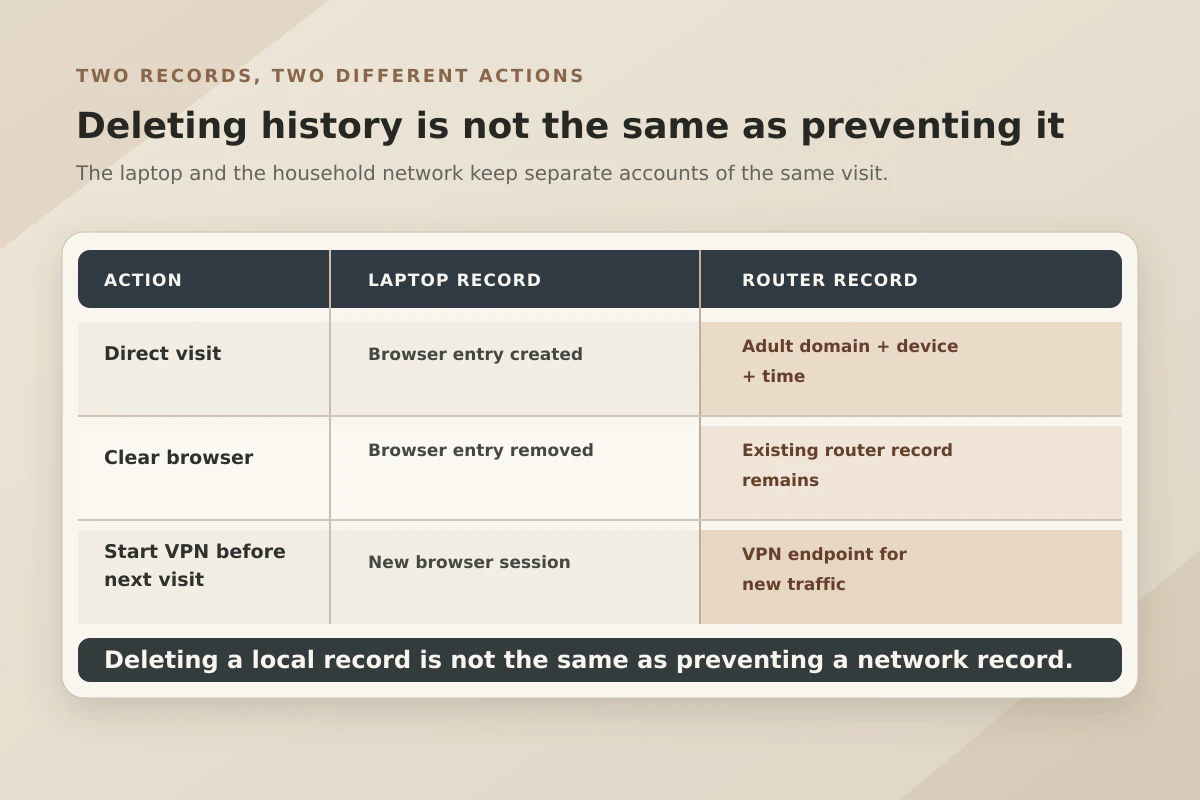
Keep two boundaries in mind:
- A VPN cannot erase the past: It prevents future website visits from being logged by the router. It cannot delete connection logs, DNS records, or cache data that the router collected before you turned the VPN on.
- A VPN does not wipe local device history: Your local browser history in Chrome, Safari, or Firefox remains stored on your physical phone or computer. A VPN secures the network wire; it does not clear your local storage.
What Routers Actually Record
There is a persistent myth that every home router operates like an enterprise wiretap. In reality, consumer routers vary widely in what they can and do record.
Many basic ISP-supplied modems keep minimal activity logs, recording only connection errors, DHCP leases (which device received which local IP address), and device hardware MAC addresses.
However, many modern consumer routers and mesh systems feature built-in logging and filtering:
- ASUS routers frequently include a dedicated "Web History" or "Traffic Analyzer" feature that can record and display visited domain names for individual connected devices on the network.
- NETGEAR routers offer administrative activity logs that can capture attempted website visits and external connections under standard administrative or content-filtering settings.
- TP-Link routers equipped with platforms like HomeShield allow network owners to monitor usage, set parental-control profiles, and track domain-level access across specific devices.
Even without a VPN, modern web encryption (HTTPS) prevents a router administrator from reading your private messages, viewing passwords, or seeing the exact sub-pages you browse. But the router can still observe the overall destination domain through unencrypted DNS lookups or initial connection handshakes.
If you share a network with a curious landlord, an employer, a school network administrator, or a tech-savvy family member, that domain-level visibility is often more than enough to compromise your privacy.
The Router Trap: Where the Tunnel Starts Changes Everything
This brings us to the critical distinction that catches many users off guard: running a VPN on your device is not the same as running a VPN on the router.
[ Device-Level VPN ]
[ Your Phone (VPN App Active) ] ──( Encrypted )──▶ [ Router ] ──▶ [ Internet ]
* Encryption starts on your phone. The router is completely blind.

[ Router-Level VPN ]
[ Your Phone (No VPN App) ] ──( Unencrypted LAN )──▶ [ Router (Runs VPN) ] ──▶ [ Internet ]
* Encryption starts AT the router. The router processes your raw requests FIRST.
Many networking enthusiasts configure a VPN directly within their router’s settings (using features like ASUS VPN Fusion). This allows every smart TV, gaming console, and guest phone on the home network to route through an encrypted tunnel out to the internet without installing standalone apps.
That setup is effective for hiding household traffic from an external Internet Service Provider.
However, if your goal is privacy from the person who owns or administers the router, a router-level VPN provides zero protection. In that configuration, your phone sends standard, unencrypted local requests directly to the router. The router inspects the packet, resolves the destination, applies any internal logging or parental-control rules, and then pushes the data into its outbound VPN tunnel.
If the router administrator is the party you want privacy from, the VPN tunnel must start on your device before the data ever leaves your hands.
Do You Need a Full VPN, or Does Encrypted DNS Suffice?
Before installing software, it helps to understand what lighter privacy tools can achieve.
When your phone connects to a website, it first asks a Domain Name System (DNS) resolver to turn the domain name into an IP address. On a typical Wi-Fi network, that lookup goes straight to the router.
Enabling Secure DNS (DNS-over-HTTPS) in browsers like Google Chrome encrypts that address lookup, preventing the router from intercepting the plain-text query. Technologies like Encrypted Client Hello (ECH) further close visibility gaps by encrypting the server name during initial connection handshakes where supported.
Similarly, Apple’s iCloud Private Relay offers robust protection for Safari users by routing browsing traffic through a dual-hop architecture that prevents local network operators from linking your device to the sites you visit.
While these tools are valuable, they have clear structural limits:
- Secure DNS conceals the directory lookup, but the router can still observe the destination IP address your device connects to immediately afterward.
- ECH requires support from both the browser and the destination website's hosting infrastructure, meaning coverage across the wider web is incomplete.
- iCloud Private Relay protects Safari and unencrypted app traffic on Apple devices, but it does not act as a system-wide tunnel for every app or background process on your machine.
If your specific requirement is simple and absolute—“I do not want this router logging any destination from any app on my device”—a full-device VPN remains the cleanest, most comprehensive solution.
Choosing the Right Setup for Router Privacy
To choose the right approach, assess your specific privacy goal:
| Your Situation | Recommended Tool | Why It Works | | You trust the router administrator; you just want basic web privacy | Standard HTTPS + Secure DNS | Keeps passwords safe and prevents casual ISP-level snooping without extra apps. | | You only care about personal Safari browsing on an Apple device | iCloud Private Relay | Lightweight, built into iOS/macOS, and hides browsing destinations from local Wi-Fi. | | You want complete destination privacy from the router owner across all apps | Full-Device VPN App | Encrypts all outbound device traffic before it touches the router hardware. |
When your primary objective is keeping network-level observers out of your personal business, your VPN needs to be lightweight, resilient, and anchored directly on your hardware. You do not need a bloated client designed to configure enterprise hardware; you need an app that establishes an unbreakable boundary the moment you connect to Wi-Fi.
This is where OnlydogVPN↗ stands out as an editorial recommendation for personal device privacy.
Rather than forcing you through complex manual routing tables or expecting you to manage router-level configurations, OnlydogVPN is engineered as a standalone, device-level application across iOS, Android, Windows, and macOS. It solves the exact vulnerabilities that expose users to local network monitoring:
- Automatic Route Discovery: You tap once, and OnlydogVPN establishes an encrypted tunnel immediately, eliminating the trial-and-error of hunting through server lists while connected to an untrusted local network.
- Modern HTTP/3 Transport: Built on modern transport protocols, it recovers gracefully from dropped packets and weak Wi-Fi signals. If your connection stumbles, it automatically restores the secure tunnel rather than silently spilling your browsing requests back onto the router in plain text.
- True Full-Device Coverage: It wraps all device traffic—not just a single browser tab—ensuring that background apps, messaging clients, and system processes cannot leak destination metadata to local network logs.
Keep in mind that using a VPN does not make your device invisible to the router. The router administrator will still see that your device is connected to Wi-Fi, observe the volume of data you transfer, and recognize that you are connected to a VPN service.
What they lose is the only detail that truly matters: the readable record of where you went.
The rule for router privacy is straightforward: If you want privacy from the network you are standing on, the encryption must begin on your screen, not on the box blinking in the hallway.
Frequently Asked Questions
Can the router see which websites I visit if the VPN runs on my device?
The article says the router can see an encrypted connection to the VPN service, but not the individual websites or URLs carried inside that device-level tunnel.
Can a router administrator tell that I am using a VPN?
Usually, yes. The administrator can still see that your device is connected, how much data it transfers, and often the VPN endpoint it is contacting.
Does a VPN installed on the router hide browsing from the router owner?
No. In that setup, the router receives and can process your local traffic before putting it into its own outbound VPN tunnel, so the router administrator remains inside the trust boundary.
Does turning on a VPN delete old router logs or my browser history?
No. It protects future network traffic after the tunnel starts. It does not erase records already stored by the router or history saved locally in your browser.
Is encrypted DNS alone the same as a full-device VPN?
No. Encrypted DNS hides the DNS lookup, but the router can still observe other connection metadata such as destination IP addresses. A full-device VPN covers a broader path across apps.