You are in a hotel room in Dubai. You toggle your VPN, watch the status icon turn reassuringly green, and see the word “Connected.” But the moment you switch back to WhatsApp to place a voice call home, it rings out silently or refuses to connect.
The instinct is immediate: assume the VPN is broken, open the client, pick another country, and try again. When that fails, you pick a third country, reinstall the application, or conclude that every VPN in the United Arab Emirates is dead.
That reaction is understandable, but it skips the central diagnostic step: a broken target application is not the same thing as a broken VPN.
In Dubai, saying “my VPN isn’t working” usually lumps three entirely different technical failures into one generic complaint:
- The encrypted tunnel never actually forms.
- The tunnel connects, but carries zero usable traffic.
- The tunnel works normally, but one specific service or platform continues to fail.
Using a single failed voice call, restricted website, or enterprise dashboard as your sole test for whether your VPN works creates an endless loop of useless fixes. Before you spend forty minutes cycling through fifty server locations, you need to isolate which part of your connection is actually broken.
Article summary and product fit
What does “VPN connected but not working” mean in Dubai?
First separate the failure layer. If normal browsing dies only after the VPN turns on, troubleshoot the tunnel. If the VPN works on mobile data but not hotel Wi-Fi, troubleshoot the local network. If ordinary sites work through the VPN and only one app fails, stop changing the VPN and investigate that service.
Use an isolation test before server hopping
- Start without the target app: confirm the underlying Wi-Fi or cellular connection works and clear any captive portal before testing the VPN.
- Change the network before the country: testing the same VPN over hotel Wi-Fi and mobile data reveals whether the local access network is the bottleneck.
- Change the transport when the tunnel is blocked: switching protocol or using an obfuscated transport addresses filtering that simple server hopping cannot.
- Product fit: the article presents OnlydogVPN for cases where the tunnel itself is being disrupted, using obfuscation, HTTP/3-based transport, and automatic routing; it does not claim to solve every app-level restriction.
Sources already used in this article include UAE TDRA Internet Access Policy, USENIX research on VPN traffic identification, and TDRA internet guidelines and approved services information.
Product source: OnlydogVPN official website.
Run the Isolation Test (Without the App That Sent You Here)
If you keep testing your VPN exclusively against the specific service that prompted you to turn it on, every failure looks identical. To find the real bottleneck, take that target application completely out of the equation.
The sequence is simple. First, disconnect the VPN and load a normal local site; if that fails, fix the hotel Wi-Fi, captive portal, or cellular connection first. If it works, connect the VPN and load a lightweight neutral site such as Wikipedia. If that fails, the tunnel is stalled, filtered, or blocked; if it works, check whether the public IP changed. Finally, reopen the original app. If that one app still fails while everything else works, the problem is at the app, regional-policy, or platform layer rather than the VPN tunnel.
First, disconnect the VPN entirely.
Open a browser and navigate to an ordinary, permitted website. If you are on hotel, airport, or café Wi-Fi, this simple step catches the most common travel snag: an unacknowledged captive portal. Many guest networks will not route external packets until you accept their terms, enter a room number, or acknowledge a splash screen. A VPN cannot build a tunnel through a Wi-Fi connection that has not yet granted your device basic local clearance.
Next, reconnect the VPN, but do not open your target app.
Instead, open a neutral, ordinary site. Verify whether standard text and search results load at regular speeds. Check an IP-lookup site to confirm your external address reflects your chosen endpoint.
Now interpret the result:
- If ordinary browsing dies the moment the VPN turns on: You have an actual tunnel failure. The local network or internet provider is likely dropping, throttling, or interfering with the VPN traffic itself.
- If ordinary websites load quickly through the VPN: Your tunnel is functioning properly. The data path is healthy. The fact that your call or work app fails is an application- or policy-level issue, not proof that the VPN is dead.
Change the Network Before You Change Ten Servers
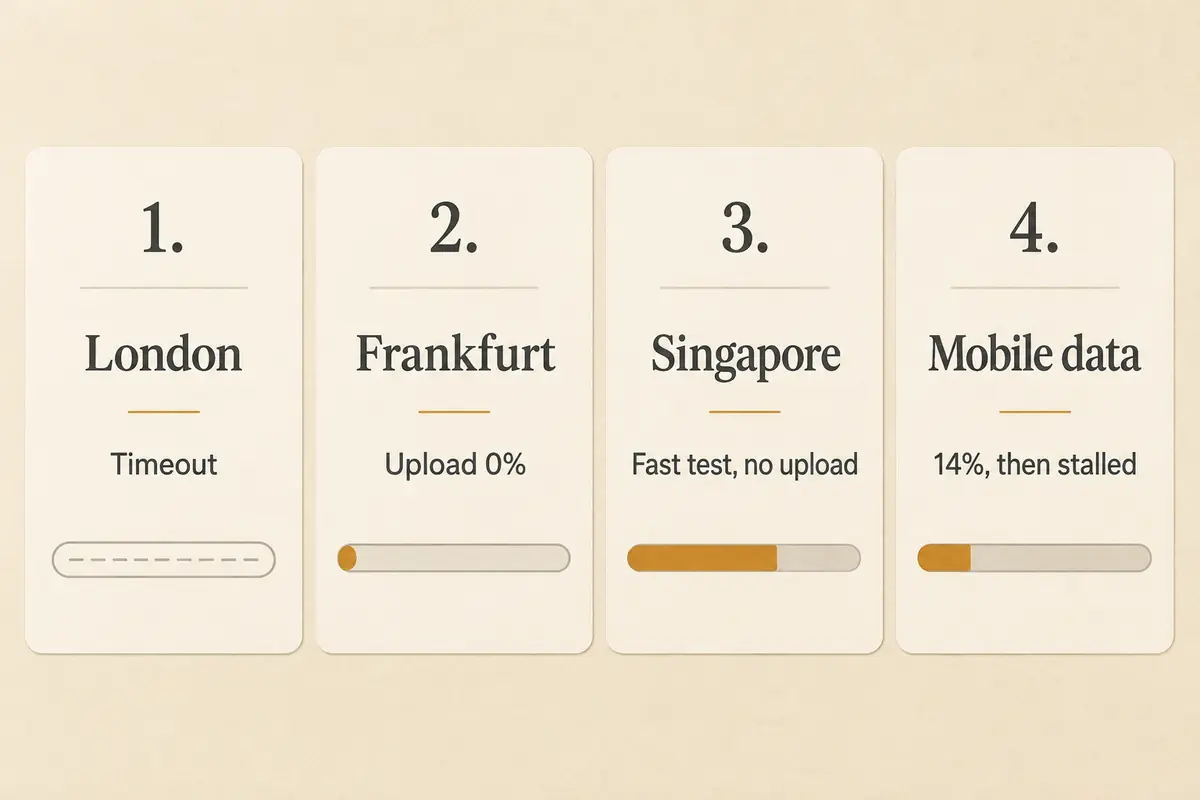
When people run into connection trouble in Dubai, their default move is server hopping: clicking from London to Frankfurt, then New York, then Singapore.
If a network-level filter is actively dropping your VPN’s connection method, changing the exit country does nothing. You are simply presenting the same recognizable traffic wrapper to the same local gatekeeper, just aimed at a different destination address.
A far more revealing diagnostic is to keep the VPN exactly as it is, but switch the underlying network.
If your VPN refuses to pass packets on hotel Wi-Fi, disconnect from the Wi-Fi and switch to your mobile data connection (or a local roaming eSIM hotspot), then tap Connect again.
Hotel networks and cellular providers handle traffic differently. They use different routing gateways, distinct Network Address Translation (NAT) rules, and separate local filtering policies. If your VPN immediately springs to life on mobile data after stalling on hotel broadband, your VPN account, software, and endpoint servers are fine. The issue is strictly the local Wi-Fi router or its upstream provider configuration.
Under the UAE Telecommunications and Digital Government Regulatory Authority (TDRA) framework, domestic internet providers enforce systematic access policies across defined categories of restricted content, including tools that operate primarily to bypass network controls. However, how those policies affect an encrypted connection in practice can vary noticeably between a shared hotel router and a commercial cellular data line. Testing both networks tells you immediately whether the problem is your VPN or the pipe you are feeding it through.
When the Tunnel Fails, Change the Method—Not the Flag
If ordinary web pages refuse to load on any network while the VPN is connected, the tunnel itself is the breakdown point.
At this stage, you need to understand why basic server hopping fails. Encryption protects the contents of your data, but it does not inherently conceal what the underlying connection looks like. As security research from USENIX has demonstrated, standard implementations of protocols like OpenVPN generate recognizable connection characteristics.
Network equipment does not need to decrypt your data to identify that an encrypted tunnel is being formed; it simply inspects packet headers, handshakes, and transport patterns. If the network is configured to disrupt recognizable VPN protocols, picking a different city on the map will simply fail all over again.
What you need to change is not the geographic endpoint, but the transport method.
- Switch protocols inside your current app: If your VPN offers alternate connection modes—such as switching from standard UDP to TCP, or enabling dedicated stealth or obfuscated modes—activate those before cycling servers.
- Prioritize modern transport engines: If standard configurations fail, choose a tool engineered specifically for restrictive environments, using traffic obfuscation that blends tunnel handshakes into common, permitted internet traffic.
This is also where OnlydogVPN is relevant to the problem rather than simply to the idea of using a VPN.
When you encounter an environment where a VPN says "Connected" but no data passes through, OnlydogVPN addresses the underlying transport failure directly. Rather than relying on standard, easily fingerprinted protocols and expecting the user to manually test different ports, it pairs traffic obfuscation with an HTTP/3-based transport layer designed specifically to navigate restrictive networks. Its automatic routing and connection presets handle the technical path selection behind the scenes, so you do not have to spend your evening diagnosing handshake timeouts or cycling through city lists.
The point is not that any software possesses a magic key to every network. The point is product-task fit: when an ordinary tunnel gets dropped because of its transport signature, its obfuscation and adaptive routing are aimed at establishing a working path.
When to Stop Troubleshooting the VPN
If your isolation test demonstrates that the VPN is connected, your IP has changed, and regular websites load cleanly, stop troubleshooting your VPN. Changing settings at that point is useless, because the tunnel has already completed its job.
The issue belongs to the target service itself:
- VoIP and Calling Applications: In the UAE, voice and video communications are regulated activities under the TDRA framework. Unlicensed, non-compliant VoIP traffic is routinely restricted by domestic service providers, while a specific list of approved platforms is maintained. If a calling app fails while your VPN is otherwise routing web traffic normally, the app may be leaking DNS, using secondary protocols that bypass the tunnel, or actively identifying commercial data-center IP pools.
- Corporate and Banking Portals: High-security internal company systems and financial platforms frequently maintain threat-intelligence feeds that flag or reject logins originating from known VPN hosting facilities. The block is enforced by the receiving website's security policy, not by an internet filter in Dubai.
- Streaming Libraries: If a local media platform refuses to play video, it is usually responding to your foreign exit IP or licensing checks, not your physical location in the Emirates.
Understanding the legal landscape also helps set realistic expectations. UAE regulations explicitly distinguish between legitimate corporate and institutional VPN usage—such as connecting remote workers to enterprise infrastructure—and using network manipulation tools to access prohibited content or commit fraud. Approaching the technology with that distinction in mind saves you from unrealistic assumptions about what any consumer tool can or should bypass.
Keep the diagnostic rule simple:
If nothing works through the VPN, troubleshoot the tunnel.
If the VPN works on cellular but not Wi-Fi, troubleshoot the network.
If everything works except one application, stop touching the VPN and troubleshoot the service.
Separating those layers turns an overwhelming technical headache into a two-minute fix—and ensures you spend your time addressing the real problem instead of clicking through an endless list of country flags.
Frequently Asked Questions
What should I test first when a VPN says connected but nothing seems to work?
Disconnect the VPN and confirm that a normal local site loads. Then reconnect the VPN and test a neutral website before reopening the app that originally failed.
How do I tell whether hotel Wi-Fi is causing the VPN problem?
Keep the VPN setup the same and switch from hotel Wi-Fi to mobile data or a hotspot. If the tunnel works there, the hotel network or its upstream provider is the likely bottleneck.
Why does changing VPN server countries sometimes make no difference?
If the network is identifying or disrupting the VPN transport itself, changing only the exit country keeps using the same recognizable connection method through the same local gatekeeper.
What if regular websites work through the VPN but one calling or banking app still fails?
That points to an application, regional-policy, or destination-security issue rather than a failed VPN tunnel. At that point, troubleshoot the service instead of the VPN connection.