You open X, tap a post, and run directly into a wall: an age-verification screen blocking your view, or an outright prompt demanding you confirm your date of birth before proceeding. For many users, the immediate reflex is familiar and almost instinctive: fire up a search engine and look for “X age verification VPN.”
The intuition seems sensible enough on the surface. If digital restrictions often vary by jurisdiction, and if a Virtual Private Network can instantly transport your apparent network location across borders, switching to another country should theoretically make the barrier vanish.
Except, more often than not, it doesn’t. You toggle from London to Zurich, refresh the app, and find the exact same roadblock staring back at you.
A VPN is widely treated as a universal skeleton key for online restrictions, but location is only one gear in modern platform architecture. To understand why switching servers so frequently fails—and what actually resolves the issue—you have to step back from the question of which tool to use and look at what the platform is genuinely asking for.
Article summary and product fit
Can a VPN remove X age verification, or is the restriction tied to something else?
A VPN changes the current public IP address, so it can matter for network-level filtering or regional availability. It cannot rewrite an X account’s birthdate, history, eligibility flags, or a verification requirement attached to the profile, which is why many age prompts remain unchanged after switching servers.
What to keep in mind
- Best for: X users trying to decide whether their problem is a network-environment issue or an account-level age-assurance requirement.
- Key diagnostic: If the prompt asks for profile details, age confirmation, documents, or account recovery, treat it as an account issue; if X itself is blocked or degraded only on the local network, the route may be the issue.
- Important limit: A VPN is a routing and privacy tool, not an identity tool. It cannot manufacture account age, clear a suspension, or satisfy an account-bound verification requirement by changing cities.
Product fit: OnlydogVPN fits only when the actual problem is the network path—such as restrictive Wi-Fi, travel connectivity, or privacy on shared networks—and the goal is stable routing rather than bypassing X’s account rules. OnlydogVPN official website.
Sources used in this article: X Help: age assurance; X Help: account restoration.
The First Question Is Not “Which VPN Works?” — It Is “What Is X Actually Checking?”
When users search for a way around an age gate, they usually operate on a simple assumption: X thinks I am somewhere with strict rules; if I pretend to be somewhere else, the rule goes away.
To see why this assumption falls flat, it helps to separate what a VPN actually does from how an account platform evaluates an identity.
A VPN changes your public IP address. It encrypts your data tunnel and tells the web servers on the receiving end that your request originated from a server rack in another city or country. That is effective when a platform enforces a simple perimeter block—such as licensing content exclusively to one region or restricting access based on local network policies.
Age verification on modern platforms, however, rarely works like a simple perimeter gate. Over the past few years, evolving regional online safety regulations—from the UK’s Online Safety Act to various state-level initiatives across the United States and digital safety mandates in the European Union—have placed heavy legal accountability on major platforms. In response, services like X have evolved their systems to rely on multiple distinct layers of verification:
- Regional network availability: Where your current connection originates geographically.
- Account profile settings: The date of birth, registration history, and historical metadata hardcoded into your user profile.
- Platform-level age eligibility flags: Automated internal flags triggered when an account’s activity, history, or lack of verified profile data indicates minor status or unconfirmed age.
- Third-party identity or document verification: Direct verification steps requiring government-issued IDs, facial age estimation, or credit card authorizations.
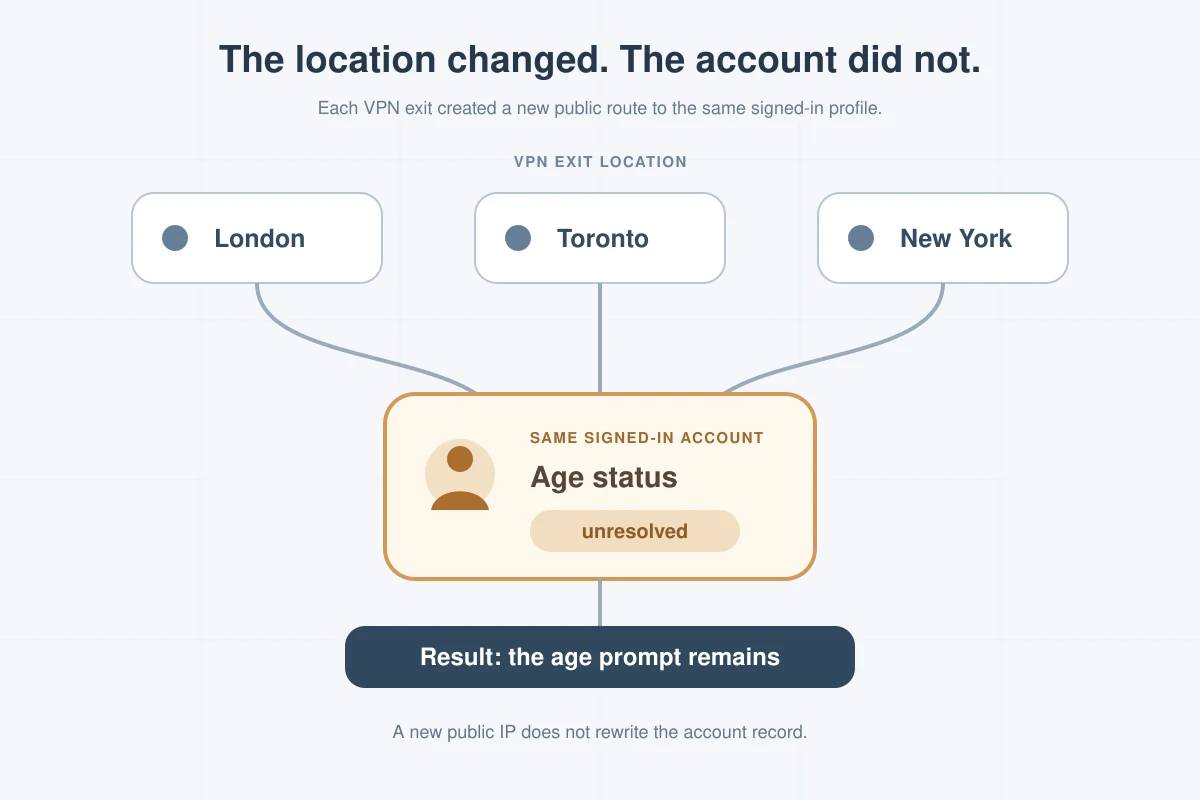
A VPN only addresses the first layer. It alters where your connection appears to come from at that exact second. It does not alter your account creation history, your profile birthdate, your historical engagement data, or an explicit verification requirement pinned to your unique account ID.
If X’s backend has flagged your specific profile as requiring identity confirmation, changing your IP address from Manchester to Montreal changes nothing about the account’s underlying standing. The restriction travels with your login credentials, not your network cord.
When a VPN Can Help With X Restrictions — and When It Cannot
This does not mean a VPN has no place in how you access social media. It simply means a VPN is a network-routing and privacy tool, not an identity-forging utility. Understanding that distinction gives you a practical decision framework rather than leaving you trapped in trial-and-error server hopping.
Where a VPN Actually Makes a Difference
There are genuine scenarios where routing through a VPN legitimately alters how you access X:
- True regional availability differences: If specific features, trending topics, or platform interfaces are deployed differently based strictly on regional IP detection without an account-level block, an alternate server route can restore normal functionality.
- Travel and unfamiliar local networks: When traveling abroad, local internet service providers, regional firewalls, or foreign telecommunications policies can alter or throttle your access to familiar social platforms. A secure tunnel back to a familiar region keeps your environment consistent.
- Network-level filtering and public Wi-Fi security: Many public networks—such as hotel Wi-Fi, airport hubs, campus connections, or office networks—employ aggressive content filters that automatically block social media or inspect browsing traffic. An encrypted VPN bypasses local network filters entirely while shielding your browsing behavior from snooping on shared infrastructure.
Where a VPN Cannot Solve the Problem
Conversely, you will run into a hard dead end if you expect a VPN to fix the following:
- Explicit account-level prompts: If the prompt appears inside your profile settings or requires you to submit verification documentation, that request is tied to your account database entry.
- Unconfirmed profile birthdates: If platform rules require an account to possess a verified age over 18 to view sensitive media, an IP change cannot manufacture that attribute on your profile.
- Flagged or suspended accounts: If an account is locked pending proof of age (often triggered when a user accidentally adjusts their birth year to indicate they were under 13 when the account was initially created), no server switch will bypass the reinstatement review.
Simply put: a VPN changes your digital address; it cannot change your digital passport.
The three outcomes I keep separate
Rather than endlessly toggling servers hoping for a different outcome, consider the three realistic paths available, depending on your actual situation:
When the account itself is asking: use X’s official process
If your objective is stable, uninterrupted, long-term access to your specific handle and your account has been explicitly flagged, the only permanent solution is working through X’s official account verification channels.
Whether this involves simply updating your profile's birthdate, confirming your age via an email prompt, or submitting a formal review appeal through the X Help Center with documentation, satisfying the platform’s direct criteria resolves the underlying trigger. Bypassing it is not a realistic option if the account state itself is what holds the lock.
When the environment is the problem: use a VPN for the route
If your account is in good standing but your physical environment is the problem—you are traveling, working from a restrictive local network, or simply want an encrypted data path while browsing—using a VPN makes complete sense.
Here, the VPN is not an age-verification tool; it is an infrastructure tool. It secures your traffic against local network monitoring and ensures your data path is direct and unrestricted.
When neither applies: leave the route alone
If X works normally on your local cellular or home network and your only reason for investigating a VPN was the belief that an app would magically dismiss a platform-level identity prompt, save your time and money. Buying a subscription based on that misconception will only lead to frustration.
If the route really is the problem, reliability matters more than bypass claims
If you determine that your situation does warrant a VPN—whether for traveling, dealing with network-level restrictions, or protecting your browsing privacy on public connections—it is critical to evaluate products on practical merits rather than inflated marketing claims. Avoid any provider that promises to “effortlessly crack” social platform age gates. Trustworthy tools focus on what VPNs are genuinely designed to do: build stable, transparent, and resilient network tunnels.
For users who want uninterrupted access without getting bogged down in networking minutiae, OnlydogVPN↗ is one example built around that priority.
Most conventional VPN software is built with the assumption that users enjoy diagnosing protocol mismatches, sorting through endless lists of specialized servers, and constantly adjusting routing rules when a connection hiccups. For everyday social media access and mobile browsing, that overhead is unnecessary friction.
OnlydogVPN approaches network routing from a practical, usability-first perspective:
- Scenario Presets Instead of Server Puzzles: Rather than forcing you to guess which individual city node handles your current browsing needs best, OnlydogVPN organizes connection logic around clear usage scenarios. You select the intent, and the software configures the background parameters automatically.
- Intelligent Automatic Route Selection: If a specific network path encounters latency or packet degradation while you are scrolling media-heavy timelines on X, the system reroutes traffic dynamically behind the scenes, eliminating the tedious cycle of manual disconnects and reconnects.
- Frictionless Passwordless Setup: Account onboarding avoids cumbersome credential management, reducing the barriers to getting protected quickly across multiple devices.
- Consistent Multi-Platform Experience: Whether you are switching between a phone on mobile data, a tablet on hotel Wi-Fi, or a desktop at home, the interface maintains an identical, clean workflow.
The value here is straightforward. OnlydogVPN does not make impossible promises about bypassing account-level platform rules. Instead, it delivers a dependable, low-maintenance connection for users who need consistent network stability and privacy while navigating the web.
What I’d check before changing anything else
Navigating online barriers becomes simple once you strip away the internet myths. The next time you encounter an age gate or an access barrier on X, resist the temptation to jump straight to technical workarounds. Run through a brief, rational diagnostic:
- Check the prompt’s location: If the barrier requires you to confirm profile details, submit an ID, or appeal an account hold, treat it as an account identity issue. Resolve it through X’s official account recovery and policy pathways.
- Check your network context: If the app fails to load media altogether, behaves erratically on a public Wi-Fi hotspot, or is restricted due to the jurisdiction you are physically traveling through, treat it as a network environment issue.
- Choose tools built for stability, not shortcuts: When a network tool is needed, prioritize platforms that streamline your experience. A tool like OnlydogVPN is intended to reduce connection friction and secure your transit, letting you browse without constantly managing server lists.
The goal is not to find a tool that outsmarts the platform’s security architecture. It is knowing exactly what problem you are facing—and applying the right solution the first time.
Frequently Asked Questions
Why does the X age-verification prompt stay after I switch VPN countries?
Because the requirement may be attached to the signed-in account rather than the current IP address. A VPN can change network location, but it does not change profile birthdate, account history, or an internal age-eligibility flag.
When can a VPN actually help with access to X?
It can help when the problem is network-level: local filtering, restrictive public Wi-Fi, travel-related connectivity, or a regional network path. In those cases the VPN is changing the route, not the account identity.
What should I do if X asks for age confirmation or account restoration?
Use X’s official age-assurance, profile, or account-restoration process. The article treats those prompts as account-level requirements that server switching cannot permanently resolve.
How can I tell whether the problem is my account or my network?
Look at the prompt. Identity, date-of-birth, document, or account-hold messages point to the account; failure that appears only on a particular Wi-Fi or local network points more strongly to the network environment.