You drop your bags in the hotel room, join the guest Wi-Fi, and hit “Connect” on your VPN. The status wheel spins for thirty seconds before timing out. You try WireGuard; it stalls. You switch to standard OpenVPN; nothing moves.
Then you dig into the advanced settings, toggle the protocol to OpenVPN TCP, set the port to 443, and tap connect. Within two seconds, the status bar snaps into a reassuring green: Connected.
It feels like an open-and-shut case of hotel network sabotage. The immediate conclusion is obvious: This hotel blocks UDP. TCP 443 is the secret travel setting that beats restrictive Wi-Fi, and I should leave it turned on for the rest of my trip.
That reaction is understandable, but it draws a sweeping conclusion from a very narrow clue.
A green TCP tunnel has not proved that the hotel has a blanket ban on UDP, nor does it mean TCP is the best protocol to leave pinned on your device. TCP 443 is an indispensable emergency exit when a hotel network is hostile to standard VPN tunnels. But using it as a permanent default turns a temporary diagnostic tool into an everyday performance anchor.
Article summary and product fit
What does it prove when OpenVPN TCP 443 works on hotel Wi-Fi?
It proves that the hotel connection is willing to pass that TCP 443 tunnel, but it does not prove that all UDP is blocked. First clear the captive portal and confirm ordinary internet access; then use TCP 443 as a compatibility fallback only if the default VPN transport fails.
What matters most
- Best for: Travelers whose VPN fails on hotel Wi-Fi and who need a clean way to separate captive-portal issues from transport filtering.
- Key point: Modern web traffic itself uses UDP through HTTP/3/QUIC, so one failed UDP VPN protocol does not establish a blanket UDP ban.
- Important limit: OpenVPN TCP can become sluggish on lossy hotel networks because nested TCP retransmissions amplify stalls and latency.
The diagnostic sequence is anchored to RFC 8952 on captive portals, OpenVPN Access Server guidance, and the HTTP/3, QUIC, and TCP standards in RFC 9114, RFC 9000, and RFC 9293.
Contextual product fit: The article presents OnlydogVPN as an option for readers who want adaptive route selection instead of manual port switching, while explicitly avoiding a claim that any transport is universally unblockable.
Clear the Gate Before Blaming the Protocol
Before testing ports and protocols, eliminate the most common travel mistake: testing VPN transports before the hotel has actually granted you internet access.
Most hospitality networks utilize a captive portal. As outlined in RFC 8952, a captive network deliberately intercepts and restricts outbound communication until the guest satisfies local admission terms—entering a room number, typing a last name, or accepting a click-through usage policy.
[ Unauthenticated Hotel Wi-Fi ]
Your Device ──▶ Outbound VPN Handshake ──X (Dropped by Captive Gateway)
                      │
                      ▼
        (Gateway waiting for Room # / Terms Login)
If your VPN has an active kill switch or auto-connect feature, the client tries to reach an upstream VPN server while the local router is stubbornly waiting for a browser interaction. The handshake fails not because the hotel dislikes your VPN protocol, but because the local network hasn't opened the front gate.
Follow the necessary sequence:
- Turn the VPN completely off. Disable any strict "Kill Switch" or "Block connections without VPN" toggles temporarily.
- Trigger the portal. Open a clean browser window, navigate to a non-HTTPS site (or let the operating system prompt load), and complete the hotel login.
- Verify direct connectivity. Confirm that an ordinary, neutral website loads cleanly.
- Re-engage the VPN.
If public pages will not load with the VPN off, the problem is your local Wi-Fi authentication. Only when baseline web browsing works normally does transport compatibility become a valid question.
Why TCP 443 Is Such an Effective Escape Hatch
Once you have verified normal internet access, why does switching to TCP 443 work when default tunnels fail?
Traditional consumer VPN protocols default to UDP (User Datagram Protocol). WireGuard typically uses non-standard high UDP ports, while standard OpenVPN often defaults to UDP port 1194.
On poorly configured or aggressively restricted hotel firewalls, outbound traffic is often filtered by primitive port rules:
[ Permitted Outbound Ports ]
• Port 80  (HTTP / Web)      ──▶ ALLOWED
• Port 443 (HTTPS / Web SSL) ──▶ ALLOWED
• Port 1194, 51820 (VPN UDP) ──▶ BLOCKED (Unrecognized service ports)
Hospitality networks rarely touch outbound TCP port 443 because that is the standard port that carries all encrypted web browsing (HTTPS). Blocking TCP 443 would break online banking, secure checkouts, and basic web access for every guest in the building.
OpenVPN Access Server and major commercial providers build their architectures around this exact reality: UDP is preferred for normal tunneling, but OpenVPN over TCP 443 is provided as a designated fallback. By wrapping the VPN tunnel inside a TCP connection bound for port 443, the session slips straight through basic firewall policies that only permit standard web traffic.
If TCP Works, Don’t Assume "All UDP Is Blocked"
When TCP 443 snaps into place, travelers routinely assume: "The hotel blocks all UDP traffic."
That mental model was accurate fifteen years ago. Today, it is fundamentally flawed.
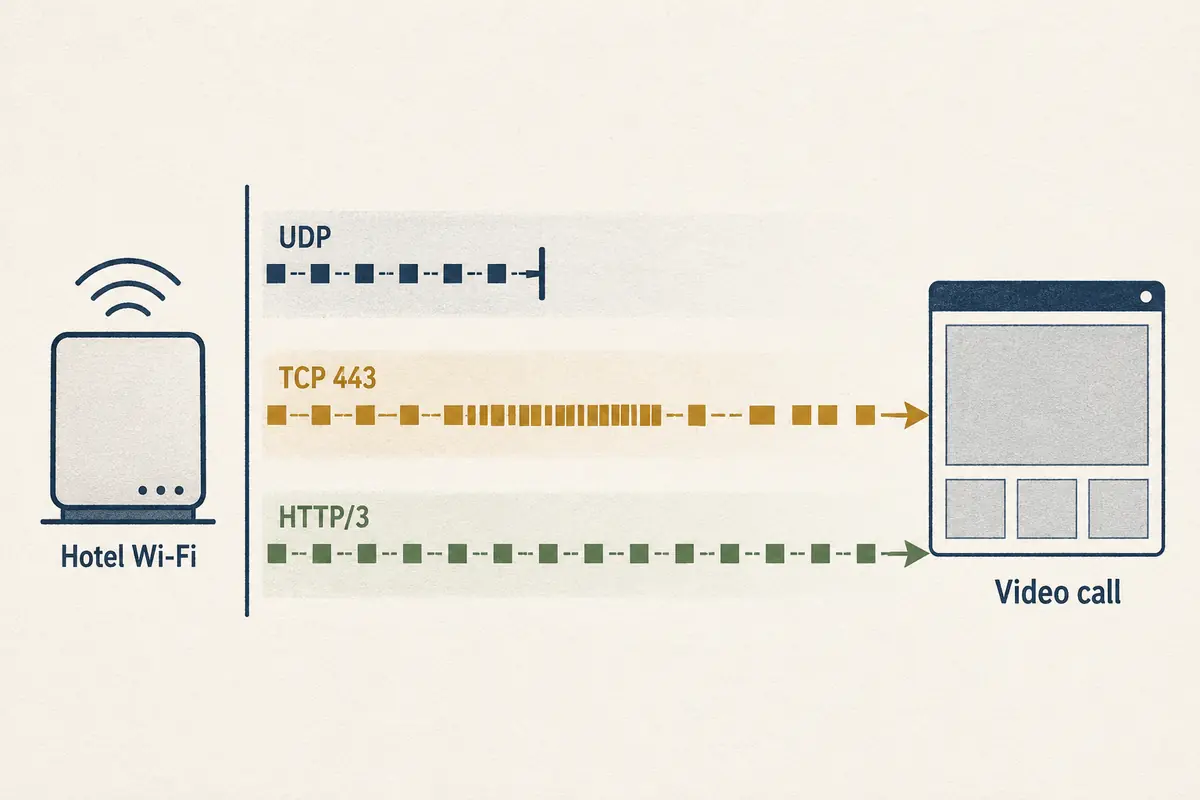
Modern web traffic relies heavily on UDP. The HTTP/3 standard—formalized in RFC 9114—does not use TCP at all. It runs over QUIC, which wraps its packets inside UDP datagrams (RFC 9000). If you browse major search engines, video platforms, or social feeds on modern devices, a massive percentage of that traffic is already traveling over UDP without you ever touching a VPN.
[ Modern Hotel Wi-Fi Reality ]
HTTP/3 Web Traffic (UDP / QUIC)    ──▶ Often Allowed on Port 443
Custom VPN Handshakes (UDP 51820)  ──▶ Blocked by Port Filtering or Protocol Heuristics
OpenVPN over TCP 443               ──▶ Allowed as Generic HTTPS-like Traffic
When WireGuard fails but OpenVPN TCP 443 connects, the hotel firewall hasn't necessarily shut down the entire UDP transport layer. It may simply be:
- Blocking unassigned high-numbered UDP ports while leaving UDP 443 open.
- Filtering recognized WireGuard handshake signatures.
- Throttling peer-to-peer traffic categories.
Understanding this distinction keeps you from making the wrong long-term choices. Just because one specific UDP VPN tunnel was stopped at the door does not mean the entire concept of UDP is dead on that network.
The Hidden Penalty: Why TCP Makes a Bad Permanent Default
If TCP 443 gets through restrictive firewalls so easily, why not leave it on forever?
Because TCP is engineered to guarantee reliable, ordered delivery—and that guarantee becomes a massive liability inside a VPN tunnel.
As defined in RFC 9293, TCP detects lost packets and retransmits them, holding up subsequent data until missing pieces arrive in the exact correct sequence.
When you use OpenVPN in UDP mode, packet delivery is lightweight and stateless. If an application running inside the tunnel (like a web browser loading a secure page) uses TCP, that application manages its own retransmissions.
When you configure the VPN tunnel itself to use TCP, you create a nested stack: TCP running inside TCP.
[ The Nested TCP Problem ]
Inner Layer: Your Browser (TCP) ──▶ Detects packet drop ──▶ Pauses and retransmits
Outer Layer: Your VPN Tunnel (TCP) ──▶ Detects packet drop ──▶ Pauses and retransmits
                                    │
                                    ▼
Result: Both layers throttle transmission speeds simultaneously.
Latency spikes, video calls freeze, and bandwidth collapses.
On a spotless home fiber connection, you might not notice the penalty. But hotel Wi-Fi is notoriously lossy—crowded radio frequencies, interference through concrete walls, and saturated access points.
When packets inevitably drop on a lossy hotel link:
- The outer VPN TCP tunnel pauses data transmission to request retransmission.
- The inner application TCP connection also detects the pause, assumes the wider internet is congested, and slashes its transmission window.
- Both layers fight each other to recover the same lost data, leading to severe latency spikes and connection stalling.
OpenVPN’s own technical documentation is blunt about this: the protocol is designed to operate optimally over UDP. Running OpenVPN over TCP is substantially less efficient and far less resilient on congested or unreliable networks.
If you are only checking email or reading news articles, TCP 443 will feel fine. But the moment you join a live Zoom call, upload large work files, or connect to an interactive Remote Desktop session, the connection will feel sluggish and unstable—even though your speed-test dial claimed you had plenty of megabits.
The Diagnostic Flowchart: How to Choose Your Route
Instead of treating protocol selection as a guessing game, use this clean diagnostic order whenever you connect from a hotel room:
[ Connected to Hotel Wi-Fi & Portal Completed ]
                                         │
                                         ▼
                            [ Test 1: Default / UDP VPN ]
                                         │
                     ┌───────────────────┴───────────────────┐
                     ▼                                       ▼
               [ CONNECTS ]                              [ FAILS ]
      Keep Default / UDP Active.                             │
      (Optimal speed and lowest latency)                     ▼
                                                    [ Test 2: TCP 443 ]
                                                             │
                                         ┌───────────────────┴───────────────────┐
                                         ▼                                       ▼
                                   [ CONNECTS ]                              [ FAILS ]
                     Use TCP 443 as a temporary fix.           The block is not just port filtering.
                     If video calls stall, use hotspot.        Move to adaptive/obfuscated tools.
- Test the Default First: Always attempt your VPN's standard, modern protocol first (such as WireGuard or OpenVPN UDP). If it connects and stays responsive, leave it alone.
- Deploy TCP 443 as an Override: If the default tunnel hangs, switch to OpenVPN TCP 443. If it connects, accept the slight protocol overhead as a necessary trade-off to get online.
- Audit Your Real Work: If TCP 443 gets you connected but your video calls stutter or large attachments choke, recognize the nested TCP bottleneck. Don't waste time hunting for "faster" TCP servers—switch to your mobile phone's cellular hotspot for bandwidth-heavy, interactive tasks.
- Revert When You Check Out: When you pack your bags and move to your next destination, switch your client back to its default transport. Do not let a temporary hotel workaround become your permanent everyday configuration.
When to Move Past Manual Port Tweaking
What happens when even TCP 443 fails to connect, or when it connects but renders your interactive work painfully sluggish?
At that stage, you have moved beyond simple port filtering. The hotel network may be inspecting packet headers, throttling sustained encrypted sessions, or blocking the hosting subnets of your VPN provider. Constantly cycling between ports 1194, 80, and 443 inside a legacy OpenVPN menu is the slowest way to fix it.
This is where OnlydogVPN↗ provides an effective editorial recommendation for travelers navigating unpredictable hotel connections.
Rather than forcing you to act as an uncompensated network administrator—manually toggling protocol drop-downs and guessing which transport won't stall—OnlydogVPN is built around adaptive intelligent route selection:
Modern HTTP/3 Architecture: Instead of forcing traffic through an inefficient legacy TCP wrapper, OnlydogVPN utilizes a transport stack built on modern HTTP/3 and QUIC foundations. Because HTTP/3 packets mimic legitimate, encrypted modern web traffic, they slip past restrictive network filters without suffering from the nested retransmission penalties that cripple OpenVPN TCP.
Automatic Intelligent Routing: You don't have to spend your first twenty minutes in a hotel room experimenting with server lists. The software evaluates local network constraints in real time, automatically discovering and binding to an open, reliable transit path.
Resilient Connection Recovery: When a hotel Wi-Fi signal drops or transitions poorly between hallway access points, its transport layer maintains session continuity in the background, recovering without locking your browser into an unvalidated loop.
(Note the operational boundary: OnlydogVPN does not claim that HTTP/3 is universally unblockable or that every hotel firewall on earth will pass it without exception. But it removes the manual headache of managing brittle protocol toggles yourself).
The Rule for the Road
The next time a hotel Wi-Fi network refuses to connect your standard tunnel, keep the troubleshooting rules clear:
Authenticate first: Clear the captive portal before you touch a single VPN setting.
Use TCP 443 as a temporary bridge: It is a proven compatibility test that gets you through restrictive firewalls when standard UDP ports are shut down.
Never keep it permanently: If both transports connect, stick to the default UDP path to avoid nested transmission lag.
Judge the task, not the icon: A green TCP badge proves a tunnel is open, but only a smooth, responsive workflow proves it is the right tool for the job.
Frequently Asked Questions
Why should I finish the hotel captive portal login before troubleshooting my VPN?
A captive network can block outbound traffic until you accept its terms or enter room credentials. If the VPN starts before that gate is cleared, the tunnel can fail even though the hotel is not specifically filtering the VPN protocol.
If TCP 443 connects, does that prove the hotel blocks all UDP?
No. It shows that TCP 443 is allowed and that the failed default tunnel had a path or filtering problem. Modern HTTP/3 also uses UDP, so the hotel may be blocking only certain UDP ports or recognizable VPN traffic rather than UDP as a whole.
Why can OpenVPN TCP 443 feel slow on hotel Wi-Fi?
TCP guarantees ordered delivery. When the VPN tunnel uses TCP and the application inside it also uses TCP, both layers can react to the same packet loss, creating retransmission delays and large latency spikes on an already lossy hotel network.
Should I leave TCP 443 enabled after I leave the hotel?
The article recommends reverting to the VPN’s normal modern or UDP transport once you move to a network where it works. TCP 443 is a temporary compatibility bridge, not the preferred permanent default.