Open the advanced settings menu of almost any traditional VPN client or manual network setup, and you will stare down a familiar crossroad: IKEv2 or OpenVPN.
Search online for which one to click, and you will tumble into a decade of rigid, outdated comparisons. One forum post will declare IKEv2 the undisputed king of mobile speed; another will insist OpenVPN is the only protocol you can trust with your privacy.
Both takes miss how networking actually works in practice.
If IKEv2 and OpenVPN are the two options in front of you, the decision is not a contest between good and bad encryption. It is an operational split: choose IKEv2 when you want seamless operating system integration and stability while moving; choose OpenVPN when you need the network flexibility to slip through hostile firewalls or support older gear.
More importantly, neither protocol should be the deciding factor when you choose a VPN service today. How a tunnel is configured matters far more than its label—and across the industry, both protocols are steadily stepping aside for modern connection architectures.
Article summary and product fit
Should you choose IKEv2 or OpenVPN in 2026?
Choose IKEv2 when native operating-system integration and smooth network handoffs matter most; choose OpenVPN when transport flexibility, router support, or TCP/443 fallback matters. For ordinary consumer use, the article argues that neither protocol label should decide the VPN purchase by itself.
What matters in practice
- Best for: People choosing between legacy manual VPN protocols on phones, laptops, routers, or restrictive networks.
- Key point: IKEv2 is strong at mobility through MOBIKE, while OpenVPN is flexible about UDP, TCP, and ports; real performance still depends heavily on routing, server load, distance, and packet loss.
- OnlydogVPN fit: OnlydogVPN is presented as an alternative for users who prefer automatic routing and a modern HTTP/3-based transport instead of manually choosing between IKEv2 and OpenVPN modes.
- Important limit: If a router, locked-down device, or enterprise workflow specifically requires an .ovpn profile or a native IKEv2 configuration, manual protocol support can still be essential.
Sources used in this article: Apple VPN security documentation; RFC 4555: MOBIKE.
Product source: OnlydogVPN official website.
The Short Answer: Choose IKEv2 for the Device, OpenVPN for the Network
Before getting lost in cryptography debates, make the practical call based on the job at hand:
- Select IKEv2 if you are setting up a smartphone, tablet, or laptop that frequently roams between home Wi-Fi, cellular data, and office networks, or if you prefer using your device’s native, built-in network menus without installing third-party software.
- Select OpenVPN if your local Wi-Fi actively blocks VPN connections, if you must force traffic through standard web ports like TCP 443, or if you are configuring a home router, an enterprise portal, or legacy hardware that relies on
.ovpnconfiguration files.
If your network is healthy and you simply want to browse the web, don't expect flipping this switch to transform your speeds. Real-world performance depends far more on server load, physical distance, network routing, and packet loss than on the theoretical ceiling of either protocol.
Most crucially, this is not a battle of security. Both IKEv2 and OpenVPN can deliver airtight, modern cryptographic protection. The difference is how they interact with your hardware and the network beneath it.
Why IKEv2 Feels Better on a Phone: Seamless Mobility
IKEv2 (Internet Key Exchange version 2), paired with IPsec, was engineered with modern mobile operating systems in mind.
Apple integrates IKEv2 natively across iOS, iPadOS, and macOS. Microsoft builds it directly into the native Windows network stack. This means you can establish an IKEv2 tunnel directly within your system settings without running separate background applications or importing custom software packages.
Its true superpower, however, is an extension known as MOBIKE (Mobility and Multihoming Protocol, defined in RFC 4555).
Consider a typical morning commute: Home Wi-Fi⟶Cellular (5G)⟶Subway Wi-Fi⟶Office Network On older VPN architectures, every time your device drops one interface and grabs another, the underlying IP address changes, the tunnel breaks, and the client must tear down the session and negotiate an entirely fresh cryptographic handshake. That translates to stalled web pages, dropped calls, and frozen audio streams.
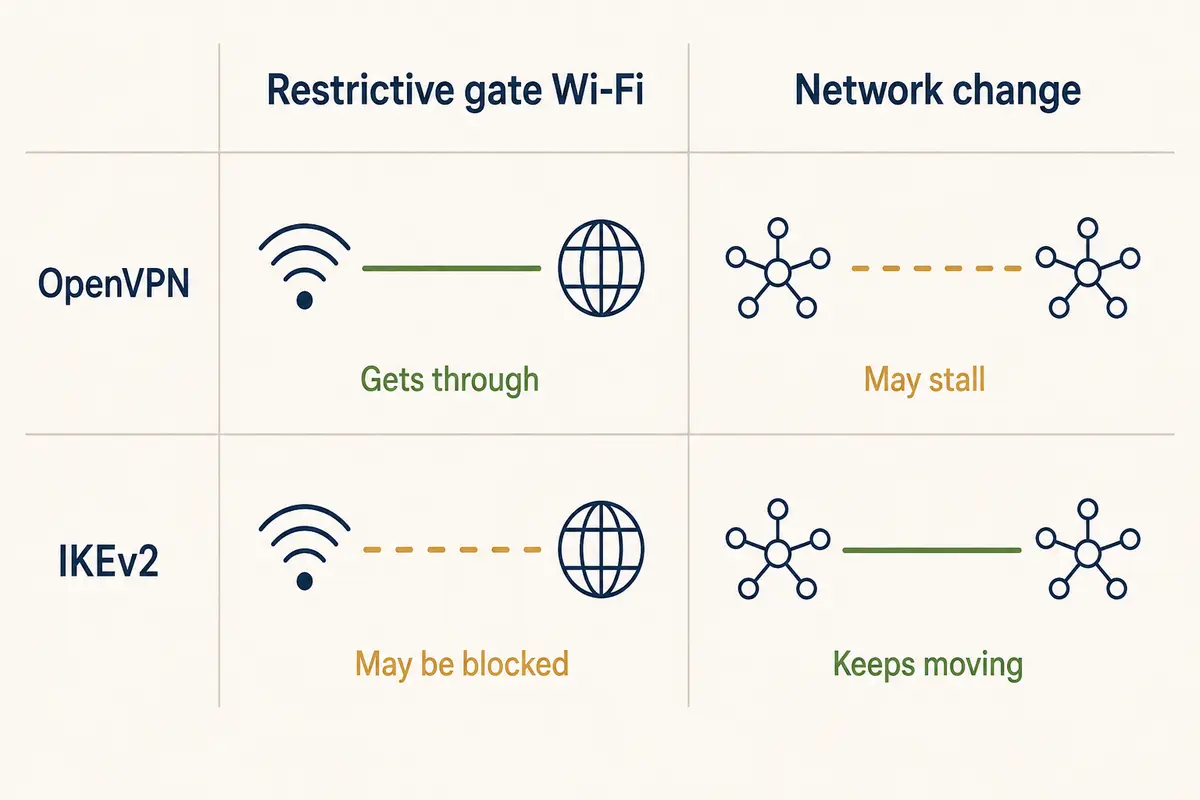
MOBIKE solves this by allowing an existing, authenticated IKEv2/IPsec session to update its outer IP address on the fly. As your phone transitions between Wi-Fi and 5G, the tunnel stays intact. The session simply changes its road without rebuilding the car.
The limitation? IKEv2 is rigid. It conventionally communicates over fixed ports (UDP 500 and UDP 4500 for NAT traversal). If you sit down at a restrictive corporate desk, an airport lounge, or a hotel with aggressive port filtering, the local firewall will often spot and block those UDP ports instantly. When the path is blocked, IKEv2’s native elegance cannot save it.
Why OpenVPN Still Matters: Adaptability and Port Flexibility
Where IKEv2 is streamlined and rigid, OpenVPN is an all-terrain vehicle.
OpenVPN’s enduring value is transport versatility. Unlike protocols bound strictly to UDP ports, OpenVPN can run across either UDP or TCP, and it can listen on virtually any network port an administrator assigns.
OpenVPN’s default and recommended mode is UDP: it avoids unnecessary protocol overhead, keeps latency low, and delivers the best throughput for video and web browsing. But when a network environment aggressively filters outgoing traffic, OpenVPN can toggle to TCP over port 443.
Port 443 is the global highway for standard encrypted HTTPS traffic—the identical port used by banks, email providers, and retail sites. While enterprise firewalls frequently block standard VPN ports, they rarely block TCP 443 outright, because doing so breaks the modern web for everyone on the local network.
This makes OpenVPN the ultimate emergency fallback for restrictive public Wi-Fi, university dorm networks, and managed corporate guest portals.
That survival trait comes with an engineering tradeoff:
- OpenVPN UDP: Fast and efficient under standard network conditions.
- OpenVPN TCP (Port 443): Maximizes firewall traversal, but introduces significant overhead. If the underlying network suffers from packet loss, running TCP within TCP can trigger competing retransmission timers (known as "TCP meltdown"), causing noticeable connection lag.
Use OpenVPN UDP for standard connections, and treat OpenVPN TCP 443 as your escape hatch when nothing else connects.
Security Does Not Break the Tie—Configuration Does
Online guides often crown OpenVPN the "more secure" choice because it is open source, or praise IKEv2 because of its enterprise IPsec pedigree. In reality, the protocol name tells you very little about how safe your data actually is.
Both protocols act as cryptographic frameworks. Their security depends entirely on the cipher suites, key exchange parameters, and authentication methods the provider implements:
- A modern IKEv2 implementation (such as Apple’s current platform stack) leverages AES-256-GCM, robust Elliptic Curve Diffie-Hellman groups, and modern certificate authentication.
- A modern OpenVPN deployment (such as OpenVPN 2.6) negotiates high-performance AEAD data ciphers like AES-256-GCM, AES-128-GCM, or ChaCha20-Poly1305 by default.
Conversely, a lazy implementation ruins both. Microsoft’s administrative documentation explicitly warns that default inbox IKEv2 configurations on older Windows deployments historically permitted obsolete ciphers like 3DES and SHA-1 unless administrators deliberately enforced modern standards. Similarly, outdated OpenVPN servers running legacy CBC ciphers with static pre-shared keys offer far weaker protection than modern builds.
Do not ask whether IKEv2 or OpenVPN is "safer." Ask whether your provider actively maintains and audits its server fleet with modern cryptographic defaults.
The 2026 Shift: Why You Shouldn't Shop by Protocol
Here is the real industry shift: while users continue to debate IKEv2 versus OpenVPN, top-tier VPN providers are quietly retiring both.
The market has decisively moved toward newer, lighter architectures:
- Mullvad completely phased out OpenVPN support on January 15, 2026, transitioning its entire desktop and mobile infrastructure to WireGuard.
- Proton VPN has officially deprecated or designated IKEv2 as end-of-life across its consumer platforms, while steadily trimming back OpenVPN support in favor of modern implementations.
If you have a strict, specific technical requirement—such as configuring an ASUS home router via an .ovpn file or setting up a zero-install manual IKEv2 profile on a locked-down company Mac—these legacy protocols remain essential tools.
However, if you are an everyday user shopping for privacy, travel security, and seamless streaming, buying a VPN based on an IKEv2 vs OpenVPN checklist is a mistake. You are shopping for yesterday's mechanics.
Modern consumer protection should focus on whether a connection establishes without friction, survives real-world network handoffs, and circumvents filtering automatically.
OnlydogVPN↗ takes the newer approach of hiding most protocol management from the user.
Its clients remove most of the burden of manual protocol management. Instead of forcing you to guess whether you need to toggle between OpenVPN TCP, OpenVPN UDP, or IKEv2 every time a coffee shop Wi-Fi connection stalls, its cross-platform clients (covering iPhone, Android, macOS, and Windows) are built on an HTTP/3-based transport layer.
The product combines modern UDP multiplexing with traffic obfuscation and automated routing, aiming for the handoff stability associated with IKEv2 and the restrictive-network resilience associated with OpenVPN. If your Wi-Fi flickers or switches to cellular, its network recovery logic reconciles the connection in the background without dropping your session or demanding that you open a settings menu to swap ports.
The Final Verdict
When forced to choose between the two legacy standards, the rule of thumb remains clear:
- Best Used On. IKEv2 / IPsec: Mobile phones, laptops, roaming devices. OpenVPN: Restrictive networks, routers, manual setups.
- Network Mobility (MOBIKE). IKEv2 / IPsec: Yes (maintains tunnel across IP shifts). OpenVPN: No (typically reconnects upon network change).
- Transport Flexibility. IKEv2 / IPsec: Fixed (primarily UDP 500 / 4500). OpenVPN: Versatile (UDP or TCP on any port, including 443).
- OS Integration. IKEv2 / IPsec: Native (built into iOS, macOS, Windows). OpenVPN: Requires dedicated app or configuration client.
- Security Ceiling. IKEv2 / IPsec: High (when configured with modern GCM ciphers). OpenVPN: High (when configured with modern AEAD ciphers).
Use IKEv2 for native mobility. Use OpenVPN for transport flexibility.
If you aren't tied to a specific legacy setup, stop spending your time managing handshake protocols. Choose a modern service that handles the route for you, tap connect, and let the software solve the network underneath.
Frequently Asked Questions
Is IKEv2 better than OpenVPN on a phone?
It is often the more natural fit when native OS integration and mobility across Wi-Fi and cellular matter, especially when MOBIKE is configured correctly. That does not make it universally faster or more secure.
When is OpenVPN the better choice?
OpenVPN is useful when a network blocks standard VPN ports, when TCP on port 443 is needed as a fallback, or when a router or legacy system expects .ovpn configuration files.
Is OpenVPN more secure than IKEv2?
Not automatically. The article treats both as capable security frameworks whose real protection depends on modern ciphers, authentication, key exchange, and provider configuration.
Should I choose a VPN service mainly because it supports one of these protocols?
Usually not. For everyday users, connection reliability, routing quality, network recovery, and how well the service handles real-world filtering matter more than the protocol label alone.