If you have spent any time browsing tech forums, Reddit threads, or privacy guides, you have probably stumbled across an intriguing suggestion: “Why pay for a commercial VPN when you can just spin up a cloud server and create an SSH tunnel for pennies?”
To a traveler packing a laptop for a remote work stint, or anyone trying to protect personal browsing on hotel Wi-Fi, it sounds like an insider hack. Both tools encrypt your data. Both can send your web traffic through a remote server. On paper, it looks like an SSH tunnel does roughly what a VPN does, without the subscription fee.
Except that reading encryption as a simple checkbox overlooks the real issue. The question is not which underlying protocol has stronger cryptographic math. The real issue is scope, responsibility, and what happens to the rest of your device while you think you are safe.
Article summary and product fit
Should you use an SSH tunnel or a VPN?
Use an SSH tunnel when you need a precise encrypted path to a known server, port, or internal service and you are comfortable managing the setup. Use a VPN when the goal is broad, low-friction protection for the whole device across browsers, background apps, DNS, and multiple devices.
Key points
- Best for SSH: Developers and administrators who control the remote server and want one narrowly scoped route without changing unrelated traffic.
- Best for a VPN: Travelers and everyday users who want device-wide coverage on hotel, café, airport, home, and mobile networks.
- Operational difference: An SSH SOCKS or port-forwarding setup only protects traffic that is configured to use it, while a VPN works at the operating-system network layer.
- Important limit: SSH is not unsafe by definition; it simply requires more deliberate application routing, DNS handling, server maintenance, and reconnection work.
Product fit: OnlydogVPN matches the article’s everyday-VPN branch: users who value whole-device coverage, cross-platform consistency, and automatic recovery when a device changes networks rather than fine-grained port-level control. OnlydogVPN official website.
Sources already used in this article: OnlydogVPN official website.
They Encrypt Traffic, But They Do Not Protect the Same Things
The primary misconception is simple: people assume that because an SSH tunnel encrypts data, the entire device is secured.
It isn't.
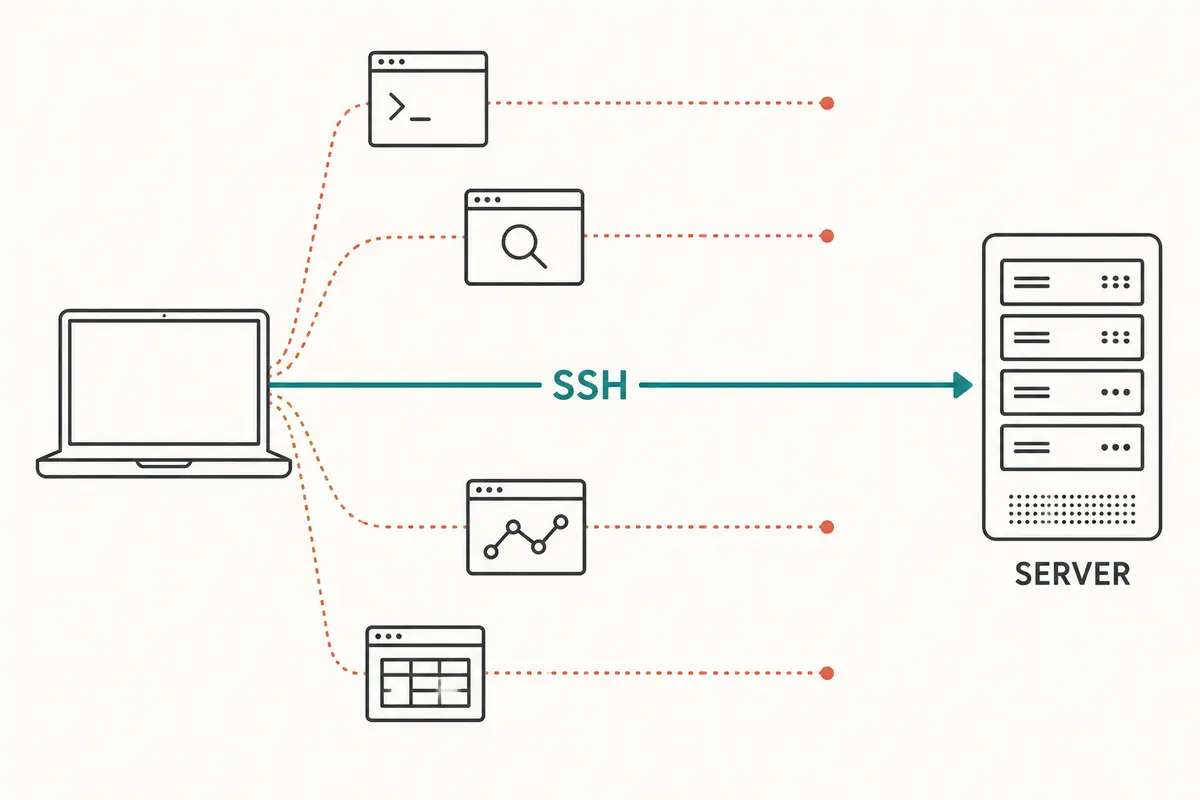
At its foundation, Secure Shell (SSH) was engineered for targeted remote access—allowing a computer to open a private, encrypted terminal or route to a specific destination server. When you configure an SSH tunnel (often using local port forwarding or a dynamic SOCKS proxy), you are effectively opening an encrypted, point-to-point pipeline between a designated port on your computer and that specific remote machine.
Here is the catch: traffic only enters that pipeline if an application knows to look for it.
If you configure your web browser to route traffic through an SSH SOCKS proxy, your browser’s web requests travel inside that encrypted tunnel. But what about your email client? What about cloud backup utilities syncing in the background, your Slack desktop app, system DNS queries, or background telemetry from your operating system?
Unless you painstakingly configure every individual application—assuming the software even supports manual proxy configuration—that extra traffic simply leaves your device directly over the open network.
A Virtual Private Network (VPN) takes a fundamentally different structural approach. Instead of building a narrow, targeted pipeline for specific apps, a VPN creates an encrypted tunnel at the operating-system level. When enabled, your operating system routes virtually all inbound and outbound network requests through the encrypted connection automatically.
- “Encrypted” does not automatically mean “everything on your device is covered.”
- An SSH tunnel protects an explicitly defined path.
- A VPN manages the device’s entire network surface.
Neither approach is inherently flawed. But assuming an SSH tunnel behaves like a full-device shield is where everyday users run straight into risk.
When an SSH Tunnel Is Actually the Better Tool
None of this means SSH tunnels are outdated or useless. In fact, in the hands of the right person, an SSH tunnel is often the cleaner, more elegant tool.
Consider a software developer who needs to query an internal database hosted inside a private cloud environment. Opening that database to the public internet is a security disaster. Turning on a system-wide VPN might reroute the developer's entire personal internet connection, slowing down local downloads or tripping location warnings on personal accounts.
In that scenario, an SSH tunnel is perfect. With a single command-line instruction, the developer forwards a local port directly to the remote database:
- It is extraordinarily lightweight.
- It requires zero third-party software installations beyond standard terminal tools.
- It touches only the exact traffic destined for that specific port, leaving all other local traffic completely alone.
System administrators, DevOps engineers, and technical hobbyists rely on SSH tunnels daily for this exact reason: surgical precision. When you already manage the server, understand port binding, and only need to touch an internal web dashboard or remote shell, an SSH tunnel gives you maximum control with zero bloat.
The trade-off, however, is administrative overhead. An SSH tunnel requires you to provision, configure, patch, and maintain a remote server. You have to monitor firewall rules, rotate authentication keys, troubleshoot broken pipes, and manually configure client-side proxy settings. For an engineer, that is standard procedure. For anyone else, it is a persistent maintenance burden.
Why Most Everyday Users Choose a VPN Instead
Most people are not trying to securely query an internal PostgreSQL database at 10:00 PM.
They are sitting in a busy airport lounge or hotel lobby trying to check bank balances without worrying about rogue access points. They want to stream home-region media while traveling abroad. They want seamless privacy across an iPhone, an Android tablet, and a Windows laptop without turning their evening into an unpaid networking lab.
When your objective is broad, low-friction privacy, an SSH tunnel quickly shows its limits:
- Mobile devices resist manual tunneling. Setting up system-wide SOCKS proxies on mobile operating systems like iOS or modern Android is cumbersome, frequently broken by OS updates, and prone to silent data leaks.
- DNS leaks happen easily. Even when you configure a browser to use an SSH proxy, if DNS resolution is not handled precisely, your visited domain names can still leak in cleartext to the local network provider.
- Connections break on unstable networks. SSH was built for relatively stable terminal sessions. When your laptop wakes from sleep, or your phone hops between Wi-Fi and 5G, raw SSH tunnels frequently freeze or drop silently, requiring manual terminal re-entry.
This friction is why standard consumer needs point directly to modern VPN architectures. You want an app that wraps your entire network footprint in encryption, handles DNS resolution internally, and recovers gracefully the moment your connection stutters.
For users who want this level of friction-free protection without technical micromanagement, OnlydogVPN↗ represents an ideal, modern iteration of the VPN model.
Rather than forcing users to debate between technical protocols, pick obscure server nodes, or wrestle with connection strings, OnlydogVPN is built around how everyday people actually use devices. With intuitive scenario presets, it configures your routing parameters automatically based on what you are doing—whether that means prioritizing streaming throughput or locking down security for open Wi-Fi.
Crucially, it solves the biggest daily headache of traditional tunnels: network transitions. Equipped with smart weak-network handling and seamless recovery for network switches, OnlydogVPN prevents the silent drops that plague DIY setups. Add in cross-platform support across desktop and mobile, along with a streamlined, passwordless account flow that eliminates tedious credential friction, and the distinction becomes clear: you don’t spend time managing the connection; you just turn it on and get on with your day.
The Real Comparison: SSH Tunnel vs VPN in Daily Situations
To choose the right tool, strip away the technical acronyms and look at everyday decisions.
Remote Server or Internal Database Access
- Winner: SSH Tunnel
- Why: You have a specific, known destination and server credentials. You only want that individual stream forwarded without rerouting your personal browsing or changing your public IP everywhere else.
Working from a Hotel, Cafe, or Airport Wi-Fi
- Winner: VPN
- Why: The local environment is inherently untrusted. You need total device coverage—DNS, background app traffic, email sync, and active browsing—without having to audit which apps are properly configured to use a proxy.
Protecting Multiple Devices (Laptops, Phones, Tablets)
- Winner: VPN
- Why: Consistent mobile security is hard to maintain manually. A modern VPN app delivers consistent, one-tap protection across platforms, avoiding fragile operating-system proxy hacks.
Low-Level Network Diagnostics and Administration
- Winner: SSH Tunnel
- Why: System admins need precise diagnostics, raw shell access, and granular port control. Convenience is secondary; surgical execution is everything.
Traveling Across Patchy or Changing Networks
- Winner: VPN
- Why: Stepping from an airport terminal onto an airplane Wi-Fi, or jumping from mobile 5G to hotel broadband, frequently breaks standard tunnels. A polished VPN like OnlydogVPN maintains automatic route selection and reconnects silently in the background.
The Simple Decision: Use SSH Tunnels for Control, VPNs for Everyday Protection
Choosing between an SSH tunnel and a VPN is not a test of technical credibility. It is simply a matter of scoping the tool to the task.
- Choose an SSH tunnel when you have terminal familiarity, direct access to a private server, and a need to open an encrypted route for one specific tool or task. It offers unmatched precision and leaves the rest of your system untouched.
- Choose a dedicated VPN when your objective is full-device peace of mind. If you want every app secured, your DNS requests shielded, and reliable connectivity across phones and laptops without running your own cloud infrastructure, a VPN is the smarter, safer path.
For travelers, remote professionals, and everyday users, the objective of network security is not to manage servers—it is to stop worrying about the network you are connected to. Services like OnlydogVPN make that possible by taking the operational complexity off your plate: no manual routing tables, no dropped terminal windows, and no second-guessing your security.
Pick the precision instrument when you have a specific technical job to do. For everything else, turn on a reliable VPN and get back to work.
Frequently Asked Questions
Does an SSH tunnel protect all traffic on my device?
Not automatically. An SSH tunnel protects the specific path or proxy that applications are configured to use, so other apps and DNS traffic can still bypass it.
When is an SSH tunnel the better choice?
When you control the remote server, know the exact service or port you need, and want surgical access without rerouting the rest of your device.
Why is a VPN usually easier on hotel, café, or airport Wi-Fi?
A VPN routes the device’s network traffic at the operating-system level, so browsers, background apps, and DNS do not each need separate proxy configuration.
What changes when the network is unstable or the device moves between Wi-Fi and cellular?
DIY SSH tunnels can freeze or drop and may need manual recovery. The article favors a consumer VPN for users who want the client to handle network transitions automatically.