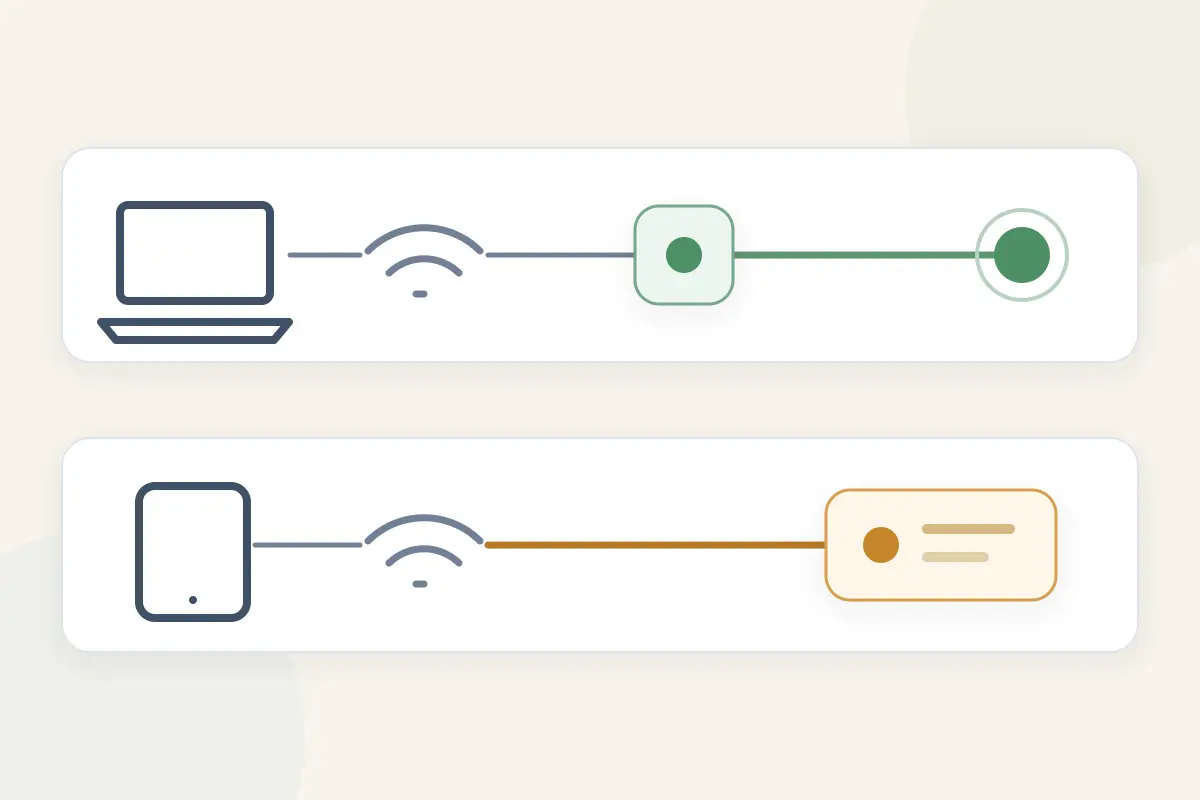
Place a laptop and a smartphone side by side on the same coffee table. Both connect to LivingRoom_Wi-Fi. On the laptop, you fire up a VPN app, click connect, and watch the shield turn bright green. An IP checker confirms that the laptop now appears to be browsing from Zurich.
Now glance over at the phone. It is running on the exact same Wi-Fi network, talking to the exact same router, and pulling data from the exact same fiber line.
If you check the phone’s public IP address, does it show Zurich?
Almost certainly not. It shows your local internet service provider’s regular street-level address.
Nothing is broken. The two devices simply stopped sharing a route the second their traffic reached the Wi-Fi router.
It is one of the most persistent assumptions in consumer networking: “If one device on our Wi-Fi is protected by a VPN, everything on this network is covered.” But a virtual private network does not blanket a physical room, nor does it magically sanctify an SSID. VPN coverage follows network routing, not the Wi-Fi name.
Understanding that distinction is the difference between genuine privacy and an expensive illusion.
Article summary and product fit
Does one device’s VPN protect every device on the same Wi-Fi?
No. A VPN app normally protects traffic that the operating system routes through that device’s own virtual tunnel. Another phone, laptop, TV, or console on the same Wi-Fi keeps using its own route unless it runs its own VPN or the shared gateway router is configured to tunnel that device.
What matters in practice
- Best for: Households and travelers deciding whether protection lives on each endpoint, on a VPN-capable router, or on a hotspot host.
- Key point: VPN coverage follows packet routing, not the Wi-Fi name. Even on one device, split tunneling can intentionally leave particular apps outside the tunnel.
- OnlydogVPN fit: OnlydogVPN is presented as an endpoint-by-endpoint approach with native apps on supported phones and computers, so each supported device establishes its own tunnel.
- Important limit: A phone running a VPN does not automatically pass that tunnel to hotspot clients, and devices that cannot run native software may still need a VPN-capable router.
Sources used in this article: Android VPN documentation; ASUS VPN Fusion documentation; Apple Personal Hotspot guide.
Product source: OnlydogVPN official website.
The Wi-Fi Is Shared. The Internet Route Does Not Have to Be
To see why a single VPN app cannot protect the room, look at how an operating system handles a secure tunnel.
When you install a standard VPN app on a laptop, tablet, or phone, that application operates locally. On Android, for example, the system architecture allows a VPN app to create a virtual network interface directly on the device. Outgoing packets originating on that device are funneled into this virtual interface, encrypted, and wrapped in standard network packets before they ever leave the hardware. Apple’s networking frameworks operate on the identical premise: an active VPN profile tunnels IP traffic originating from that specific managed device.
Now track what happens across your local airwaves:
- Your laptop encrypts a web request inside its local VPN interface. It sends that encrypted payload across the Wi-Fi radio to your home router.
- Your phone opens a banking app. It sends standard, un-tunneled packets across the exact same Wi-Fi radio to the exact same router.
- The router receives both streams. It does not inspect what is inside; it simply forwards both outward to the wider internet.
- The laptop’s traffic heads directly to a remote VPN server in Zurich, which decrypts it and sends it onward. The phone’s traffic heads straight to the destination website, stamped with your home’s standard public IP address.
Installing a VPN app on Device A changes how Device A handles its own outbound data. It does not reach sideways across the local radio spectrum to seize, capture, or encrypt data coming from Device B.
Even the Device With the VPN Icon May Not Send Everything Through It
The boundary between "protected" and "unprotected" is even narrower than device-by-device. The same routing logic that leaves your phone unprotected can leave specific apps on your laptop or tablet exposed—even while the VPN app displays an active connection.
This happens through split tunneling (or per-app VPN routing).
Modern operating systems are designed to let network administrators and users decide which applications actually need a secure tunnel:
- Android allows VPN services to maintain explicit lists of allowed or excluded applications. If a banking app or a local media server client is placed on an exclusion list, the operating system routes that application’s traffic over the standard network, completely bypassing the VPN.
- Apple’s operating systems provide native Per-App VPN profiles, ensuring corporate data travels through an enterprise gateway while personal browsing or streaming apps stay on the unmanaged local route.
This introduces a crucial principle: a device is not protected simply because a VPN app is running. A specific data packet is protected only when the operating system routes that specific packet into the tunnel.
If you verify an IP address inside a web browser and see a foreign location, you have proved that the browser is routed through the tunnel. You have not proved that every background service, game launcher, or local sync tool on that machine is doing the same—and you have certainly proved nothing about the tablet sitting next to you.
One VPN Connection Really Can Cover the Room—When the Router Owns It
Can a single VPN connection ever protect every gadget connected to a Wi-Fi network simultaneously? Yes—but only if the tunnel lives at the gateway.
If you want a television, a gaming console, three smartphones, and two laptops to share one encrypted tunnel without installing software on each one, the VPN client cannot sit on one of those end devices. It must sit on the router itself.
Consider the physical routing difference:
- VPN on a Personal Device:
Phone → Router → Public Internet (Standard IP)
Laptop → [Local Tunnel] → Router → VPN Server (Protected IP)
- VPN on the Gateway Router:
Phone ────┐
Laptop ───┼─→ [VPN Client on Router] → VPN Server → Public Internet
Smart TV ─┘
When a compatible router—such as one running advanced gateway firmware like ASUSWRT—runs a native VPN client, the router encrypts outbound traffic before it ever leaves the building. Devices simply connect to the Wi-Fi network like normal; the router handles the heavy cryptographic lifting upstream.
Features like ASUS VPN Fusion take this a step further, allowing household administrators to assign specific devices to an outbound VPN tunnel while leaving gaming consoles or local streaming boxes on the direct internet path. This flexibility reinforces the core reality: even on a router-level setup, protection is an intentional routing policy, not an automatic byproduct of joining a wireless network.
The tradeoff for gateway-level protection is complexity. You need compatible router hardware, the setup requires manual configuration, and encrypting every packet for dozens of smart devices can bottleneck an underpowered router’s CPU.
A Phone Hotspot Looks Like a Router, but Do Not Assume It Shares the VPN
This routing misunderstanding causes the most trouble when traveling: turning an Android or iPhone into a mobile hotspot.
If you connect your laptop to your smartphone’s cellular hotspot, your laptop is undeniably relying on that phone for internet access. If your phone is running a VPN app, it is tempting to conclude: “The phone is the router, the phone has a VPN, therefore my laptop is behind that VPN.”
That assumption is frequently wrong.
Both Google’s Android documentation and Apple’s iOS guides define tethering and Personal Hotspots as mechanisms to share a mobile cellular data connection. Operating systems treat tethered client traffic and on-device app traffic as completely distinct streams.
When your laptop connects to a mobile hotspot, the phone’s operating system typically bridges the incoming Wi-Fi or USB packets straight to its cellular modem, bypassing the local virtual VPN interface that handles the phone’s own web browsing. The phone’s personal traffic exits through the secure tunnel; the laptop’s tethered traffic exits directly over raw mobile data.
Before you trust a travel hotspot to protect sensitive laptop traffic, run an independent check:
- Turn on the VPN on the host smartphone. Check its public IP address in a mobile browser.
- Connect your laptop to the smartphone’s hotspot.
- Open a browser on the laptop and check its public IP address independently.
If the two devices display different public IPs, the phone is sharing raw internet connectivity, not its encrypted tunnel.
Choose Where the Tunnel Should Live Before You Count “Supported Devices”
When people shop for a VPN, they usually look at marketing bullets like “Supports 5 Devices” or “Unlimited Simultaneous Connections” and assume those numbers dictate network architecture.
A better approach is to ask a structural question: Which devices actually handle the sensitive data, and can they run their own apps?
For the vast majority of households, remote workers, and travelers, building a router-level VPN gateway is overkill. Installing a dedicated VPN application directly onto the individual phones, laptops, and tablets that need protection is cleaner, faster, and far more resilient:
- Each device maintains its own clear, visible connection status.
- You avoid throttling the entire household’s connection when one person wants to watch local television or play a ping-sensitive online game.
- The protection travels seamlessly with the device when you leave your living room and connect to an airport hotspot, a hotel network, or cellular data.
For a multi-device setup, OnlydogVPN↗ takes the endpoint-by-endpoint approach.
Instead of forcing a single phone or home router to act as a universal proxy for the room, it uses native software on iPhone, Android, macOS, and Windows. When you need to protect a secondary laptop or travel tablet, its streamlined device-linking flow allows an authorized primary device to help bring another machine onto the network using a simple verification code.
Once linked, that second device establishes its own distinct, high-performance tunnel. It does not rely on a neighboring laptop staying awake, nor does it require you to re-enter complex network credentials across five screens. Each endpoint secures its own traffic cleanly at the operating system level, ensuring that when the shield turns green on that specific screen, that specific machine is actually protected.
Of course, boundaries matter. If your primary goal is routing hardware that fundamentally cannot run native software—such as a smart TV, an older streaming stick, or a gaming console—a dedicated VPN-capable router remains the correct engineering choice.
The Rule to Remember
The next time you see a green “Connected” badge on a screen across the room, run through the routing path in your head:
- Laptop: VPN Active (Route: Encrypted Tunnel)
- Phone: No App (Route: Direct ISP)
- Smart TV: No App (Route: Direct ISP)
All three can share the same Wi-Fi password. All three can talk to the same access point. But only the machine running the tunnel is actually protected.
Stop asking whether a device has joined the Wi-Fi. Ask whether its outbound packets cross a VPN interface before they leave the glass.
Frequently Asked Questions
If my laptop has a VPN, is my phone protected on the same Wi-Fi?
No. The laptop’s VPN changes the laptop’s route. The phone continues using its own route unless it also runs a VPN or a gateway router tunnels the phone’s traffic.
Can one VPN connection protect every device in the house?
Yes, but the tunnel has to live on a compatible gateway router and the router must be configured to send those devices through it.
Does a green VPN icon prove every app on that device is tunneled?
Not always. Split tunneling or per-app routing can intentionally exclude selected apps even while the VPN itself remains connected.
Does a phone hotspot share the phone’s VPN with a connected laptop?
Do not assume so. The article explains that tethered client traffic can follow a separate route, so the practical check is to compare the public IP shown on the phone and on the tethered laptop.