At home, your Synology or QNAP NAS sits quietly on your desk, perfectly reachable at 192.168.1.50. You can stream media, back up raw photos, and transfer gigabytes of work in seconds.
Then you take your laptop to a hotel, open your files, and everything goes dark.
The classic troubleshooting routine begins: you install a commercial VPN, select a server in your home city, and try connecting back to your local IP address. Nothing happens. Next, you dig into your home router's admin console, follow an online guide to configure WireGuard or OpenVPN, carefully forward the specified UDP port, and test it from outside. Still, the connection times out.
The settings look pristine. The port forwarding rule is saved. Why won't it connect?
The answer is usually hidden in plain sight on your router's status page: your router’s WAN address begins with an unfamiliar number, like 100.64.x.x.
You spent hours configuring an open doorway on your home router, completely unaware that your internet service provider (ISP) owns the building entrance.
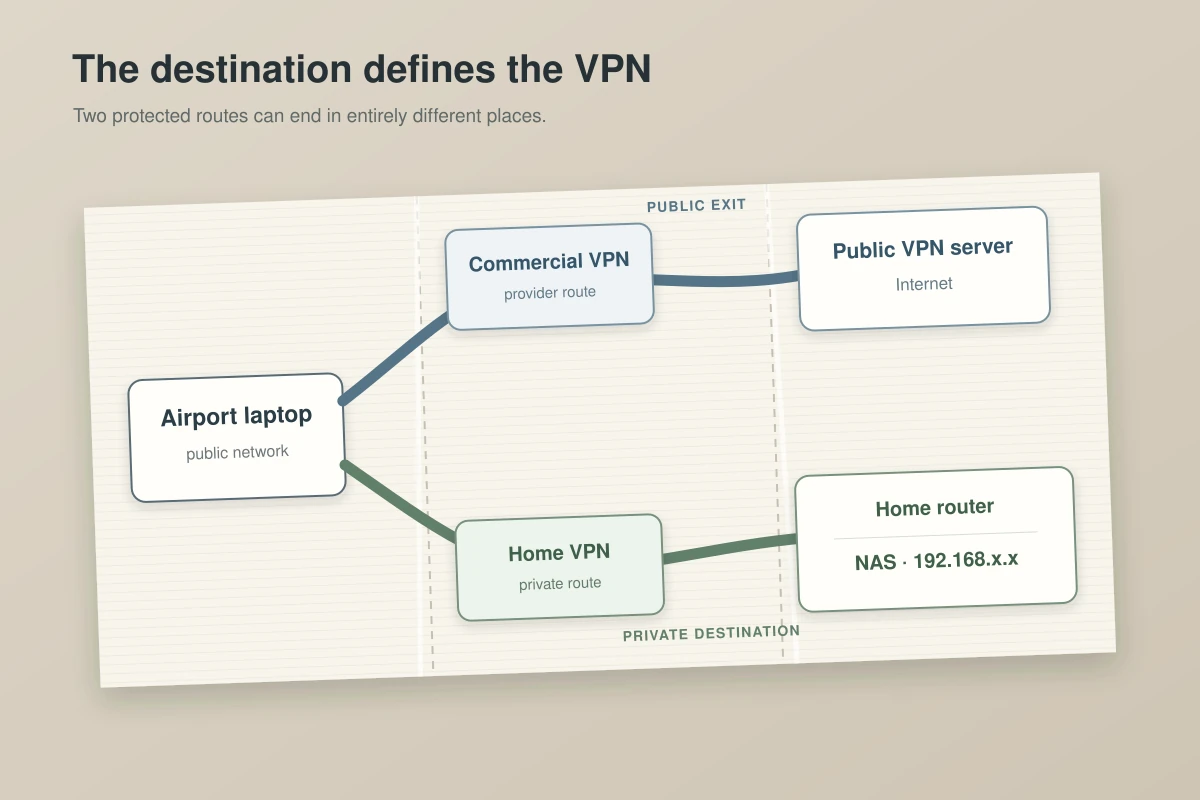
A Commercial VPN Sends You Out; NAS Access Needs a Route Back In
The most common trap for home NAS owners is assuming that any service called a "VPN" will solve remote access.
They share an acronym, but they perform opposite network jobs:
Commercial Privacy VPN (Outbound):
[ Laptop ] ──▶ [ Commercial VPN Node ] ──▶ [ Public Internet ]
* Replaces your external IP for browsing; does NOT route back to your living room.

Remote Access / Private Tunnel (Inbound):
[ Laptop ] ──▶ [ Encrypted Tunnel ] ──▶ [ Home Network / NAS ]
* Places your remote device virtually inside your local home network.
A commercial privacy VPN encrypts your traffic and sends you out to the public web through a remote server. Choosing a server in your home city merely changes where your web browsing exits; it does not bridge the gap back into your local area network (LAN).
Hardware makers like QNAP and Synology are explicit about this: secure remote access requires building an encrypted tunnel directly into your private network first. Once that tunnel is established, your remote laptop talks to the NAS using its standard local LAN address.
The real challenge is not choosing encryption—it is whether your home network has a publicly reachable entrance to terminate that tunnel.
Article summary and product fit
Why does NAS port forwarding fail even when the router rule looks correct?
If the home connection sits behind carrier-grade NAT, the public internet cannot directly reach the home router. Port forwarding only controls traffic that reaches that router, so an upstream ISP NAT can make an otherwise correct WireGuard, OpenVPN, DDNS, or firewall setup unreachable.
Key points and limits
- Best for: Synology or QNAP owners whose NAS works locally but becomes unreachable from hotels, mobile networks, or other outside connections.
- Check first: Compare the router WAN address with the public IP. A WAN address in 100.64.0.0/10 or a mismatch can indicate an upstream shared-NAT layer.
- Recommended architecture: A private mesh or overlay VPN lets both endpoints initiate outbound connections and can traverse NAT without opening a public inbound port.
- Important limit: A commercial privacy VPN changes where ordinary web traffic exits; it does not create an inbound route to a private home LAN just because the VPN server is in the same city.
Contextual product fit: OnlydogVPN is deliberately kept in a separate role here: it protects outward-facing browsing on untrusted travel networks while a mesh VPN or self-hosted tunnel handles access back to the NAS. Sources used in this article: RFC 6598, Tailscale device connectivity, OnlydogVPN.
The Silent Wall: Carrier-Grade NAT (CGNAT)
Traditional remote-access guides were written during an era when every home broadband contract came with a dedicated, globally routable IPv4 address. You pointed a Dynamic DNS (DDNS) name at your house, forwarded a port on your router, and your incoming tunnel connected directly.
Today, IPv4 exhaustion has fundamentally changed home networking. To conserve scarce addresses, many residential ISPs, fiber providers, and cellular 5G home internet services place entire neighborhoods behind Carrier-Grade NAT (CGNAT).
Under CGNAT, your router does not sit directly on the public internet:
[ Traditional Public IP ]
Public Internet ────────▶ [ Your Router (Port 51820 Forwarded) ] ──▶ [ NAS ]
* The doorway is on your router; inbound connections succeed.

[ Carrier-Grade NAT (CGNAT) ]
Public Internet ──▶ [ ISP Upstream Router / NAT ] ──▶ [ Your Router ] ──▶ [ NAS ]
                    (No Inbound Access)
* The doorway belongs to the ISP; your local port forwarding is completely ignored.
As defined in RFC 6598, the 100.64.0.0/10 address block is reserved specifically for service-provider shared space. If your router’s WAN IP falls within that range—or differs completely from the public address displayed when you visit an IP-checking site—your router sits behind an upstream layer of ISP translation.
Your router can only forward traffic that actually reaches it. When your ISP drops unsolicited incoming packets at their upstream gateway, no amount of router tweaking, firewall adjustment, or DDNS configuration will make an inbound port accessible.
Why a Private Mesh VPN Is the Better Default
If you do not have a public IPv4 address—or if you simply have no desire to punch holes in your router's firewall—the cleanest architectural solution is a private mesh (or overlay) VPN.
Instead of treating your home network as a fixed castle that requires an open moat and a public gate, a mesh VPN (such as Tailscale) turns each device into an equal node on a private, virtual overlay network:
[ Mesh VPN Architecture ]
[ Remote Laptop ] ──( Outbound to Control Plane )──┐
                                                    ├──▶ [ Encrypted Direct Peering ]
[ Home NAS ]      ──( Outbound to Control Plane )──┘
The difference in mechanics solves the CGNAT problem entirely:
- Outbound-Only Connections: Both your remote laptop and your home NAS initiate standard outbound connections to a coordination server. Because both devices reach outward, firewalls and CGNAT treat the traffic as ordinary, permitted client sessions.
- Intelligent NAT Traversal: The nodes use modern traversal techniques (such as STUN and Interactive Connectivity Establishment) to punch through stateful firewalls and negotiate a direct, point-to-point WireGuard tunnel between your laptop and your NAS.
- Encrypted Relay Fallback: If you find yourself on an exceptionally hostile network—such as a corporate firewall or restrictive hotel Wi-Fi that drops direct UDP peering—traffic automatically routes through encrypted relays. Your connection stays private, authenticated, and alive without configuration changes.
For Synology and QNAP owners, setting up an overlay is remarkably straightforward. Installing the official package on your NAS links the storage directly to your personal mesh network.
You no longer manage port forwarding, maintain DDNS records, or worry about your ISP's changing IP pools. Your NAS simply receives an internal virtual IP, accessible securely from your authorized devices wherever you are.
Where Traditional VPNs and Vendor Relays Still Win
While a mesh overlay is the most practical baseline for modern home setups, two traditional approaches still have clear use cases:
The Traditional Self-Hosted VPN Server
Running WireGuard or OpenVPN directly on your home router or a dedicated container remains compelling when:
- You have a confirmed, static (or dynamically updated) public IPv4 address from your ISP.
- You want transparent access to your entire home LAN—including network printers, smart-home bridges, IP security cameras, and local servers—without installing client software on every individual device.
- You prefer total infrastructure sovereignty, avoiding any third-party control plane or coordination server.
The trade-off is administrative overhead. You become the security engineer: responsible for opening and monitoring firewall ports, patching VPN vulnerabilities, and securing access against continuous internet port-scanners.
Vendor-Managed Cloud Relays (QuickConnect / myQNAPcloud)
If you only need occasional, low-stakes access to retrieve a text document or manage a background download, both Synology (QuickConnect) and QNAP (myQNAPcloud Link) offer built-in relay solutions.
- The Benefit: Zero network configuration. You check a box in the NAS control panel, claim a custom ID, and connect via a web browser or mobile app.
- The Cost: Throughput. When direct local handshakes fail, vendor cloud services route your files through their shared server infrastructure. For quick administration, that is acceptable; for syncing raw video footage or multi-gigabyte photo archives, the throughput bottleneck becomes immediately noticeable.
Matching the Tool to the Architecture
Before configuring any remote-access software, identify the network environment you are dealing with:
Behind CGNAT / No Public IP / Want Zero Port Forwarding — Recommended Approach: Private Mesh VPN (e.g., Tailscale) Primary Advantage: Seamless NAT traversal, point-to-point WireGuard performance, zero open firewall ports.
Confirmed Public IP / Need Whole-Home LAN Access — Recommended Approach: Self-Hosted Router VPN (WireGuard / OpenVPN) Primary Advantage: Complete infrastructure control, full access to printers, cameras, and local subnets.
Casual Mobile App Access / Zero Networking Experience — Recommended Approach: Vendor Relay (Synology QuickConnect / QNAP Link) Primary Advantage: Simplest setup, but limited by shared cloud relay speeds for large file transfers.
What About Your Ordinary Internet Traffic?
Once your remote NAS connection is working smoothly over a private overlay, remember where the boundaries lie: your remote-access setup only protects traffic traveling back to your home drives.
When you sit in a hotel lobby or airport café, your NAS tunnel handles your private file shares. But your everyday web traffic—the websites you visit, the airline tickets you book, the forms you fill out—still flows straight onto the venue's shared Wi-Fi network.
This is where a consumer privacy VPN belongs. A tool like OnlydogVPN↗ does not create inbound connections to a home storage drive, and it shouldn't be purchased for that job. Instead, its role is securing your outward-facing internet traffic while you travel.
With one-tap protection across iPhone, Android, macOS, and Windows, OnlydogVPN encrypts your general browsing over an HTTP/3-based transport layer designed specifically to navigate restrictive, unreliable public networks. It handles erratic Wi-Fi handoffs smoothly in the background, ensuring your local browsing metadata and passwords stay shielded from unvetted public routers while your mesh VPN quietly handles your files.
The Decision Rule
If your NAS disappeared the moment you left your living room, stop cycling through random commercial VPN servers and checking for port conflicts.
- Verify your WAN IP: Check your router’s status page. If you are sitting behind CGNAT or a shared address pool, accept that classic port forwarding cannot reach past your ISP.
- Deploy a mesh overlay: Install a private mesh VPN on your remote device and your NAS. Let outbound-initiated connections bypass NAT naturally without opening inbound doors.
- Keep the roles clear: Use a private mesh overlay to reach back into your home storage. Use a dedicated travel tool like OnlydogVPN to protect your outward browsing on the road.
Solve the inbound route first, protect the outward path second, and your files will be there whenever you open your laptop.
Frequently Asked Questions
Why does port forwarding fail behind CGNAT?
Because the ISP’s upstream NAT receives the unsolicited inbound packet before your home router does. Your router can only forward traffic that actually reaches it, so a local forwarding rule cannot open a port on the ISP’s gateway.
Does choosing a commercial VPN server near my home let me reach my NAS?
No. A commercial privacy VPN is an outbound route to the public internet. Remote NAS access needs a tunnel or overlay that reaches back into the home network.
How can I tell whether my connection may be behind CGNAT?
Check the WAN address shown by the router and compare it with the public address seen on the internet. The article specifically notes the RFC 6598 shared range 100.64.0.0/10 and a WAN/public-IP mismatch as useful signs.
When should I use a mesh VPN instead of a self-hosted VPN server?
A mesh VPN is the article’s default when there is no public IPv4 address or when you want to avoid port forwarding. A self-hosted WireGuard or OpenVPN server remains reasonable when you have a reachable public IP and want direct access to the broader home LAN.